Sample Code for adding a button for SubGrid and passing id of the selected records (CRM 2011)


Simply replace the entity schema name with your entity

  <RibbonDiffXml>
        <CustomActions>
          <CustomAction Id="MyOrg.CustomAction" Location="Mscrm.SubGrid.entitySchemaName.MainTab.Management.Controls._children" Sequence="50">
            <CommandUIDefinition>
              <Button Id="MyOrg.Button" ToolTipTitle="Upload Required Document" ToolTipDescription="Upload Required Documents for the Case" Command="MyOrg.Command" Sequence="50" LabelText="Upload Document" Alt="Upload Document To Portal" Image16by16="/_imgs/ribbon/AddEmail_16.png" Image32by32="/_imgs/ribbon/Email_32.png" TemplateAlias="o1" />
            </CommandUIDefinition>
          </CustomAction>
        </CustomActions>
        <Templates>
          <RibbonTemplates Id="Mscrm.Templates"></RibbonTemplates>
        </Templates>
        <CommandDefinitions>
          <CommandDefinition Id="MyOrg.Command">
            <EnableRules />
            <DisplayRules />
            <Actions>
              <JavaScriptFunction Library="$webresource:new_test" FunctionName="showvalue">
                <StringParameter Value="Guid(s) Selected" > </StringParameter>
                <CrmParameter Value="SelectedControlSelectedItemIds"></CrmParameter>
              </JavaScriptFunction>
            </Actions>
          </CommandDefinition>
        </CommandDefinitions>
        <RuleDefinitions>
          <TabDisplayRules>
          </TabDisplayRules>
          <DisplayRules />
          <EnableRules />
        </RuleDefinitions>
        <LocLabels />
      </RibbonDiffXml>

Function for the jscript web resource.

function showvalue(){

alert(value);

}

Hope it helps.

Sample code for adding a custom button on a custom tab for SubGrid of an entity in ribbon (CRM 2011)


Just replace the schema name of your entity.

 <RibbonDiffXml>
        <CustomActions>
          <CustomAction Id="Sample.SubGrid.entitySchemaName.CustomTab.CustomAction" Location="Mscrm.SubGrid.entitySchemaName.ContextualTabs._children" Sequence="40">
            <CommandUIDefinition>
              <Tab Id="Sample.SubGrid.entitySchemaName.CustomTab" Command="Sample.SubGrid.entitySchemaName.CustomTab" Title="Custom Tab" Description="Custom Tab Description" Sequence="500">
                <Scaling Id="Sample.SubGrid.entitySchemaName.CustomTab.Scaling">
                  <MaxSize Id="Sample.SubGrid.entitySchemaName.CustomTab.FirstGroup.MaxSize" GroupId="Sample.SubGrid.entitySchemaName.CustomTab.FirstGroup" Sequence="10" Size="LargeMedium" />
                </Scaling>
                <Groups Id="Sample.SubGrid.entitySchemaName.CustomTab.Groups">
                  <Group Id="Sample.SubGrid.entitySchemaName.CustomTab.FirstGroup" Command="Sample.SubGrid.entitySchemaName.FirstGroup" Sequence="10" Title="Custom First Group" Template="Mscrm.Templates.3.3">
                    <Controls Id="Sample.SubGrid.entitySchemaName.CustomTab.FirstGroup.Controls">
                      <Button Id="Sample.SubGrid.entitySchemaName.CustomTab.FirstGroup.FirstButton" ToolTipTitle="ButtonToolTipTitle" ToolTipDescription="ToolTipDescription" Command="Sample.SubGrid.entitySchemaName.FirstButton" Sequence="10" LabelText="LabelText" Alt="LabelText" Image16by16="/_imgs/ribbon/AddEmail_16.png" Image32by32="/_imgs/ribbon/Email_32.png" TemplateAlias="o1" />
                    </Controls>
                  </Group>
                </Groups>
              </Tab>
            </CommandUIDefinition>
          </CustomAction>
        </CustomActions>
        <Templates>
          <RibbonTemplates Id="Mscrm.Templates"></RibbonTemplates>
        </Templates>
        <CommandDefinitions>
          <CommandDefinition Id="Sample.SubGrid.entitySchemaName.FirstGroup">
            <EnableRules>
              <EnableRule Id="Mscrm.Enabled " />
            </EnableRules>
            <DisplayRules>
            </DisplayRules>
            <Actions />
          </CommandDefinition>
          <CommandDefinition Id="Sample.SubGrid.entitySchemaName.CustomTab">
            <EnableRules>
              <EnableRule Id="Mscrm.Enabled " />
            </EnableRules>
            <DisplayRules>
            </DisplayRules>
            <Actions />
          </CommandDefinition>
          <CommandDefinition Id="Sample.SubGrid.entitySchemaName.FirstButton">
            <EnableRules />
            <DisplayRules />
            <Actions>
              <JavaScriptFunction Library="$webresource:new_test" FunctionName="showvalue">
                <StringParameter Value="Guid(s) Selected" > </StringParameter>
                <CrmParameter Value="SelectedControlSelectedItemIds"></CrmParameter>
              </JavaScriptFunction>
            </Actions>
          </CommandDefinition>
        </CommandDefinitions>
        <RuleDefinitions>
          <TabDisplayRules>
            <TabDisplayRule TabCommand="Sample.SubGrid.entitySchemaName.CustomTab">
              <EntityRule EntityName="entitySchemaName" Context="SubGridStandard" />
              <EntityRule EntityName="entitySchemaName" Context="SubGridAssociated" />
            </TabDisplayRule>
            <TabDisplayRule TabCommand="Sample.Form.entitySchemaName.CustomTab">
              <EntityRule EntityName="entitySchemaName" Context="Form" AppliesTo="PrimaryEntity" />
            </TabDisplayRule>
            <TabDisplayRule TabCommand="Sample.Grid.entitySchemaName.CustomTab">
              <EntityRule EntityName="entitySchemaName" Context="HomePageGrid" />
            </TabDisplayRule>
          </TabDisplayRules>
          <DisplayRules />
          <EnableRules />
        </RuleDefinitions>
        <LocLabels />
      </RibbonDiffXml>

This is the helpful post

http://dynamicscrm2011.wordpress.com/tag/adding-a-button-to-the-crm-2011-sub-grid-ribbon/

Hope it helps !

Using List control to show 1 to n related information in a repeated manner in SSRS report.


Suppose these are our two tables, Person and Person Details, having one to many relationships to each other.

Person:-

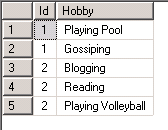
Person details:-

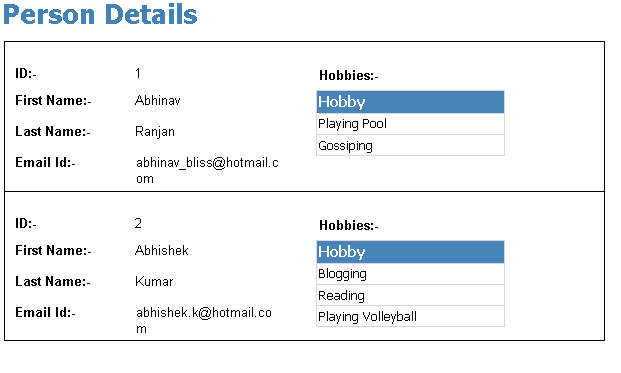
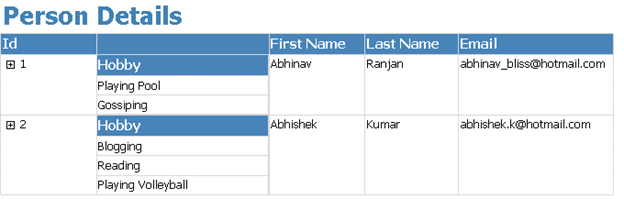
Now here we would like the report to show data in the following format (in repeated fashion)

1st record of Person Table

All details of that record

2nd record of Person Table

All details of that record

Now first create a report having following simple query for the data set

SELECT Id, [First Name], [Last Name], Email FROM Person

Now create one more report which we would be using as a Subreport with the following query

SELECT Hobby FROM [Person Details] WHERE (Id = @Id)

Now go to our main report,

Add a List Control to the report.

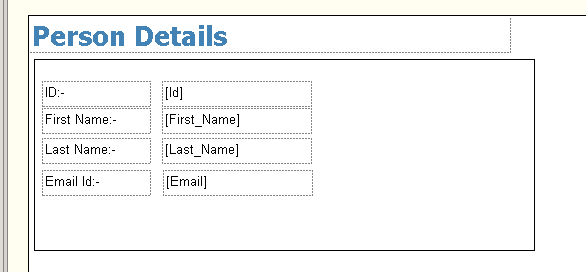
Drag the fields from the DataSet of the main Person table to the report.

Next drag the Subreport control inside the list control of the report.

Specify properties for the Subreport.

Refer to my previous post for that (little lazy to put those stuffs again)

https://nishantrana.wordpress.com/2011/08/20/using-subreport-control-to-show-1-to-n-related-information-in-ssrs-report/

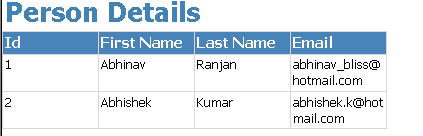
Our final report would look like this.

Hope it is helpful.

Using Subreport control to show 1 to n related information in SSRS report.


Suppose these are our two tables, Person and Person Details, having one to many relationships to each other.

Person:-

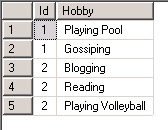
Person details:-

Now first create a report having following simple query for the data set

SELECT Id, [First Name], [Last Name], Email FROM Person

Now create one more report which we would be using as a Subreport with the following query

SELECT Hobby FROM [Person Details] WHERE (Id = @Id)

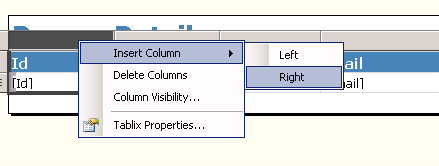
Now go to our main report, select id column, right click it and select add column to the right.

Drag Subreport control from the toolbox there in the new column added

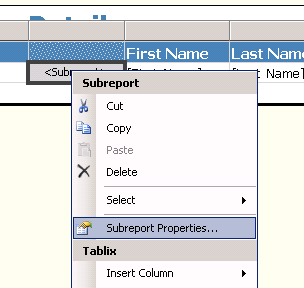
Next right click it and select Subreport properties

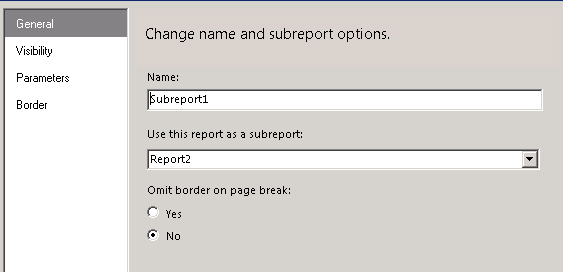
Specify the detail report as Subreport.

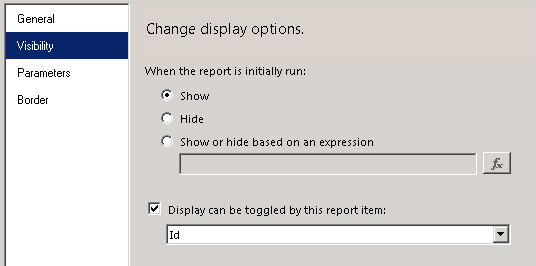
For visibility specify the following options (report would be auto expanded and we will have + sign in front of our id column through which we can toggle the visibility of the subreport)

For Parameters specify value for the id to be passed from the main report.

That’s it. We are done J

Hope it is helpful.

Helper Code for uploading a document to a SharePoint document library.


In one my projects we had a requirement to programmatically upload document to a SharePoint’s document library.

Below is the code we used to achieve that.


        // documentFileUrl would be :- http://server_name/doclibraryname/foldername (till doclibrary name or folder name to which doc
		// is to be uploaded
		// bytes :- byte array of the content
		// fileNameWithExtension would be :- test.docx
		// listName :- the display name of the list

	   public void UploadDoctofolder(string docfileurl, string fileNameWithExtension, byte[] bytes, string listName)
        {
            WebRequest request = WebRequest.Create(docfileurl + "/" + fileNameWithExtension);
            request.Credentials = this.credentials;
            request.Method = "PUT";

            byte[] buffer = new byte[1024];
            using (Stream stream = request.GetRequestStream())
            {
                using (MemoryStream ms = new MemoryStream(bytes))
                {
                    for (int i = ms.Read(buffer, 0, buffer.Length); i > 0; i = ms.Read(buffer, 0, buffer.Length))
                    {
                        stream.Write(buffer, 0, i);
                    }
                }
            }

            WebResponse response = request.GetResponse();
            response.Close();
        }

Hope it helps!

Helper Code to delete an existing document from a SharePoint document library.


In one my projects we had a requirement to programmatically delete document uploaded to SharePoint’s document library.

Below is the code we used to achieve that.


        // documentFullUrl would be :- http://server_name/sites/contact/volunteer/test.docx.
		// listName :- the display name of the list

		/// <summary>
        /// Deletes the existing document by URL.
        /// </summary>
        /// <param name="documentFullUrl">The document full URL.</param>
        /// <param name="listName">Name of the list.</param>
        public void DeleteExistingDocumentByUrl(string documentFullUrl, string listName)
        {
            //// Gets the file name with extension from the submitted document url
            string fileNameToBeDeleted = documentFullUrl.Substring(documentFullUrl.LastIndexOf("/") + 1);

            //// Removes the file name from url to get the folder name
            string folderUrl = documentFullUrl.Replace("/" + fileNameToBeDeleted, String.Empty);

            //// Get the file Id
            string fileId = this.GetListIdInSharePoint(listName, folderUrl, fileNameToBeDeleted);

            //// Delete the file
            if (!String.IsNullOrEmpty(fileId))
            {
                this.DeleteItem(fileId, documentFullUrl, listName);
            }
        }

		 /// <summary>
        /// Gets the list id of a file.
        /// </summary>
        /// <param name="documentLibraryName">Name of the document library.</param>
        /// <param name="folderUrl">The folder URL to search in e.g. "http://server_name/sites/contact/volunteer"</param>
        /// <param name="fileName">Name of the file to search for.</param>
        /// <returns></returns>
        public string GetListIdInSharePoint(string documentLibraryName, string folderUrl, string fileName)
        {
            this.CreateListService();

            //// Set up xml  doc for getting list of files under a folder
            XmlDocument doc = new XmlDocument();
            XmlElement queryOptions = doc.CreateElement("QueryOptions");
            queryOptions.InnerXml = "<Folder>" + folderUrl + "</Folder>";

            XmlNode listItemsNode = listService.GetListItems(documentLibraryName, null, null, null, null, queryOptions, null);

            XmlDocument xmlResultsDoc = new XmlDocument();
            xmlResultsDoc.LoadXml(listItemsNode.OuterXml);

            XmlNamespaceManager ns = new XmlNamespaceManager(xmlResultsDoc.NameTable);
            ns.AddNamespace("z", "#RowsetSchema");

            foreach (XmlNode row in xmlResultsDoc.SelectNodes("//z:row", ns))
            {
                if (fileName == row.Attributes["ows_LinkFilename"].Value)
                {
                    return row.Attributes["ows_ID"].Value;
                }
            }

            return String.Empty;
        }

        /// <summary>
        /// Deletes the item.
        /// </summary>
        /// <param name="listService">The list service.</param>
        /// <param name="fieldId">The field id.</param>
        /// <param name="fieldRef">The field ref.</param>
        /// <param name="listName">Name of the list.</param>
        public void DeleteItem(string fieldId, string fieldRef, string listName)
        {
            string strBatch = string.Empty;
            strBatch = "<Method ID='1' Cmd='Delete'>" + "<Field Name='ID'>" + fieldId + "</Field><Field Name='FileRef'>" + fieldRef + "</Field></Method>";

            this.CreateListService();
            XmlDocument xmlDoc = new System.Xml.XmlDocument();
            XmlElement batch = xmlDoc.CreateElement("Batch");
            batch.InnerXml = strBatch;

            XmlNode myNode = listService.UpdateListItems(listName, batch);
        }

Hope it helps.

Nishant Rana's Weblog

Everything related to Microsoft .NET Technology

Skip to content ↓