List of Error Codes in CRM 2011


Hi,

Was wondering where we can get the list of error codes in CRM 2011.

For CRM 4.0 we used to have the following link (page in SDK)

http://msdn.microsoft.com/en-in/library/cc151248.aspx

In CRM 2011, we can get it in SDK at the following path

\sdk\samplecode\cs\helpercode

Do check this post as well

http://mscrmuk.blogspot.com/2009/01/crm-error-codes.html

Bye.

Advertisements

Error Activating Microsoft Dynamics CRM 2011 List Component for SharePoint


Hi,

After adding the crmlistcomponent.wsp solution to the SharePoint’s team site, while trying to Activate the solution we were getting some error.

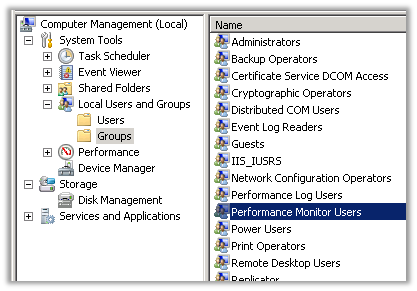
The solution for which was to start the SharePoint User Code Host service. However in our case we were not able to start the service, as it would stop after few seconds. The reason was because the service account under which that service was running was not a member of Performance Monitor Users group for the machine. Adding the user to the group fixed the issue for us.

Hope it helps.

Fixed: The given key was not present in the dictionary error in Register Managed Account in SharePoint 2013


Hi,

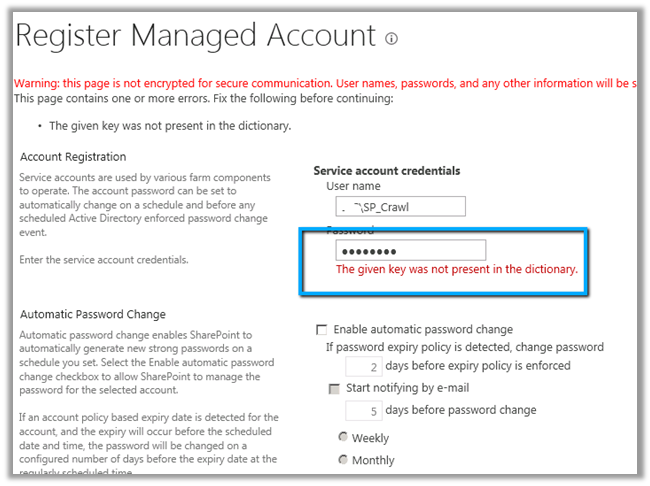
While trying to register a new managed account in SharePoint 2013 through Central Administration we were getting the below error.

To resolve this issue, we need to open the Active Directory Users and Computers console and select the account, right click Properties, select Authenticated Users in Security tab and
give Allow Permissions for Read Account Restrictions.

Hope it helps.

Fixed: Failed to create the configuration database. An exception of type System.Security.AccessControl.PrivilegeNotHeldException was thrown. Additional exception information: The process does not possess the ‘SeSecurityPrivilege’ privilege which is required for this operation.


Hi,

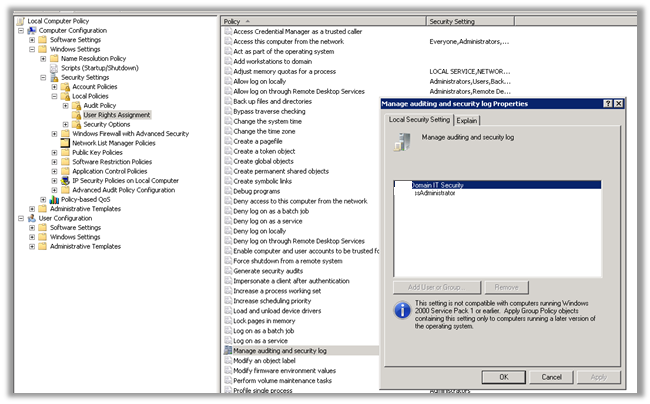
Got the below error while running the Configuration Wizard in SharePoint 2013.

Adding the user under which the installation was running to the Manage Security and Audit Log resolved the issue for us.

gpedit.msc àcomputer configurationàWindows Settings àSecurity Settings àUser Rights Assignment

Hope it helps.

Republishing SSRS Report in CRM 2011.


Hi,

We were recently doing installation of CRM 2011 and faced issue while installing CRM 2011 Reporting Extension (SRS Data Connector).

https://community.dynamics.com/crm/b/crmcustomereffective/archive/2011/12/05/microsoft-dynamics-crm-2011-reporting-extension-srs-data-connector-installation-service-account-warning.aspx#.UY3ITbWnwQY

After resolving the issue and completing the installation, we saw that there were no reports published. It was because of a flag being set in MSCRM_CONFIG when the installer ran first.

Check out this helpful post to resolve this issue

http://blog.customereffective.com/blog/2011/10/crm-2011-and-restoring-the-ssrs-server.html

Hope this helps.

Minimum Permissions Required for Dynamics CRM 2011 Setup, Services, and Components


Nice guide to follow while planning for installation.

darrenliu's avatarDarren Liu's Blog

I have been asked to figure out the minimum permissions required to install CRM 2011.  I dig around and I didn’t realize the product group already put the information in the Implementation Guide (IG).  I found the article below from the CRM 2011 IG, just in case you are looking for it, here you go.

————————————————————-

Microsoft Dynamics CRM is designed so that its components can run under separate identities. By specifying a domain user account that is granted only the permissions necessary to enable a particular component to function, you help secure the system and reduce the likelihood of exploitation.

This topic describes the minimum permissions that are required by the user account for Microsoft Dynamics CRM services and components.

Microsoft Dynamics CRM Server Setup

The user account used to run Microsoft Dynamics CRM Server Setup that includes the creation of databases requires the following minimum permissions:

  • Be a…

View original post 862 more words

Nishant Rana's Weblog

Everything related to Microsoft .NET Technology

Skip to content ↓