Unit Test RetrieveResponse in CRM using Microsoft Fakes.


Hi,

Recently we wrote a plugin that was using RetrieveResponse class to get the information of an n – n relationship using Relationship class.

The issue that we faced over here is that the Entity property of RetrieveResponse is read only, we cannot set it. The option was to write the wrapper class over it and use the same wrapper class in the code and the unit test.

/// <summary>
 /// Wrapper class for retrieve response
 /// </summary>
 [DataContract(Namespace = "http://schemas.microsoft.com/xrm/2011/Contracts")]
 public class RetrieveResponseWrapper : OrganizationResponse
 {
 /// <summary>
 /// The _entity
 /// </summary>
 private Entity entity;

/// <summary>
 /// Initializes a new instance of the <see cref="RetrieveResponseWrapper"/> class.
 /// </summary>
 /// <param name="response">The response.</param>
 public RetrieveResponseWrapper(OrganizationResponse response)
 {
 try
 {
 this.entity = ((RetrieveResponseWrapper)response).Entity;
 }
 catch
 {
 this.entity = ((RetrieveResponse)response).Entity;
 }
 }

/// <summary>
 /// Gets or sets the entity.
 /// </summary>
 /// <value>
 /// The entity.
 /// </value>
 public Entity Entity
 {
 get
 {
 return this.entity;
 }

set
 {
 this.entity = value;
 }
 }
 }


Check out this post for more details
http://www.alexanderdevelopment.net/post/2013/01/13/How-to-unit-test-C-Dynamics-CRM-interface-code-part-III

 Hope it helps.

Querying CRM Relationships


James Wood's avatarWOODSWORKBLOG

Recently I had to create a query that for a given primary entity would return a set of related target entities and support both 1-many and many-many relationships.

I knew how to do this in separate queries, so I could have some branching logic to see which type of query I needed to perform but that wasn’t a particularly elegant solution. I found the RelationshipQueryCollection, this allows you create a RetrieveRequest against your primary entity and then link in any related targets. All you have to do is specify the relationship name and it will support both 1-many and many-many relationships. If your are using self-referencing relationship be sure the populate relationship.PrimaryEntityRole.

Edit based on comment from daryllabar:

To better explain this function here is a practical example.

  • There is a one to many relationship between contact and account, it is named “account_primary_contact”.
  • The foreign key on the account is…

View original post 212 more words

Using Relationship and RelationshipQueryCollection class to retrieve n to n relationship details in CRM.


Suppose we need to query a n:n relationship and get details of both the entity records involved.

For this we can make use of Relationship and RelationshipQueryCollection class,

Suppose I have an entity named A  and it has n to n relationship with B  Entity.

This I how we can get the details all the A records associated with a particular entity B record.

i.e. Name of all the A records associated with a particular B entity record along with the  name of the B entity record.

</pre>
private void GetManytoManyRelationShipDetails(IOrganizationService _service, Guid entityBGuid)
 {
 // get offences records' name
 QueryExpression query = new QueryExpression("EntityA");
 ColumnSet cols = new ColumnSet();
 cols.AddColumn("EntityANameToBeRetreived");
 query.ColumnSet = cols;

// Relationship Name
 Relationship relationship = new Relationship("EntityA_EntityBRelationshipName");
 RelationshipQueryCollection relationshipColl = new RelationshipQueryCollection();
 relationshipColl.Add(relationship, query);

// get the legal issue record's name
 RetrieveRequest request = new RetrieveRequest();
 request.RelatedEntitiesQuery = relationshipColl;
 request.Target = new EntityReference("EntityB", entityBGuid);
 request.ColumnSet = new ColumnSet("EntityBNameToBeRetreived");
 RetrieveResponse response = (RetrieveResponse)_service.Execute(request);

string entityAName = string.Empty;

foreach (Entity entity in response.Entity.RelatedEntities[relationship].Entities)
 {
 entityAName += entity.Attributes["EntityAName"].ToString();
 }
 }

Hope it helps.

Fixed – Grid can not be used in this (‘quirks’) model in jqGrid


We got the above error in an HTML Web Resource which was using jqGrid. The page was working fine in IE 10 browser only in IE 8 we got that error.

The solution was to use the following meta tag inside the HEAD tag of the html page.


<meta
http-equiv=”X-UA-Compatible”
content=”IE=edge”
/>

More details on this meta tag

http://stackoverflow.com/questions/6771258/whats-the-difference-if-meta-http-equiv-x-ua-compatible-content-ie-edge-e

Hope it helps.

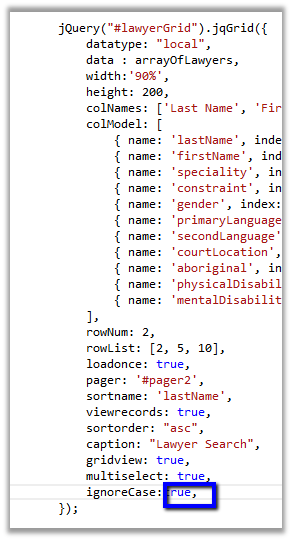
Fixed – Expected identifier, string or number error in HTML Web Resource in IE.


We recently developed an html web resource which was using jqGrid. The web resource was working properly on machines having IE 10 browser, but got the above error in case of IE 8.

As it turned out extra “,” i.e. trailing comma was the reason for the error.

Removing it fixed the issue. IE 10 was more forgiving.

Hope it helps.

Sample Code: OData Synchronous Call in CRM 2011


Just sharing the sample code to make synchronous OData call in CRM 2011.


var oDataRequestUrl = http://server/orgname/xrmservices/2011/OrganizationData.svc/ContactSet?$select=FullName

var result = syncODataCall(oDataRequestUrl);

// function to make synchronous oData call
 function syncODataCall(odataSelect) {
 var request = new XMLHttpRequest();
 request.open("GET", odataSelect, false);
 request.setRequestHeader("Accept", "application/json");
 request.setRequestHeader("Content-Type", "application/json; charset=utf-8");
 request.send();
 var objJQuery = jQuery.parseJSON(request.responseText);
 return objJQuery.d
 }

Check for following methods to parse the result returned

  • ProcessReturnedEntities(data.d.results)
  • ProcessReturnedEntity(data.d)

http://crmscape.blogspot.in/2011/03/crm-2011-odata-json-and-crm-forms.html

Hope it helps !

Nishant Rana's Weblog

Everything related to Microsoft .NET Technology

Skip to content ↓