Sample code to get label and value for OptionSet in CRM


Hi,

Just sharing a sample code that retrieves optionset data from CRM and also sorts it. We are using it to bind drop down in one of our custom SharePoint Application Page.


/// <summary>
/// The get global option sets.
/// </summary>
/// <param name="config">
/// The config.
/// </param>
/// <param name="globalOptionSetName">
/// The _global option set name.
/// </param>
/// <returns>
/// The <see cref="List"/>.
/// </returns>
public static List<XrmOptionSet> GetGlobalOptionSets(IOrganizationService config, string globalOptionSetName)
{
using (
XrmServiceContext context = SDKHelper.GetXrmServiceContext(
config.OrganizationServiceUrl,
config.Credentials))
{
RetrieveOptionSetRequest retrieveOptionSetRequest = new RetrieveOptionSetRequest
{
Name =
globalOptionSetName
};

// Execute the request.
RetrieveOptionSetResponse retrieveOptionSetResponse =
(RetrieveOptionSetResponse)context.Execute(retrieveOptionSetRequest);

OptionSetMetadata retrievedOptionSetMetadata =
(OptionSetMetadata)retrieveOptionSetResponse.OptionSetMetadata;

OptionMetadata[] optionList = retrievedOptionSetMetadata.Options.ToArray();

List<XrmOptionSet> optionSetItems = new List<XrmOptionSet>();

// Add each item in OptionMetadata array to the ListItemCollection object.
foreach (OptionMetadata o in optionList)
{
XrmOptionSet xrmOptionSet = new XrmOptionSet();
xrmOptionSet.Label = o.Label.LocalizedLabels[0].Label;
xrmOptionSet.Value = o.Value.Value.ToString(CultureInfo.InvariantCulture);
optionSetItems.Add(xrmOptionSet);
}

optionSetItems.Sort(
delegate(XrmOptionSet thisItem, XrmOptionSet otherItem)
{
return thisItem.Label.CompareTo(otherItem.Label);
});

return optionSetItems;
}
}

/// <summary>
/// The get local option sets.
/// </summary>
/// <param name="config">
/// The config.
/// </param>
/// <param name="entityName">
/// The entity name.
/// </param>
/// <param name="optionSetAttributeName">
/// The option set attribute name.
/// </param>
/// <returns>
/// The <see cref="List"/>.
/// </returns>
public static List<XrmOptionSet> GetLocalOptionSets(
IOrganizationService config,
string entityName,
string optionSetAttributeName)
{
using (
XrmServiceContext context = SDKHelper.GetXrmServiceContext(
config.OrganizationServiceUrl,
config.Credentials))
{
// Create the Attribute Request.
RetrieveAttributeRequest retrieveAttributeRequest = new RetrieveAttributeRequest
{
EntityLogicalName =
entityName,
LogicalName =
optionSetAttributeName,
RetrieveAsIfPublished
= true
};

// Get the Response and MetaData. Then convert to Option MetaData Array.
RetrieveAttributeResponse retrieveAttributeResponse =
(RetrieveAttributeResponse)context.Execute(retrieveAttributeRequest);
PicklistAttributeMetadata retrievedPicklistAttributeMetadata =
(PicklistAttributeMetadata)retrieveAttributeResponse.AttributeMetadata;
OptionMetadata[] optionList = retrievedPicklistAttributeMetadata.OptionSet.Options.ToArray();

List<XrmOptionSet> optionSetItems = new List<XrmOptionSet>();

// Add each item in OptionMetadata array to the ListItemCollection object.
foreach (OptionMetadata o in optionList)
{
XrmOptionSet xrmOptionSet = new XrmOptionSet();
xrmOptionSet.Label = o.Label.LocalizedLabels[0].Label;
xrmOptionSet.Value = o.Value.Value.ToString(CultureInfo.InvariantCulture);
optionSetItems.Add(xrmOptionSet);
}

optionSetItems.Sort(
delegate(XrmOptionSet thisItem, XrmOptionSet otherItem)
{
return thisItem.Label.CompareTo(otherItem.Label);
});

return optionSetItems;
}
}
}

&nbsp;


Hope it helps.

Issue while using SDK.MetaData.js in Chrome in CRM 2013.


Recently was writing a jscript function to populate optionset value using SDK.MetaData.js helper class.

https://nishantrana.wordpress.com/2014/02/05/retrieve-optionset-label-using-sdk-metadata-rertrieveattribute-method-in-javascript-crm-2011/

It was working fine in IE, however I was getting error in Chrome.

It turned out the following condition was always evaluating as true

And as selectSingleNode is not supported in Chrome we were getting error.

Added the following condition fixed the issue


if (typeof(window.chrome) != ‘undefined’) {


var xpe = new XPathEvaluator();


var xPathNode = xpe.evaluate(xpathExpr, node, _NSResolver, XPathResult.FIRST_ORDERED_NODE_TYPE, null);


return (xPathNode != null) ? xPathNode.singleNodeValue : null;


}


Hope it helps..

Generic SQL Error – RetriveMultiple with ConditionOperator.Contains in CRM


Hi,

Was getting Generic SQL Error while using ConditionOperator.Contains in the ConditionExpression. The requirement was to get all the incident records based on the title attribute value.

condExp.AttributeName = “title”;

condExp.Operator = ConditionOperator.Contains;

condExp.Values.Add(“test”);

The correct way to perform this kind of search is by using Like operator with %.

condExp.AttributeName = “title”;

condExp.Operator = ConditionOperator.Contains;

condExp.Values.Add(“%test%”);

http://social.microsoft.com/Forums/en-US/ede5932b-5ac9-4fc9-86d9-12ef5b2b305d/crm-2011-getting-generic-sql-error-when-performing-retrievemultiple-with?forum=crmdevelopment

Hope it helps.


attributeName error while using join in LINQ in CRM.


I recently wrote a LINQ using joins, all seemed fine, but was still getting the attributeName exception. Finally this post came to rescue.

http://www.develop1.net/public/post/e2809cValue-cannot-be-nullParameter-name-attributeNamee2809d-when-running-Linq-query-with-join.aspx

Hope it helps.


Fixed – The given key was not present in the dictionary error while using FormattedValues in LINQ in CRM 2013.


Hi,

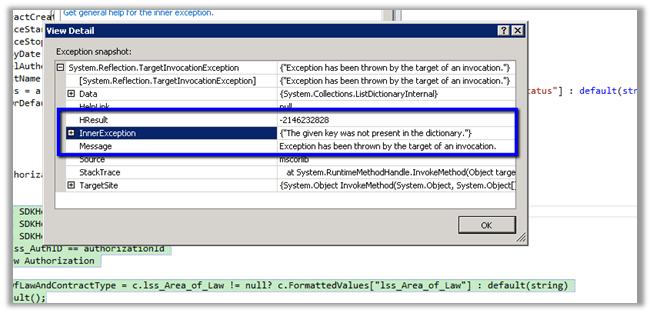
I was getting the following exception while trying to get the text for an option set field named area of law in linq.

The query with joins


var authorization = (from a in
SDKHelper.XrmServiceContext.lss_AuthorizationSet 
join c in SDKHelper.XrmServiceContext.lss_contractSet on a.lss_ContractId.Id equals c.Id

join l in

SDKHelper.XrmServiceContext.lss_lawyerSet on c.lss_LawyerId.Id equals l.Id

where a.lss_AuthID == authorizationId

select
new
Authorization
{

AreaOfLawAndContractType = c.lss_Area_of_Law != null? c.FormattedValues[“lss_area_of_law”] : default(string)

}).FirstOrDefault();

return authorization;


The fix was instead of using FormattedValues collection of related entity in join, we need to use the FormattedValues collection of the primary entity.


var authorization = (from a in
SDKHelper.XrmServiceContext.lss_AuthorizationSet

join c in
SDKHelper.XrmServiceContext.lss_contractSet on a.lss_ContractId.Id equals c.Id

join l in
SDKHelper.XrmServiceContext.lss_lawyerSet on c.lss_LawyerId.Id equals l.Id

where a.lss_AuthID == authorizationId

select
new
Authorization

{

AreaOfLawAndContractType = c.lss_Area_of_Law != null? a.FormattedValues[“lss_area_of_law”] : default(string)

}).FirstOrDefault();


return authorization;


Hope it helps.

System.Exception: Action Microsoft.Crm.Setup.Server.InstallConfigDatabaseAction failed. —> System.Data.SqlClient.SqlException: Connection Timeout Expired. The timeout period elapsed while attempting to consume the pre-login handshake acknowledgement.


Got this error while installing CRM 2013.

Following post helped in fixing the issue.

http://stackoverflow.com/questions/15488922/connection-to-sql-server-works-sometimes

https://community.dynamics.com/crm/f/117/t/115384.aspx

Hope it helps.