Calling Asp.NET web service from form onLoad in CRM


This is the code we can make use for calling ASP.NET webservice in form onLoad javascript event handler of our Entity in Microsoft CRM.

This example calls the simple Hello World service and assigns the value returned (i.e. “Hello World”) to a field in the entity form

xmlHttp=new ActiveXObject(“Microsoft.XMLHTTP”);

xmlHttp.open(‘post’, ‘http://localhost/WebService1/Service1.asmx/HelloWorld’, false);

xmlHttp.send();

var xmlDoc=xmlHttp.responseXML;

var responseElement=xmlDoc.getElementsByTagName(“string”)[0];

var exch=responseElement.firstChild.nodeValue;

crmForm.all.address1_name.DataValue=exch ;

return false;

Check this link for more information

https://nishantrana.wordpress.com/2007/10/18/calling-aspnet-webservice-from-javascript-ajax/

Bye

Refresh CRM form from third-party applications


http://support.microsoft.com/default.aspx/kb/821669

Code to put in the javascript of our custom page

function window.onunload()
{
window.opener.location.reload();
window.close();
}

But the thing with the code is that it only works when we deploy the page in the same server where our Crm is deployed.

When i had deployed the page in my machine, the page wasn’t refreshing but when i deployed the same page where the crm is deployed everything was working perfectly fine.

I think in the previous case because of the cross-domain issue i guess there were problems.

One more thing,  to assign values to attributes in our Crm Form from our isv page we can make use of familiar syntax

window.opener.document.crmForm.all.new_totalbilling.DataValue=parseInt(//value );

parseInt – if the crm attribute is of numeric type

alert(window.parent.document.all.crmForm.all.name.DataValue);

Bye

How to – Find shared records in CRM


To find all the records(say lead)  shared with any particular user we can make use of following query

It will return us all records(lead) shared with the user directly( i.e. through Action–>Sharing and user)

select  fl.subject

from
PrincipalObjectAccess poa , FilteredLead fl, FilteredSystemUser fsu
where
poa.ObjectTypeCode = 4
and poa.ObjectId = fl.leadid
and poa.PrincipalId = fsu.systemuserid
and fsu.domainname=SYSTEM_USER

// fsu.fullname=’name of user’

And to get the records shared with the user indirectly (i.e. through Action–>Sharing and Team (user belongs to that team)

select  fl.subject
from
FilteredLead fl,  PrincipalObjectAccess poa,  FilteredTeam ft
where
poa.ObjectTypeCode = 4 

and poa.ObjectId =fl.leadid
and poa.PrincipalId = ft.teamid and 

fl.owneridname not in (select fullname from filteredsystemuser
where domainname=SYSTEM_USER)
and
ft.teamid  in (select ft.teamid from filteredteammembership fm
, filteredsystemuser fsu, filteredteam ft
where fm.systemuserid=fsu.systemuserid and
ft.teamid=fm.teamid
and fsu.domainname=SYSTEM_USER
)

Bye

Advertisements

Making value in one lookup depended on value of another lookup.


Making value in one lookup depended on value of another lookup in Microsoft CRM. Say we have created 2 custom entities Categories and Skill. Skill entity has category lookup field which relates it to that category.(Added a relationship between them)Than created few records for both the entities. After that we have added that entities to the third entity where they’ll appear as LookUp.

Now we want the value of Skill lookup to be dependent value selected on Resource(Category) LookUp.

untitled1.JPG

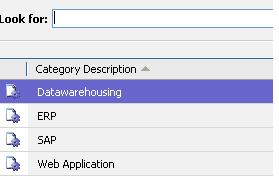
Resource can have following values

untitled2.JPG

Now if Datawarehousing is selected than

we want to show Analysis and SSAS in the Skill lookup
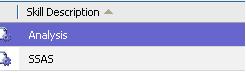
untitled3.JPG

To accomplish this we will write the following code in the OnChange event of Resource Lookup

// Making the skill id lookup null whenver a new values is selected for reesource

crmForm.all.new_skillid.DataValue=null;

crmForm.all.new_skillid.disabled = false;

// getting the value of selected resource

var ar=new Array();

ar=crmForm.all.new_resourceid.DataValue;

var rID = ar[0].id;

// Changing the display of skillid lookup so that only skill belonging to particular rID should appear

crmForm.all.new_skillid.lookupbrowse=1;

// in the additionalparams for the skill id attribute we will specify the fetch xml query // e.g. select * from new_categoryskill (name of our custom skill entity) where new_categoryofskillid = rid

crmForm.all.new_skillid.additionalparams = “fetchXml=<fetch mapping=’logical’ ><entity name=’new_categoryskill’><all-attributes/><filter type=’and’><condition attribute=’new_categoryofskillid’ operator=’eq’ value='” + rID + “‘/></filter></entity></fetch>”;

To get the fetchXml query what we can do over here is

http://ronaldlemmen.blogspot.com/2006/11/using-advanced-find-for-fetchxml.html

We will go to our skill entity form and run an advancedfind query against it (giving the appropriate condition for which we want the fetch xml)

Now pressing CTRL+N open it in a new window Now in URl replace everything with the following line

javascript:prompt(“my%20query:”,%20resultRender.FetchXml.value);

Press Ok to the dialog that appears and it opens a prompt window from where we can copy our fetch xml and modify it accordingly.


Using ISV.config to access field values in CRM


First of all open your isv.config file ( found at <installation path\_Resources\isv.config e.g. C:\Program Files\Microsoft CRM\CRMWeb\_Resources”

Here we are adding buttons in the form toolbar for opportunity, inside the isv.config file (Plzz take it’s backup)

Add the following

<Entity name=”opportunity”>

<ToolBar ValidForCreate=”0″ ValidForUpdate=”1″>

<Button Title=”MyBtn1″ Icon=”/_imgs/ico_18_debug.gif”

Url=”http://default.aspx” PassParams=”1″ WinParams=”” WinMode=”0″ AvailableOffline=”false” />

<Button Title=”my button” ToolTip=”Advanced Mail Merge” Icon=”url” Client=”Web, Outlook”

JavaScript=

var n=crmForm.all.name.DataValue;

var objectID=crmForm.ObjectId;

window.open(‘http://Default.aspx?name=’+n+’&oId=’+objectID)”

/>

</ToolBar>

</Entity>

In the above code we have created two button.

First button makes use of URL and passParam attribute.

When we set passParam as 1 then objectid( id of the record), object name and object type code are passed to url specified as query string.

The thing here is that in our custom web page we can only get the id and the type of entity.

What if we want values of other form fields.

Well in this case we can make use of JavaScript attribute.This attribute will override the Url attribute if in case both of them are defined.In the above code we are attaching the name value of opportunity in the query string.

One more thing to get the current record’s primary key i.e. say opportunity id for opportunity we’ll use crmForm.ObjectId

We can even user window.opener object in javascript of our isv custom page.

Chk this

https://nishantrana.wordpress.com/2007/10/13/refresh-crm-form-from-third-party-applications/

Bye

Finding Lead records that have an associated activity with them


Here in the query one more condition is added which is when the Rating is Hot. 

select leadqualitycodename,* from filteredlead As fl inner join dbo.FilteredActivityParty as fap
ON fl.leadid=fap.partyid
and fl.leadid=‘yourleadid’ and leadqualitycodename=‘Hot’