Using Multivalued Parameter in Fetch XML based report in CRM 2011 online.


Hi,

Say for e.g. we want a report that shows all the contacts based on owners selected.

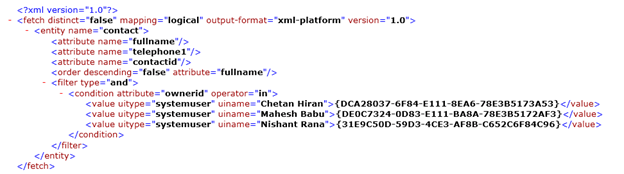
If we create the query using advanced find, our query will look like this

Here we have selected three users for owner.

From the query we get the initial impression that it won’t be possible to use the above Fetch XML in our report as the Value Tag needs to dynamic based on the no. of the owners selected.

However to use it in the report we need to make the following change in the query

Here @Owners Query Parameter will takes its value from a Multivalued Report Parameter.

Hope it helps.

CRM 2011 Online Fetch XML based SSRS Report and the In condition.


Hi,

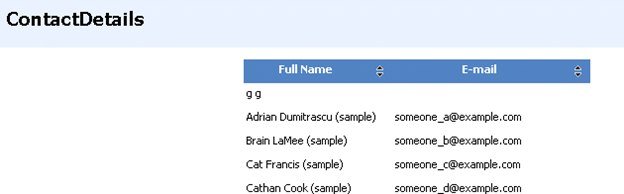
Suppose I have a simple Fetch XML based report that shows all the contact’s Full name and their Email Id.
The query for it
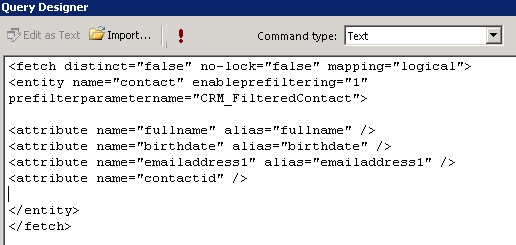
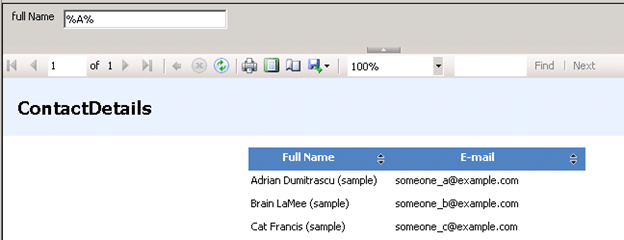
Now let us add a like condition to it. (i.e. get all the contacts where fullname like)

The full name parameter will appear in the report.
Now comes the tricky part.

Suppose we have to find all the contact records based on the owners selected.

For owners we will have drop down field in the report.

The fetch xml query would look like below (if we specify two owners)

But here the issue is that value (tag) part would be dynamic, it has to be equal to the values selected by user in the drop down owner parameter of the report. It seems that we can’t dynamically change the Fetch Xml query in runtime for the report.

So the “In” operator won’t be of much use in case of fetch xml based report.

One way we can overcome this issue is by using Default filters.
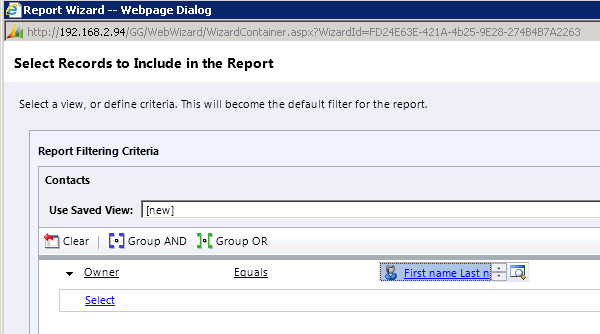
Here users will have option of editing the filter and specifying the values for the owner which would be then passed down to the report.

This is one way I can think of getting the multiselect thing working in Fetch XML based report.

Please share and suggest your ideas for the same.

Update :-

The multivalue can be passed in the following comma separated way, so we can make use of Multiselect Report Parameter here.


<fetch mapping="logical" count="50" version="1.0">
 <entity name="contact">
 <filter>
 <condition attribute="ownerid" operator="in">
 <strong><value>48379161-2782-e111-b0d1-78e3b5178a51,48379161-2782-e111-b0d1-78e3b5178a52,A81F00C-D4E4-E011-B58C-00155D2A49C7</value></strong>
 </condition>
 </filter>
 </entity>
</fetch>

The fetch XML will have condition in the following format

<condition attribute=”ownerid” operator=”in” value=”@ActivityOwner”>

Bye.

DateTime Parameter Issue in SSRS (The date/time format is not valid)


Hi,

In one of our SSRS Report we had 2 Report Parameters, one for “From Date” and other for “To Date”.

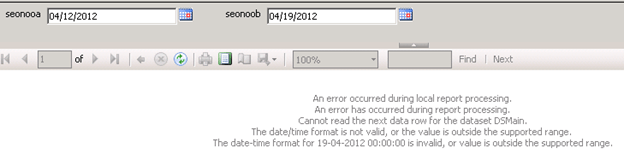
On selecting values for them through calendar control, the value was being displayed in the proper format (mm/dd/yyyy). However the value being passed to the query was in the format (dd-mm-yyyy), because of which we were getting “The date/time format is not valid” error.

The following was the regional setting in the server.

We changed it to English (United States)

We tried running the report, but we again got the same issue.

Next we tried by changing the Language Settings of Internet Explorer.

This also didn’t solve the issue.

Finally thought of restarting the server, in case if the settings might not have got reflected properly.

After restarting the system, again tried running the report and it ran successfully J

Hope it helps.

List of all the tools and resources for Microsoft Dynamics CRM 2011.


Hi,

Got to know about this wonderful CRM Wiki page today, so just thought of sharing it.

http://social.technet.microsoft.com/wiki/contents/articles/2490.microsoft-dynamics-crm-2011-development-resources.aspx

Thanks George Doubinski and Ben Hosking for publishing it.

Bye.

Installing Microsoft Dynamics CRM 4.0 in Windows Server 2008 R2 machine having Microsoft SQL Server 2008 database.


Hi,

These are the steps we followed to install Microsoft Dynamics CRM 4.0 in Windows Server 2008 R2 machine (Here we had the Microsoft SQL Server 2008 installed on a different server)

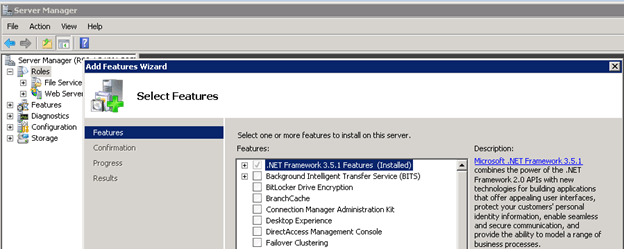
Before running the setup, first we added the .NET Framework 3.5.1 Features from Server Manager.

After running the installer we got the following error in the Environment Diagnostics Wizard.

 ERROR : (provider: Named Pipes Provider, error: 40 – Could not open a connection to SQL Server) (Microsoft SQL Server, Error: )

We followed the step mentioned in this article to resolve this issue.

http://blog.sqlauthority.com/2009/05/21/sql-server-fix-error-provider-named-pipes-provider-error-40-could-not-open-a-connection-to-sql-server-microsoft-sql-server-error/

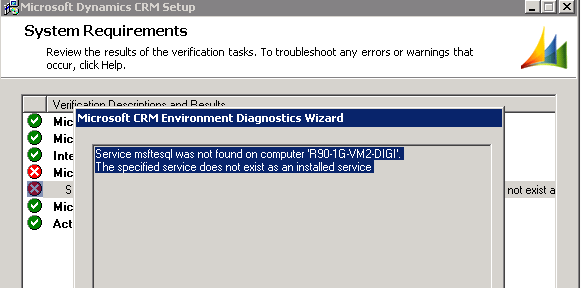
On running the installer again, we got this issue

Error : Service msftesql was not found on computer …… The specified service does not exist as an installed service.


We followed the below mentioned steps to resolve the issue

  1. Run > Regedit
  2. HKEY_LOCAL_MACHINE\SYSTEM\CurrentControlSet\Services
  3. Rename MSSQLFDLauncher Folder to msftesql
  4. Reboot System
  5. Administrative Tools > Services > SQL Full-text Filter Daemon Launcher (MSSQLSERVER) and Check START Status
  6. Rename back msftesql Folder to MSSQLFDLauncher

http://social.microsoft.com/Forums/eu/crm/thread/d8dda562-aae6-47b7-9c81-86f98d2b77f6

Bye.

Determining the Update Rollup Version of the CRM installed


Hi,

Just sharing two useful posts which would help us to identify the update rollup version installed in our CRM environment.

For CRM 2011

http://crmdynamo.com/2011/09/crm-2011-update-rollup-release-build-numbers-and-how-to-find-them/

For CRM 4.0

http://crmdynamo.com/2010/03/check-which-update-rollup-version-is-installed-on-your-crm-environments/

Bye.