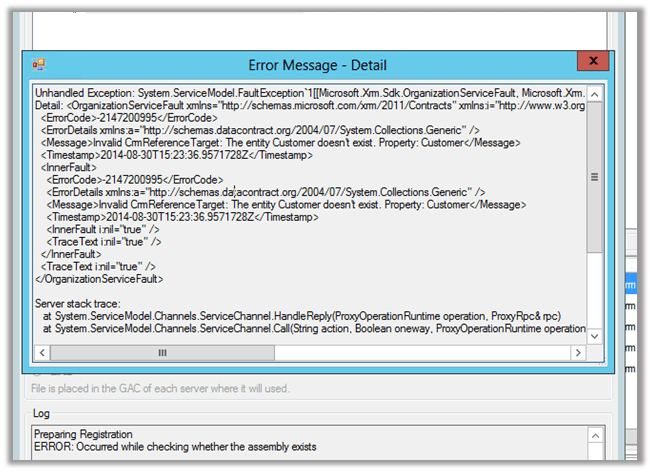
Invalid CRMReference Target: The entity Customer doesn’t exist.


Hi,

Was writing a custom workflow activity on incident entity and in which we wanted the Customer Lookup Value. And based on type of Customer i.e. either contact or account there was some logic to be executed.

So declared an input parameter or type Customer

However while registering the workflow I got the below error

The way to handle this is,

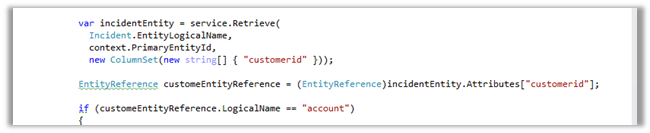
Get the guid of the record from the context and then retrieve the value of customer id attribute.

On retrieval check if the EntityReference is of type account or contact and then proceed accordingly


Hope it helps ..

Microsoft Fakes and LINQ (Custom Workflow Activity) in CRM


Hi,

Just sharing a sample code to test a custom workflow activity using Microsoft Fakes.

The custom workflow activity uses LINQ.

The custom workflow activity code


public sealed class MyCustomWorkflowActivity : CodeActivity
{
#region Public Properties

[Input("Stage Name")]
public InArgument<string> StageName { get; set; }

#endregion

#region Methods

/// <summary>
/// Executes the workflow activity.
/// </summary>
/// <param name="executionContext">
/// The execution context.
/// </param>
protected override void Execute(CodeActivityContext executionContext)
{
// Create the tracing service
var tracingService = executionContext.GetExtension<ITracingService>();

// Create the context
var context = executionContext.GetExtension<IWorkflowContext>();

var serviceFactory = executionContext.GetExtension<IOrganizationServiceFactory>();

IOrganizationService service = serviceFactory.CreateOrganizationService(context.UserId);

try
{
using (var xrmServiceContext = new XrmServiceContext(service))
{
// get the business process workflow id
var workflow = (from w in xrmServiceContext.WorkflowSet
where w.Name == "Business Process Workflow Name"
select new Workflow { WorkflowId = w.WorkflowId }).FirstOrDefault();

if (workflow != null)
{
// get the stage name from the context's input parameter
var stageName = this.StageName.Get<string>(executionContext);
var stage = (from s in xrmServiceContext.ProcessStageSet
where s.StageName == stageName && s.ProcessId.Id == workflow.WorkflowId
select new ProcessStage { ProcessStageId = s.ProcessStageId }).FirstOrDefault();

if (stage != null)
{
// update the sales state in the case record to which the above business process flow is associated
var incident = new Incident
{
Id = context.PrimaryEntityId,
StageId = stage.ProcessStageId
};
service.Update(incident);
}
}
}
}
catch (FaultException<OrganizationServiceFault> e)
{
tracingService.Trace("Exception: {0}", e.ToString());
throw;
}

}

Unit Test Code


public void UnitTestCustomWorkflowActivity()
{

var workflowUserId = Guid.NewGuid();
var workflowCorrelationId = Guid.NewGuid();
var workflowInitiatingUserId = Guid.NewGuid();

var service = new Microsoft.Xrm.Sdk.Fakes.StubIOrganizationService();

var workflowContext = new Microsoft.Xrm.Sdk.Workflow.Fakes.StubIWorkflowContext();
workflowContext.UserIdGet = () =>
{
return workflowUserId;
};
workflowContext.CorrelationIdGet = () =>
{
return workflowCorrelationId;
};
workflowContext.InitiatingUserIdGet = () =>
{
return workflowInitiatingUserId;
};

// ITracingService
var tracingService = new Microsoft.Xrm.Sdk.Fakes.StubITracingService();
tracingService.TraceStringObjectArray = (f, o) =>
{
Debug.WriteLine(f, o);
};

// IOrganizationServiceFactory
var factory = new Microsoft.Xrm.Sdk.Fakes.StubIOrganizationServiceFactory();
factory.CreateOrganizationServiceNullableOfGuid = id =>
{
return service;
};

SetBpfStage target = new SetBpfStage();

var wfEntity = new Workflow();
wfEntity.Id = Guid.NewGuid();
wfEntity["name"] = "abcabcabc";
var wfEntity1 = new Workflow();
wfEntity1.Id = Guid.NewGuid();
wfEntity1["name"] = "abcabcabc";

var processStageEntity = new ProcessStage();
processStageEntity.Id = Guid.NewGuid();
processStageEntity["name"] = "abcabcabc";
service.ExecuteOrganizationRequest = r =>
{
RetrieveMultipleResponse response = null;
if (((Microsoft.Xrm.Sdk.Query.QueryExpression)((RetrieveMultipleRequest)r).Query).EntityName
== "workflow")
{
List<Entity> entities = new List<Entity> { wfEntity };

response = new RetrieveMultipleResponse
{
Results =
new ParameterCollection
{
{
"EntityCollection",
new EntityCollection
(entities)
}
}
};

return response;
}

if (((Microsoft.Xrm.Sdk.Query.QueryExpression)((RetrieveMultipleRequest)r).Query).EntityName
== "processstage")
{

List<Entity> entities = new List<Entity> { processStageEntity };

response = new RetrieveMultipleResponse
{
Results =
new ParameterCollection
{
{
"EntityCollection",
new EntityCollection
(entities)
}
}
};

return response;
}

return response;
};

service.UpdateEntity = (p) =>
{
};

var invoker = new WorkflowInvoker(target);
invoker.Extensions.Add<ITracingService>(() => tracingService);
invoker.Extensions.Add<IWorkflowContext>(() => workflowContext);
invoker.Extensions.Add<IOrganizationServiceFactory>(() => factory);

var inputs = new Dictionary<string, object>
{
{ "StageName", "New" }
};

invoker.Invoke(inputs);
}

Hope it helps..

Using LINQ in CRM 2013


There are few ways we can make use of LINQ to write queries against CRM.

Using the early bound entity classes along with the generated service context

Use the CrmSvcUtil tool to generated the early bound entity classes and service context

CrmSvcUtil.exe /url:http://<serverName>/<organizationName>/XRMServices/2011/Organization.svc

/out:<outputFilename>.cs /username:<username> /password:<password> /domain:<domainName>

/namespace:<outputNamespace> /serviceContextName:<serviceContextName>


Uri organizationUri = new Uri("http://server/orgname/XRMServices/2011/Organization.svc");
 Uri homeRealmUri = null;</pre>
<pre> ClientCredentials credentials = new ClientCredentials();
 credentials.Windows.ClientCredential = new System.Net.NetworkCredential("username", "password", "domain");
 OrganizationServiceProxy orgProxy = new OrganizationServiceProxy(organizationUri, homeRealmUri, credentials, null);
 orgProxy.EnableProxyTypes();
 IOrganizationService _service = (IOrganizationService)orgProxy; 
 
 var xrmServiceContext = new XrmServiceContext(_service);
 // get all contact record that has first name as Hugh
 var lstContact = (from c in xrmServiceContext.ContactSet
 where c.FirstName == "Hugh"
 select c).ToList();
 foreach(var contact in lstContact)
 {
 MessageBox.Show(contact.FullName);
 }


Using Early bound entity classes and OrganizationServiceContext

Suppose we have the early bound entity classes but haven’t generated the service context. In this case we can use OrganizationServiceContext


var xrmServiceContext = new OrganizationServiceContext(_service);

var lstContact = (from c in xrmServiceContext.CreateQuery<Contact>()
 where c.FirstName == "Hugh"
 select c).ToList();

foreach (var contact in lstContact)
 {
 MessageBox.Show(contact.FullName);
 }

Using Late bound and OrganizationServiceContext

Suppose we are not generating the early bound classes and using late binding


  var xrmServiceContext = new OrganizationServiceContext(_service);

 var lstContact = (from c in xrmServiceContext.CreateQuery("contact")
 where c["firstname"] == "Hugh"
 select c).ToList();

 foreach (var contact in lstContact)
 {
 MessageBox.Show(contact["fullname"].ToString());
 }

Hope it helps..


“the specified type is not a known entity type” error while using early bound entity classes in CRM 2013


Hi,

We were writing a custom workflow activity that was using LINQ (early bound).

Here we had used ILMerge to merge the early bound assemblies with the workflow assembly.

The solution was to place the following attribute in the AssemblyInfo.cs of the workflow assembly (same goes for Plugin Assembly)

[assembly: Microsoft.Xrm.Sdk.Client.ProxyTypesAssemblyAttribute()]


The helpful thread

http://social.microsoft.com/Forums/en-US/7c05f900-f930-46b3-a233-75a94ffca9c5/how-to-make-the-crm-2011-plugin-detect-types-from-early-bound-organisation-class?forum=crmdevelopment

Hope it helps..


OptionSetId cannot be changed. EnumAttributeInfo.AttributeDescription.OptionSetId(089e077e-6055-446a-ad6e-326f0bee7c9c) != c0864f8b-2c13-e411-93ed-000d3a800961


We got this error while importing the solution. This issue is caused by having an optionset with same name but different guid.

The solution is to identify the field and delete it from the org where we are importing.

select name from optionsetview where optionsetid = ‘c0864f8b-2c13-e411-93ed-000d3a800961’ (the 2nd guid)

The helpful post

http://atriosystems.wordpress.com/2012/11/12/import-unmanaged-solution-error-optionsetid-cannot-be-changed/

Bye

CRM 2013 New and Beautiful getClientUrl() method instead of getServerUrl()


Sanghamitra's avatarSanghamitra Samantaray

In CRM 2013 Microsoft has introduced this new client context method called “getClientUrl”

This is the replacement to the previous method called “getServerUrl” that was present in CRM 2011.

This method was faulty because it always returns the server name in the URL as it is set up in the CRM deployment manager, irrespective of how the host url looks like.

this is issue in scenarios where users might have invoked CRM using the server IP address or fully qualified domain name etc.

because when in the java script we call getServerUrl it does not return the URL with the server name as it was used by the calling the host url, but that of what is stored in the server, which fails , in the situations where the server name is not accessible from the host machine but the IP or fully qualified name.

in order to correct this…

View original post 125 more words