Hi,
I got the below error while installing the CRM Server.
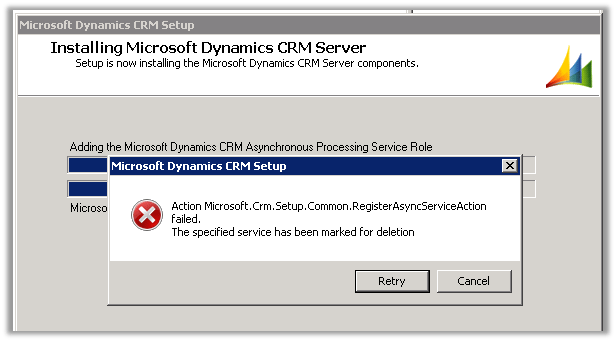
The issue was after uninstalling the CRM Server, we hadn’t restarted the server. So after restarting the server and running the setup again the installation went smoothly.
Hope it helps.

Hi,
I got the below error while installing the CRM Server.
The issue was after uninstalling the CRM Server, we hadn’t restarted the server. So after restarting the server and running the setup again the installation went smoothly.
Hope it helps.

Hi,
I was installing CRM 2011 on new set of machines and got the above error. The account that was being used had all the privileges required for doing the installation.
While searching for the solution found out one thread that mentioned that the error could be because the SQL Server Management Studio query window might be open and could be locking one of the system DB. It was hard to believe however I gave it a try, closed the Management Studio window on the SQL Server machine and retried and the installation was successful.
http://social.microsoft.com/Forums/en-US/crmdeployment/thread/15e70102-7b65-4aa8-947d-61594a253ae5
Update :- The next time i had the management studio closed but had a remote session open to the SQL Server machine, disconnecting the session resolved the issue.
Hope it helps.


I recently received the e-book of Microsoft Dynamics CRM 2011 Scripting Cookbook (Packt Publishing by Nicolae Tarla) from the publisher for review.
The book has over 50 recipes divided in 10 chapters. It starts with basics of JavaScript in context of CRM and then goes into details of implementing validation, events handling, error handling, debugging etc. It also covers advanced topics like UI manipulation, using open source JavaScript libraries and framework and integration with Facebook, twitter etc. The book will be enjoyable and informative read for both the readers new as well as advanced.
Most of the recipes are nicely divided into following different sections
The book and all the recipes are so properly organized that it makes it very easy for the readers to understand and implement it, and also make reading the book a wonderful experience. A must read for everyone who loves working in Microsoft Dynamics CRM 2011.
We can get the book here
http://www.packtpub.com/microsoft-dynamics-crm-2011-scripting-cookbook/book

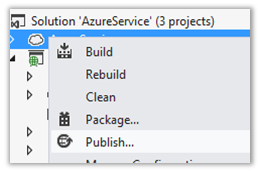
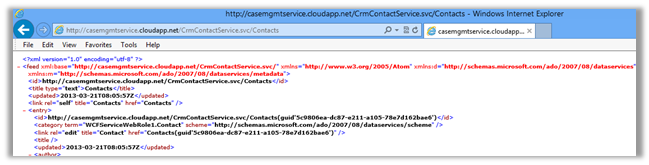
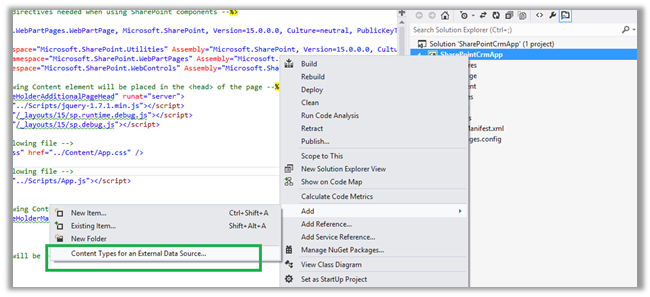
Here we will be creating an ASP.NET Data Service and host it in azure. This ASP.NET Data Service will be used to generate BCS Model in SharePoint 2013 online. The service will allow basic CRUD operation on Contact record in CRM 2011 from SharePoint 2013 online.


</pre>
using Microsoft.Xrm.Sdk;
using Microsoft.Xrm.Sdk.Client;
using Microsoft.Xrm.Sdk.Query;
using System;
using System.Collections.Generic;
using System.Configuration;
using System.Data.Services;
using System.Data.Services.Common;
using System.Linq;
using System.Reflection;
using System.Runtime.Serialization;
using System.Web;
namespace WCFServiceWebRole1
{
 [DataServiceKey("ContactId")]
 [Serializable]
 public class Contact
 {
 [DataMemberAttribute()]
 public Guid ContactId
 {
 get;
 set;
 }
 [DataMemberAttribute()]
 public string FirstName
 {
 get;
 set;
 }
 [DataMemberAttribute()]
 public string LastName
 {
 get;
 set;
 }
 }

public class CrmContext : IUpdatable
 {
 public static List<Contact> lstContacts;
 public static OrganizationServiceProxy orgProxy = GetOrganizationService();

public static List<Contact> GetContacts()
 {
 List<Contact> lstContact = new List<Contact>();
 QueryExpression queryExpression = new QueryExpression("contact");
 ConditionExpression conditionExpression = new ConditionExpression("statuscode", ConditionOperator.Equal, 1);
 queryExpression.ColumnSet = new ColumnSet(new String[] { "contactid", "firstname", "lastname" });
 EntityCollection contactCollection = orgProxy.RetrieveMultiple(queryExpression);

Contact contactRecord;
 foreach (Entity entity in contactCollection.Entities)
 {
 contactRecord = new Contact();
 contactRecord.ContactId = (Guid)entity.Attributes["contactid"];
 if (entity.Contains("firstname"))
 {
 contactRecord.FirstName = entity.Attributes["firstname"].ToString();
 }
 if (entity.Contains("lastname"))
 {
 contactRecord.LastName = entity.Attributes["lastname"].ToString();
 }

lstContact.Add(contactRecord);
 }

return lstContact;
 }

public IQueryable<Contact> Contacts
 {
 get
 {
 return lstContacts.AsQueryable();
 }
 }

Contact currentEntry;
 bool NewEntry = false;
 bool Delete = false;

#region implemented methods
 object IUpdatable.CreateResource(string containerName, string fullTypeName)
 {
 var objType = Type.GetType(fullTypeName);
 var resourceToAdd = Activator.CreateInstance(objType);
 lstContacts.Add((Contact)resourceToAdd);
 currentEntry = (Contact)resourceToAdd;
 NewEntry = true;
 return resourceToAdd;
 }

void IUpdatable.DeleteResource(object targetResource)
 {
 orgProxy.Delete("contact", ((Contact)targetResource).ContactId);
 lstContacts.Remove(targetResource as Contact);
 Delete = true;
 }

object IUpdatable.GetResource(IQueryable query, string fullTypeName)
 {
 object result = null;
 var enumerator = query.GetEnumerator();
 while (enumerator.MoveNext())
 {
 if (enumerator.Current != null)
 {
 result = enumerator.Current;
 break;
 }
 }
 if (fullTypeName != null && !fullTypeName.Equals(result.GetType().FullName))
 {
 throw new DataServiceException();
 }

return result;
 }

object IUpdatable.GetValue(object targetResource, string propertyName)
 {
 return targetResource.GetType().GetProperty(propertyName).GetValue(targetResource, null);

}

object IUpdatable.ResolveResource(object resource)
 {
 return resource;
 }

void IUpdatable.SaveChanges()
 {
 if (!Delete)
 {
 if (!NewEntry)
 {
 Entity contactNewRecord = new Entity();
 contactNewRecord.LogicalName = "contact";
 contactNewRecord.Attributes["contactid"] = currentEntry.ContactId;
 contactNewRecord.Attributes["firstname"] = currentEntry.FirstName;
 contactNewRecord.Attributes["lastname"] = currentEntry.LastName;
 orgProxy.Update(contactNewRecord);
 }
 else if (NewEntry)
 {
 Entity contactUpdateRecord = new Entity();
 contactUpdateRecord.LogicalName = "contact";
 contactUpdateRecord.Attributes["contactid"] = currentEntry.ContactId;
 contactUpdateRecord.Attributes["firstname"] = currentEntry.FirstName;
 contactUpdateRecord.Attributes["lastname"] = currentEntry.LastName;
 orgProxy.Create(contactUpdateRecord);
 }
 }

}

void IUpdatable.SetValue(object targetResource, string propertyName, object propertyValue)
 {
 Type TargetType = targetResource.GetType();
 PropertyInfo property = TargetType.GetProperty(propertyName);
 property.SetValue(targetResource, propertyValue, null);
 currentEntry = targetResource as Contact;
 }
 #endregion

#region not implemented methods

void IUpdatable.RemoveReferenceFromCollection(object targetResource, string propertyName, object resourceToBeRemoved)
 {
 throw new NotImplementedException();
 }

void IUpdatable.AddReferenceToCollection(object targetResource, string propertyName, object resourceToBeAdded)
 {
 throw new NotImplementedException();
 }

void IUpdatable.ClearChanges()
 {
 throw new NotImplementedException();
 }
 object IUpdatable.ResetResource(object resource)
 {
 return resource;
 }
 void IUpdatable.SetReference(object targetResource, string propertyName, object propertyValue)
 {
 throw new NotImplementedException();
 }
 #endregion
 public static OrganizationServiceProxy GetOrganizationService()
 {

 IServiceManagement<IOrganizationService> orgServiceManagement =
 ServiceConfigurationFactory.CreateManagement<IOrganizationService>(new Uri(ConfigurationManager.AppSettings["OrganizationService"]));
 AuthenticationCredentials authCredentials = new AuthenticationCredentials();
 authCredentials.ClientCredentials.UserName.UserName = ConfigurationManager.AppSettings["UserName"];
 authCredentials.ClientCredentials.UserName.Password = ConfigurationManager.AppSettings["Password"];
 AuthenticationCredentials tokenCredentials = orgServiceManagement.Authenticate(authCredentials);
 return new OrganizationServiceProxy(orgServiceManagement, tokenCredentials.SecurityTokenResponse);

}

}
}
<pre>
Source Code for CRMDataService.svc
using System;
using System.Collections.Generic;
using System.Data.Services;
using System.Data.Services.Common;
using System.Linq;
using System.ServiceModel.Web;
using System.Web;

namespace WCFServiceWebRole1
{
 public class CrmContactService : DataService<CrmContext>
 {
 // This method is called only once to initialize service-wide policies.
 public static void InitializeService(DataServiceConfiguration config)
 {
 config.SetEntitySetAccessRule("*", EntitySetRights.All);
 config.SetServiceOperationAccessRule("*", ServiceOperationRights.All);
 config.DataServiceBehavior.MaxProtocolVersion = DataServiceProtocolVersion.V3;
 }

protected override CrmContext CreateDataSource()
 {
 CrmContext.lstContacts = CrmContext.GetContacts();
 return base.CreateDataSource();
 }
 }
}




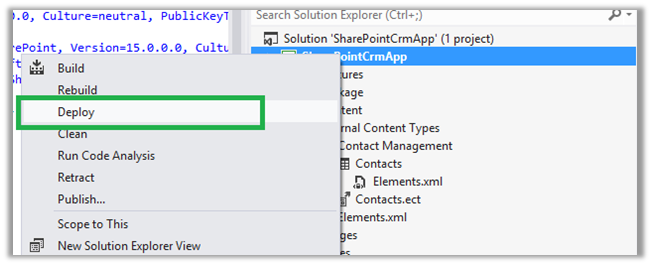


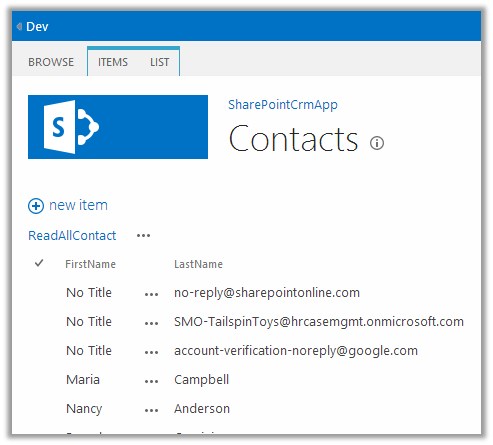
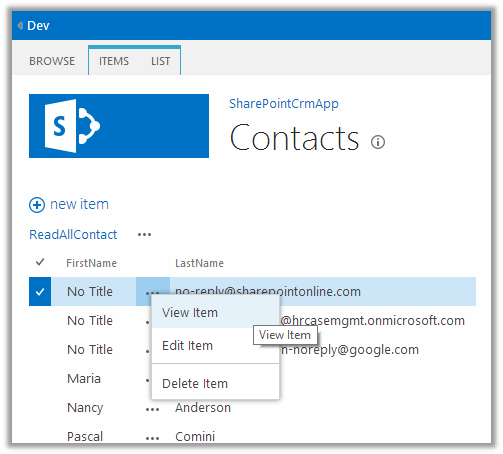
Hope it helps.

Hi,
I got below error when I was trying to create a new organization named dev. Dev is one the reserved names which cannot be used.
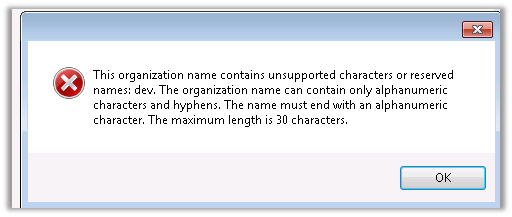
There is a table named ReservedNames in MSCRM_CONFIG database that lists all the reserved names.
The helpful post
http://www.mscrmking.com/2012/04/list-the-reserved-word/
Hope it helps.

Hi,
I was struggling hard to hide the Activities and Closed Activities from the form’s left navigation pane. Then came across the post which explained how to achieve the same. Actually in System Entity’s Form we can remove those links using Form Editor, however we cannot do the same for the custom entity’s form. There we can make use of Xrm.Page.ui.navigation class to hide them.
Check out the helpful post
Bye.

 Nishant Rana's Weblog