We were getting this error in one of our pages in SharePoint.

Just verify the Content Link it might not be pointing to correct url in the Content Editor Web Part.

Hope it helps..

We were getting this error in one of our pages in SharePoint.
Just verify the Content Link it might not be pointing to correct url in the Content Editor Web Part.
Hope it helps..

I spent last week or so discovering things on CRM 2013 tablet application and to be honest, it is pretty good. There are limitations but it is a good start for Dynamics CRM in tab and mobile market with having an out of box app.
Here are the series of blogs which pretty much sum all I could find on CRM 2013 Tablet application configuration, what can be done what cannot be done etc. For installation it is available in Google store for Android tabs, Windows store for Windows tabs and Apple store for IPAD tabs.
· Want to know how to configure multi entity search for CRM 2013 App. Here you go: Click here
· Want to know how to reconfigure IPAD app and options: Reconfigure vs Sign out for CRM 2013 App. Here you go: Click here
· Want to know Security Privileges required to access CRM 2013…
View original post 50 more words

Hi,
Was looking into how the business hours works in SLA.
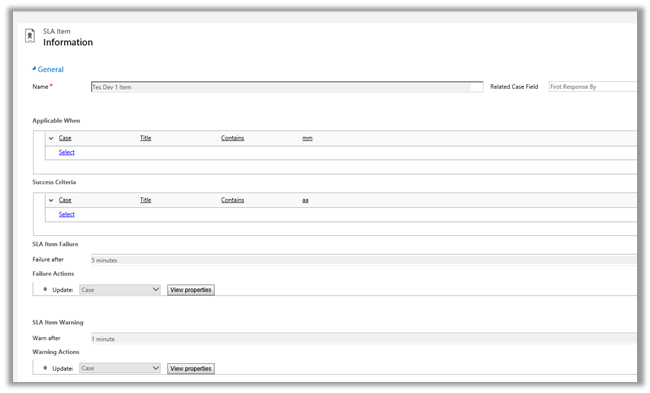
For this we a created new SLA record on CreatedOn field and which will update one of the fields on warning after one minute and some other field on failure after waiting for 5 minute.
And Applicable When -> when the Title field of Case contains “mm” text in it.
Following was the schedule
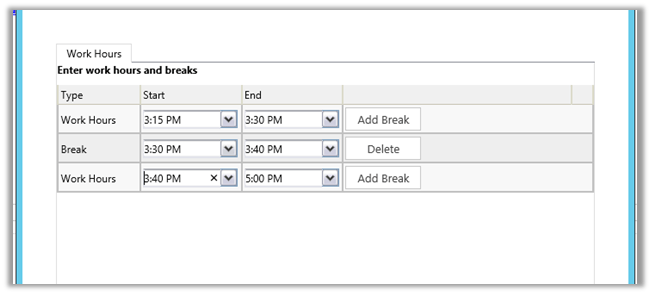
We created case record that satisfies the above condition at 3:28 P.M.
It updated one field on warning after one minute and then on 3:30 it went into wait condition and then resumed at 3:40 and showed failure at 3:43 as expected (i.e. total 5 minutes).
So it did consider the Break specified and on resuming ran for the remaining 3 minutes.
Hope it helps..

Happy to reach this milestone today – (24 September 2014)


CRM 2013 Service Pack 1 has introduced Enterprise Case Management functionalities, which includes new service entities such as “Entitlement” and “SLA”, and that lovely time control on case forms.
How do I put everything together?
View original post 661 more words


 Nishant Rana's Weblog