Fixed – An unrecoverable error has occurred. Please contact your system administrator error while uploading the profile picture in SharePoint 2013


Hi ,

got the below error while trying to upload profile picture for the user.

The reason was because no My Site was configured.

http://thuansoldier.net/?p=2326

Creating a My Site site collection and specifying it as My Site Host location fixed the issue.

Profile picture getting updated.

Hope it helps..

Fixed – “There was a problem retrieving data for this field. Updating values in this field is disabled temporarily. You can still update values in the other fields” error in User Profile Service application in SharePoint 2013


Got this error while trying to edit user profile

There was no Managed Metadata Service Application configured.

http://social.technet.microsoft.com/wiki/contents/articles/25537.there-was-a-problem-retrieving-data-for-this-field-updating-values-in-the-field-is-disabled-temporarily-you-can-still-update-values-in-other-fields.aspx

Configuring it as mentioned in the post fixed the issue

Hope it helps..

“The entity referenced by this process includes a currency value that does not exist in your organization. Select a different currency and try again.” Error in Workflow in CRM.


After importing one of the solution was getting the below error in one of the processes

The solution was to find out the Currency field and set it to the currency that existed in our organization.

Hope it helps..

Query execution time of 60 seconds exceeded the threshold of 10 seconds warning in CRM 2013.


Query execution time of 60 seconds exceeded the threshold of 10 seconds warning in CRM 2013.

We were getting the below warning in one of our test environment

On analyzing figured out that one of the plugin was using retrieve with ColumnSet(true) option i.e. retrieving all the columns of the entity which was not required in this case.

Fetching only the required columns fixed the warning.

The other option could have been indexing or increate the value for LongQueryThersholdInSeconds column in ServerSetingProperties table of MSCRM_Config.

Helpful posts

http://blog.edgewater.com/2013/01/07/microsoft-dynamics-crm-querying-data-using-late-binding-versus-early-binding/

http://www.dynamicscrmpros.com/mscrmplatform-warning-in-event-viewer-in-microsoft-dynamics-cr-event-id-17972/

Hope it helps..


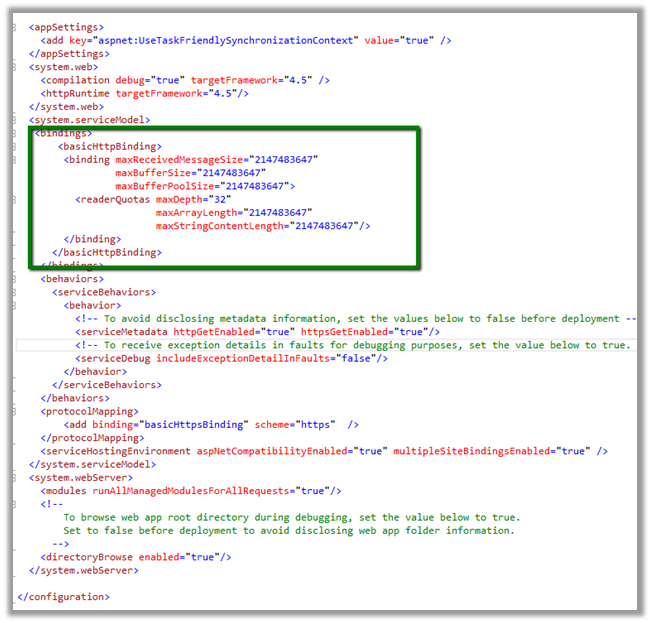
Fixed: The request message is too big. The server does not allow messages larger than 2097152 bytes while uploading attachment using CSOM in SharePoint 2013


Got below error while uploading document to SharePoint folder.

Following PowerShell script can be used to increase the limit.

$ws = [Microsoft.SharePoint.Administration.SPWebService]::ContentService
$ws.ClientRequestServiceSettings.MaxReceivedMessageSize = 5242880
$ws.ClientRequestServiceSettings.MaxParseMessageSize  = 5242880
$ws.Update()

https://msdn.microsoft.com/en-us/library/office/ff599489%28v=office.14%29.aspx

Hope it helps !

Configure Server Side Sync with Exchange Online for CRM Online


Open the System User and assign the license for Exchange Online


Open the system user record and click on Open Mailbox to open user’s mail box.


Set Server Profile as Microsoft Exchange Profile and Server Side Synchronization or Email Router option for Incoming and Outgoing email.


Followed by

Approve Email command.

Followed by

Test and Enable Mailbox command

On successful configuration all the warnings will be gone


Go to Settings à Email Configuration

Click on Email Server Profiles

Select and open the already existing Email Server Profile i.e. Microsoft Exchange Profile.


Open Mailboxes and select Test and Enable Mailboxes to test the mail boxes of the user.


Create an email activity and send.

Open Outlook to verify.

Hope it helps..