

When running marketing campaigns, UTM parameters help us understand where our leads are coming from. They help us track whether a lead came from Google Ads, Facebook campaigns, email campaigns, or some other source.
Recently while working with a Dynamics 365 Marketing form, we used a small JavaScript snippet to automatically capture UTM parameters from the URL and store them directly into marketing form fields.
 <script>
document.addEventListener("d365mkt-afterformload", function () {
    const params = new URLSearchParams(window.location.search);
      const mappings = [
        { param: "utm_source", name: "custom_utm_source" },
        { param: "utm_medium", name: "custom_utm_medium" },
        { param: "utm_campaign", name: "custom_utm_campaign" },
        { param: "utm_term", name: "custom_utm_term" },
        { param: "utm_content", name: "custom_utm_content" },
        { param: "gclid", name: "custom_gclid" },
        { param: "gclsrc", name: "custom_gclsrc" },
        { param: "fbclid", name: "custom_fbclid" }
    ];
    mappings.forEach(function (m) {
        const field = document.querySelector(`[name="${m.name}"]`);
        const value = params.get(m.param);

        if (field && value) {
            field.value = value;
        }
    });
});
</script>
Suppose the marketing form URL is opened like this:
https://contoso.com/form?utm_source=google&utm_medium=cpc
In the example below, the values from the URL are automatically populated into the form fields.
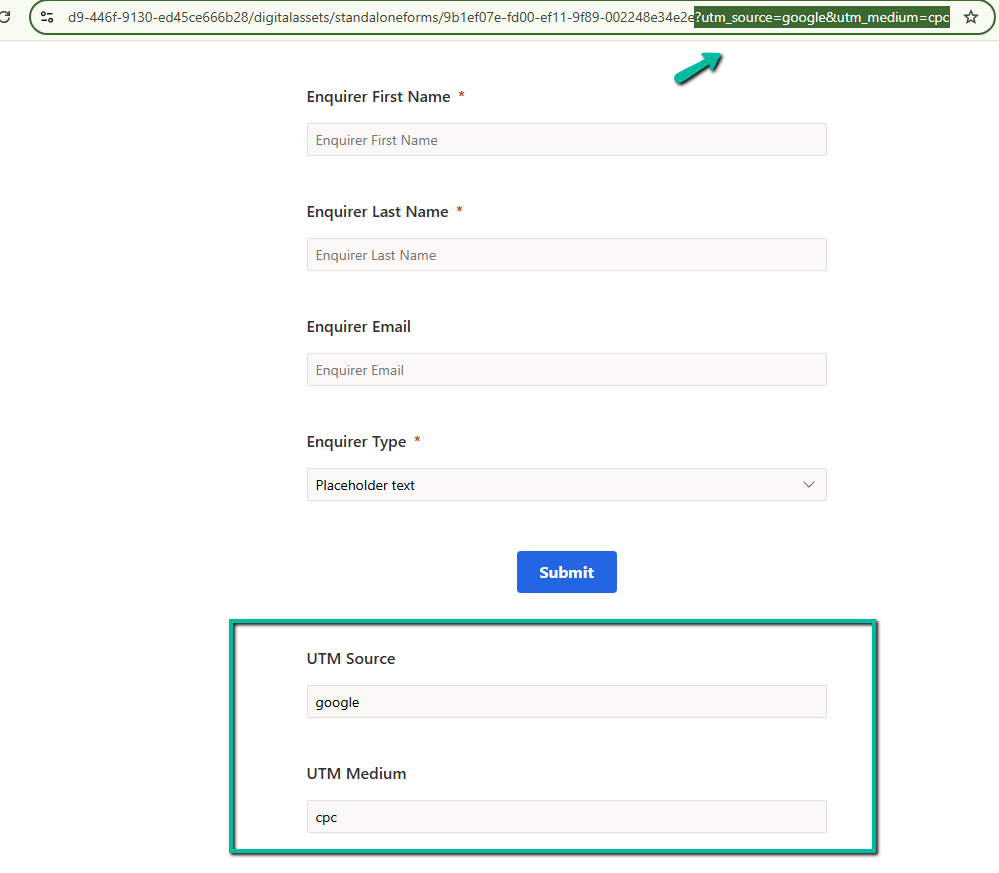
The script first waits for the Dynamics 365 Marketing form to fully load using the d365mkt-afterformload event. This is important because the fields may not yet exist when the page initially loads.
After that, the script reads the query string from the URL using URLSearchParams. So if the URL contains values like utm_source=google or utm_medium=cpc, those values become available to the script.
The mappings array is used to map URL parameters to marketing form fields. For example, utm_source maps to custom_utm_source and utm_medium maps to custom_utm_medium.
The script then loops through each mapping, finds the matching field inside the marketing form, and sets the value automatically.
Using this approach helps us capture campaign attribution data directly inside Dataverse during form submission
References –
https://paulinekolde.info/javascript-library-for-real-time-marketing-form-in-customer-insights
Extend Customer Insights – Journeys marketing forms using code
Hope it helps..
Discover more from Nishant Rana's Weblog
Subscribe to get the latest posts sent to your email.
Share It -


 Nishant Rana's Weblog
One thought on “Capture UTM Parameters in Dynamics 365 Marketing Forms Using JavaScript (Dynamics 365 Customer Insights)”