

Recently, we needed to remove the legacy Resco MobileCRM (Woodford) managed solution from a Dynamics 365 Field Service environment.
Although the uninstall initially appeared straightforward, when we attempted to uninstall the Woodford solution, Dynamics 365 displayed a list of dependencies that needed to be addressed before.
The dependencies included references from model-driven apps, site maps, security roles, workflows, plug-in steps and managed solutions.
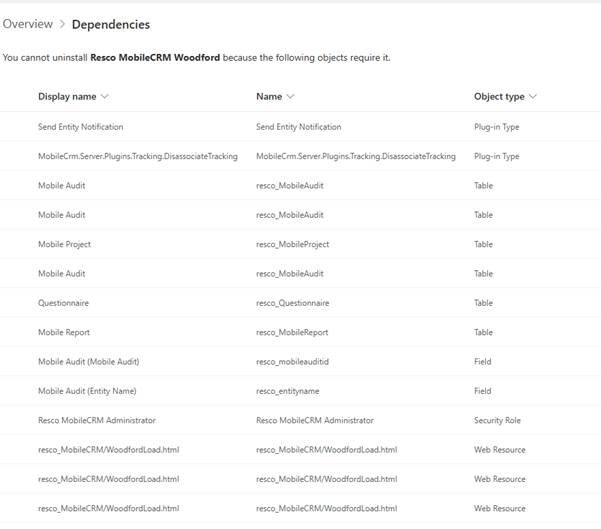
One of the first dependencies we identified was a set of Resco tables that were still included in a model-driven application. These included Mobile Project, Mobile Audit, Questionnaire, and Mobile Report. Removing these tables from the application eliminated the app-related dependencies.
The next set of dependencies came from site maps. The Mobile CRM navigation area was still present in multiple site maps and needed to be removed. Once the references were removed and the changes published, the related site map dependencies disappeared.
The dependency report also showed a dependency on the Resco MobileCRM Administrator security role. The role was being referenced from a form, and removing that reference resolved the dependency.
Another dependency involved the following plug-in step:
MobileCrm.Server.Plugins.Tracking.DisassociateTrackingDeleting the plug-in step removed the dependency.
We also found a legacy workflow named:
Push Notification - Schedule ChangeAfter stopping and deleting the workflow, the dependency was removed.
At this point, most of the dependencies had been addressed, but the uninstall was still blocked by process and flow dependencies associated with Resco entities.
After further investigation, we found that these dependencies were originating from legacy geofencing functionality. Uninstalling the Geofence Alerts managed solution removed the remaining process and flow dependencies.

At this point, the dependency report showed no remaining blockers.
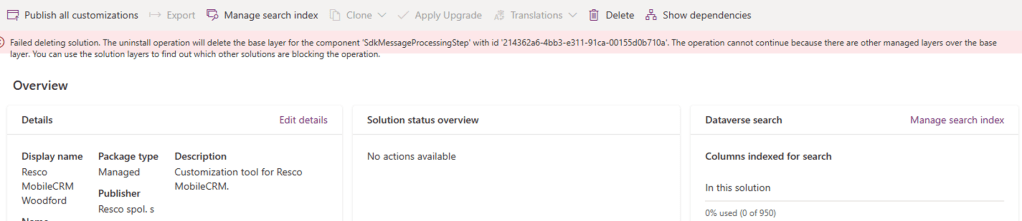
Despite the dependency report being clean, the uninstall continued to fail with the following error:
The uninstall operation will delete the base layer for the component ‘SdkMessageProcessingStep’. The operation cannot continue because there are other managed layers over the base layer.
The error referenced a plug-in step associated with a Resco entity. Since the dependency report was now clean, we investigated the component using the Solution Layers feature.
The layer information showed that Woodford was providing the base layer, while another managed solution named msdyn_FSMNotifications had installed a managed layer on top of that component.
This explained why Dataverse would not allow the Woodford base layer to be removed.
After uninstalling the dependent managed solution, the layer dependency was removed.

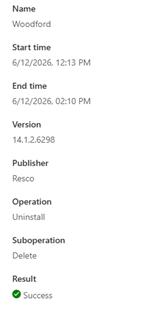
We then re-tried the Woodford uninstall, and this time it completed successfully.
One interesting observation was that the uninstall itself took approximately two hours to complete after it was started.
The key takeaway from this exercise is that a clean dependency report does not always mean a managed solution can be removed. If the uninstall fails with a managed layer error, reviewing the Solution Layers for the component referenced in the error message can quickly identify the actual blocking solution.
Hope it helps..
Discover more from Nishant Rana's Weblog
Subscribe to get the latest posts sent to your email.
Share It -


One thought on “How We Successfully Removed the Resco Woodford Managed Solution from Dynamics 365 Field Service”