

Sometimes when we are writing JavaScript in Dynamics 365, we need the exact schema name of a field’s control so that we can hide, show, or manipulate it properly. While the attribute’s schema name is straightforward, controls may have numbered names like gendercode1, gendercode2, etc., depending on how many times the field is placed on the form.
To quickly figure this out, we can run a small helper script directly in the browser console. This script highlights all instances of the field on the form, expands tabs/sections if they are collapsed, and shows the schema names against each control.
Here’s the script for the field gendercode: – specify the schema name and run it in console.
(function () {
    // configurable schema name
    var schemaName = "gendercode"; // change this as needed

    var formContext = Xrm.Page;
    var attr = formContext.getAttribute(schemaName);
    if (!attr) { alert(schemaName + " not found"); return; }

    // clear old highlights/badges
    document.querySelectorAll('.schema-badge-' + schemaName).forEach(function(b){ b.remove(); });
    document.querySelectorAll('.schema-highlight-' + schemaName).forEach(function(e){
        e.style.outline = '';
        e.style.backgroundColor = '';
        e.classList.remove('schema-highlight-' + schemaName);
    });

    var names = [];
    var tabsExpanded = {};

    // expand tabs/sections containing the control
    attr.controls.forEach(function (ctrl) {
        var name = ctrl.getName();
        names.push(name);

        try {
            var section = ctrl.getParent && ctrl.getParent();
            var tab = section && section.getParent && section.getParent();
            if (tab && typeof tab.setDisplayState === 'function') {
                var tabName = tab.getName ? tab.getName() : null;
                if (!tabsExpanded[tabName]) {
                    try { tab.setDisplayState('expanded'); } catch (e) {}
                    tabsExpanded[tabName] = true;
                }
            }
            if (section && typeof section.setVisible === 'function') {
                try { section.setVisible(true); } catch (e) {}
            }
        } catch (e) {}
    });

    // highlight after expansion
    setTimeout(function () {
        attr.controls.forEach(function (ctrl, index) {
            var name = ctrl.getName();
            var el = findElementForControl(name);

            if (el) {
                el.classList.add('schema-highlight-' + schemaName);
                el.style.outline = "2px solid orange";
                el.style.backgroundColor = "#fff8e1";

                var badge = document.createElement("div");
                badge.className = "schema-badge-" + schemaName;
                badge.textContent = schemaName + " " + (index + 1);
                badge.style.cssText = "font-size:11px;color:white;background:orange;padding:1px 6px;margin-top:4px;border-radius:3px;display:inline-block";
                (el.parentElement || el).appendChild(badge);
            } else {
                console.warn("Could not find DOM element for control:", name);
            }
        });

        alert("Controls for " + schemaName + ":\n" + names.map(function(n,i){ return (i+1)+". "+n; }).join("\n"));
    }, 500);

    // helper to find DOM element for a control
    function findElementForControl(name) {
        var selectors = [
            '[data-id="' + name + '"]',
            '[id="' + name + '"]',
            '[id*="' + name + '"]',
            '[name="' + name + '"]',
            '[name*="' + name + '"]',
            '[aria-label*="' + name + '"]',
            '[data-id*="' + name + '"]'
        ];
        for (var i = 0; i < selectors.length; i++) {
            var node = document.querySelector(selectors[i]);
            if (node) return node;
        }
        var lab = document.querySelector('label[for="' + name + '"], label[for*="' + name + '"]');
        if (lab) return lab.closest('div.field-wrapper, .control, .ms-crm-Form-Field-Container') || lab.parentElement;
        return null;
    }

    // clear function
    window.clearHighlights = function () {
        document.querySelectorAll('.schema-badge-' + schemaName).forEach(function(b){ b.remove(); });
        document.querySelectorAll('.schema-highlight-' + schemaName).forEach(function(e){
            e.style.outline = '';
            e.style.backgroundColor = '';
            e.classList.remove('schema-highlight-' + schemaName);
        });
        try {
            var a = Xrm.Page.getAttribute(schemaName);
            if (a && a.controls) a.controls.forEach(function(c){ try{ c.clearNotification && c.clearNotification(); }catch(e){} });
        } catch (e) {}
        console.log(schemaName + ' highlights cleared');
    };
})();
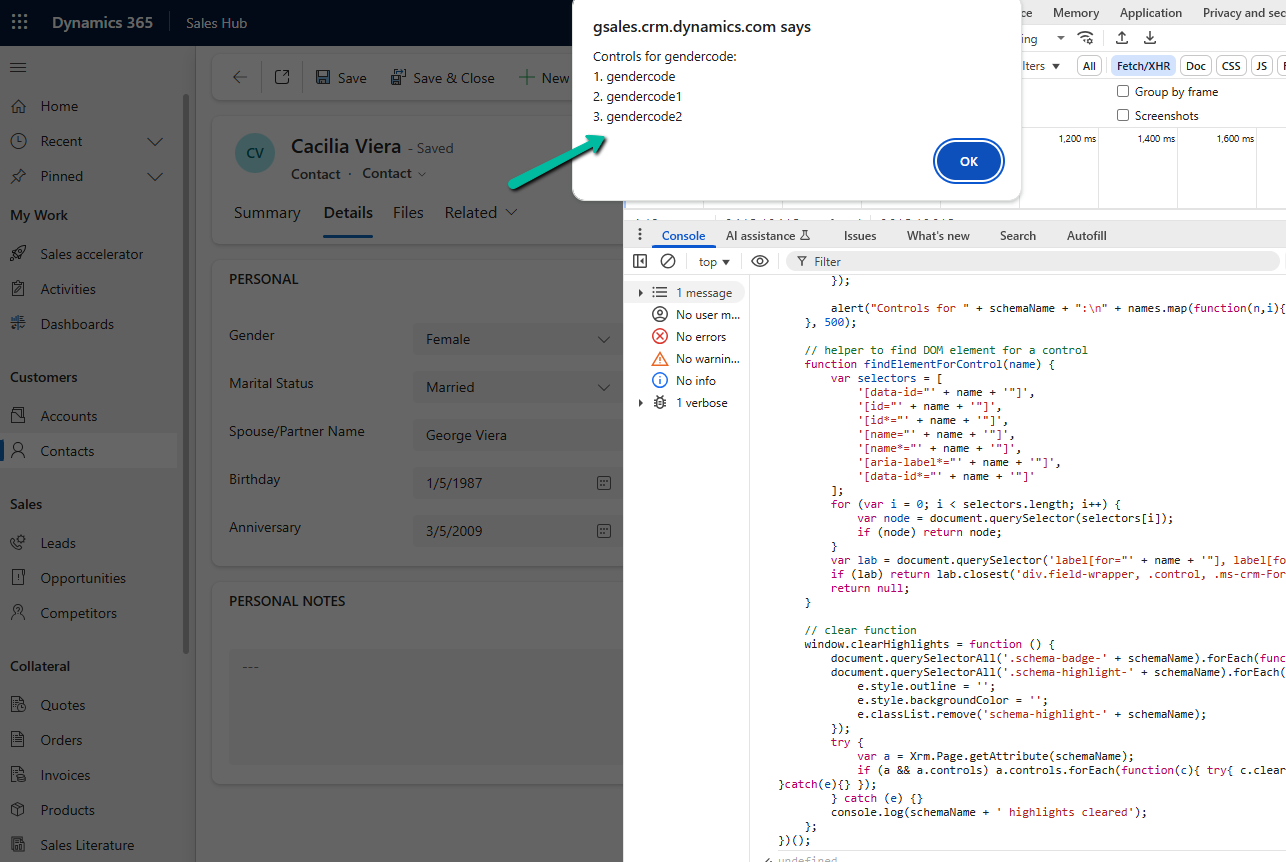

When we run this in the console, it: Highlights all instances of the field with an orange outline and light background. Adds a small badge like gendercode 1, gendercode 2 next to each control. Alerts and logs the schema names so we can directly use them in our scripts.
This makes it very easy for us to identify which control name we should be using in our JavaScript.
Hope it helps..
Discover more from Nishant Rana's Weblog
Subscribe to get the latest posts sent to your email.
Share It -


 Nishant Rana's Weblog