

In our Dataverse environment, we had a field named custom_sampledate configured as a DateOnly type with User Local behavior. At some point, we changed its behavior to Time Zone Independent, assuming it would prevent confusion across time zones.
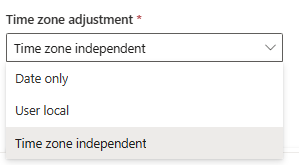
At first glance, everything seemed fine. But over time, users in time zones like New Zealand (NZ) started reporting an issue: for older records created before the change, the dates were now showing up as one day earlier than what they had originally entered.
This was because, when we changed the field’s behavior from User Local to Time Zone Independent, Dataverse stopped interpreting the date based on the user’s local time zone. Instead, it began treating the stored value exactly as-is, which caused trouble for values that were originally entered as User Local, especially from users in forward time zones like NZ.
Dataverse stores DateOnly fields as a datetime behind the scenes, with the time part set to 00:00:00.000. The behavior setting (User Local vs. Time Zone Independent) affects how this raw value is interpreted and displayed. Before the behavior was changed, NZ users (UTC+13/UTC+12) were entering dates into a User Local field. Dataverse automatically converted their local midnight time to UTC when storing it.
For example:
- A NZ user enters 2025-04-03
- Dataverse stores it as 2025-04-02 11:00:00 UTC
Later, when the field behavior was switched to Time Zone Independent, that same stored value was no longer adjusted for the user’s time zone. It got displayed as is as 2025-04-02 which was one day earlier than intended.
However, the new records entered after the change didn’t show the issue, because after the behavior was set to Time Zone Independent, any newly entered values were saved and displayed exactly as the user typed them—without conversion.

To correct this mismatch without losing data, we followed the below approach:
- Created a temporary DateOnly field named custom_sampledate_temp, set to Time Zone Independent behavior.
- Copied all values from the existing custom_sampledate field into custom_sampledate_temp.
- Deleted the original custom_sampledate field (after backups).
- Recreated custom_sampledate with the same schema name, but set it back to User Local behavior.
- Copied data back from the temp field into the new custom_sampledate field.
- Deleted the temp field after verification.
Also check for more information – https://temmyraharjo.wordpress.com/2024/05/18/dataverse-update-time-zone-adjustment-from-time-zone-independent-to-user-local-and-date-time-behavior/
Changing a DateOnly field from User Local to Time Zone Independent, might look harmless—but it can cause subtle issues, especially across global teams. We need to careful before we make this change, as apart from UI this could result changing the JavaScript, Cloud Flows and Plugins where we have used that field to reflect correct date.
Hope it helps..
Discover more from Nishant Rana's Weblog
Subscribe to get the latest posts sent to your email.
Share It -


 Nishant Rana's Weblog
One thought on “Fixing Date Shift Issue After Changing DateOnly Field from Time Zone Independent to User Local – Dataverse / Dynamics 365”