
Recently for one of our requirements we had to use the CDS/CRM Connection of KingswaySoft’s SSIS Integration Toolkit for Dynamics 365
Below are the steps to be followed –
Drag the Script Transformation component, specify any input columns and inputs / outputs as required.
In the Connection Managers add the connection to Dynamics 365
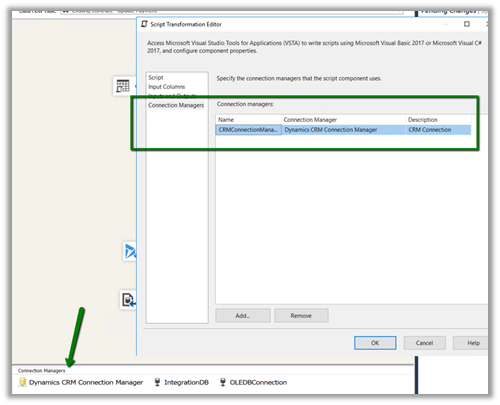
Click on Edit Script to open the Visual Studio.
Add references to below 3 assemblies. We need to search for the 2 KingswaySoft assemblies in the machine and then add them.

The sample code –
public override void Input0_ProcessInputRow(Input0Buffer Row)
{
var connMgr = this.Connections.CRMConnectionManager;
var connectionString = (string)connMgr.AcquireConnection(null);
var conn = new CrmConnection(connectionString);

var orgService = (IOrganizationService)conn.GetCrmService();

RetrieveRequest retRequest = new RetrieveRequest();
retRequest.ColumnSet = new ColumnSet();
retRequest.ColumnSet.AddColumn("statuscode");
retRequest.Target = new EntityReference("dxc_contract", "dxc_contractnumberinternal", Row.dxccontractnumberinternal);
var response = (RetrieveResponse)orgService.Execute(retRequest);

if (response.Entity != null)
{
// status is closed
if (((OptionSetValue)response.Entity.Attributes["statuscode"]).Value == 282210002)
{
Row.IsApprovedContract = "N";
}
else
{
Row.IsApprovedContract = "Y";
}
}
}
Get all the details here
Hope it helps..
Discover more from Nishant Rana's Weblog
Subscribe to get the latest posts sent to your email.
Share It -


 Nishant Rana's Weblog
4 thoughts on “Using CDS/CRM Connection Manager of KingswaySoft’s SSIS Dynamics 365 Integration toolkit in Script Component (SSIS)”