Integrating CRM 2011 and SharePoint 2013 using BCS (WCF Service – CRUD Operation)


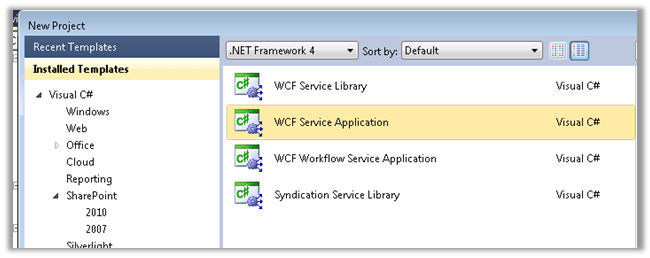
Create a new WCF Service Application in Visual Studio with .NET Framework version as 4.0 (since we will be using CRM 2011’s assembly that are in version 4.0).
Please go through this MSDN article first to get a clear understanding on the BCS Service

http://msdn.microsoft.com/en-us/library/office/ff953200(v=office.14).aspx

Define the Service Contract and the Date Contract in the following manner. Here we would be performing CRUD operation on Date of Birth and Last Name field of the Contact Entity.

Add references to the following assemblies
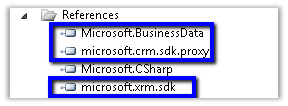
Microsoft.BusinessData can be found at

C:\Program Files\Common Files\Microsoft Shared\Web Server Extensions\15\ISAPI on the SharePoint Server.


[ServiceContract]
 public interface IService1
 {
 [OperationContract]
 IEnumerable<ContactEntity> ReadList();

[OperationContract]
 ContactEntity ReadItem(Guid contactId);

[OperationContract]
 ContactEntity Create(ContactEntity newContact);

[OperationContract]
 void Update(ContactEntity contact);

[OperationContract]
 void Delete(Guid contactId);
 }

 [DataContract]
 public class ContactEntity
 {
 [DataMember]
 public Guid ContactId { get; set; }

[DataMember]
 public DateTime? DateOfBirth { get; set; }

[DataMember]
 public string LastName { get; set; }
 }


Implement the Service Contract


public class Service1 : IService1
 {
 private readonly IOrganizationService _orgService = GetOrganizationService();

public ContactEntity ReadItem(Guid contactId)
 {
 try
 {
 var cols = new ColumnSet(new[] {"lastname", "birthdate"});
 ContactEntity contactRecord = null;
 Entity entity = _orgService.Retrieve("contact", contactId, cols);
 if (entity != null)
 {
 contactRecord = new ContactEntity();
 contactRecord.ContactId = contactId;
 if (entity.Contains("lastname"))
 {
 contactRecord.LastName = entity.Attributes["lastname"].ToString();
 }
 if (entity.Contains("birthdate"))
 {
 contactRecord.DateOfBirth = (DateTime) entity.Attributes["birthdate"];
 }
 }

return contactRecord;
 }
 catch (InvalidOperationException)
 {
 throw new ObjectNotFoundException(
 "Unable to read data for the conatct with ID = " +
 contactId.ToString() +
 ". The contact no longer exists.");
 }
 catch (Exception generalException)
 {
 throw new RuntimeException(
 "There was a problem reading contact data.",
 generalException);
 }
 }

public IEnumerable<ContactEntity> ReadList()
 {
 try
 {
 var queryExpression = new QueryExpression("contact");
 var conditionExpression = new ConditionExpression("statuscode", ConditionOperator.Equal, 1);
 queryExpression.ColumnSet = new ColumnSet(new[] {"contactid", "lastname", "birthdate"});
 queryExpression.Criteria.AddCondition(conditionExpression);

EntityCollection contactCollection = _orgService.RetrieveMultiple(queryExpression);
 var lstContactType = new List<ContactEntity>();
 ContactEntity contactRecord;
 foreach (Entity entity in contactCollection.Entities)
 {
 contactRecord = new ContactEntity();
 contactRecord.ContactId = new Guid(entity.Attributes["contactid"].ToString());
 if (entity.Contains("lastname"))
 {
 contactRecord.LastName = entity.Attributes["lastname"].ToString();
 }
 if (entity.Contains("birthdate"))
 {
 contactRecord.DateOfBirth = (DateTime) entity.Attributes["birthdate"];
 }

lstContactType.Add(contactRecord);
 }

return lstContactType;
 }
 catch (Exception generalException)
 {
 throw new RuntimeException(
 "There was a problem reading contact data.",
 generalException);
 }
 }

public ContactEntity Create(ContactEntity newContact)
 {
 try
 {
 var returnContact = new ContactEntity();
 returnContact.ContactId = Guid.NewGuid();
 returnContact.DateOfBirth = newContact.DateOfBirth;
 returnContact.LastName = newContact.LastName;

var contactRecord = new Entity();
 contactRecord.LogicalName = "contact";
 contactRecord.Attributes["lastname"] = returnContact.LastName;
 contactRecord.Attributes["contactid"] = returnContact.ContactId;
 contactRecord.Attributes["birthdate"] = returnContact.DateOfBirth;
 newContact.ContactId = _orgService.Create(contactRecord);

return returnContact;
 }
 catch (Exception generalException)
 {
 throw new RuntimeException(
 "There was a problem creating a new contact.",
 generalException);
 }
 }


 public void Update(ContactEntity updateContact)
 {
 try
 {
 var contactRecord = new Entity();
 contactRecord.LogicalName = "contact";
 contactRecord.Attributes["lastname"] = updateContact.LastName;
 contactRecord.Attributes["contactid"] = updateContact.ContactId;
 contactRecord.Attributes["birthdate"] = updateContact.DateOfBirth;

_orgService.Update(contactRecord);
 }
 catch (InvalidOperationException)
 {
 throw new ObjectNotFoundException(
 "Unable to update the contact with ID = " +
 updateContact.ContactId.ToString() +
 ". The contact no longer exists.");
 }
 catch (Exception generalException)
 {
 throw new RuntimeException(
 "There was a problem updating the lawyer with ID = " +
 updateContact.ContactId.ToString() + ".", generalException);
 }
 }

public void Delete(Guid contactId)
 {
 try
 {
 _orgService.Delete("contact", contactId);
 }
 catch (InvalidOperationException)
 {
 throw new ObjectNotFoundException(
 "Unable to delete the contact with ID = " +
 contactId.ToString() +
 ". The contact no longer exists.");
 }
 catch (Exception generalException)
 {
 throw new RuntimeException(
 "There was a problem lawyer the customer with ID = " +
 contactId.ToString() + ".", generalException);
 }
 }

public static IOrganizationService GetOrganizationService()
 {
 var organizationUri = new Uri("http://crmserver/orgname/XRMServices/2011/Organization.svc");
 Uri homeRealmUri = null;
 var credentials = new ClientCredentials();
 credentials.Windows.ClientCredential = new NetworkCredential("username", "password", "domain");
 var orgProxy = new OrganizationServiceProxy(organizationUri, homeRealmUri, credentials, null);
 IOrganizationService _service = orgProxy;
 return _service;
 }


Host the Service in the IIS.

Open SharePoint Designer 2013 and connect to the site where we want to create an external content type based on our WCF Service.

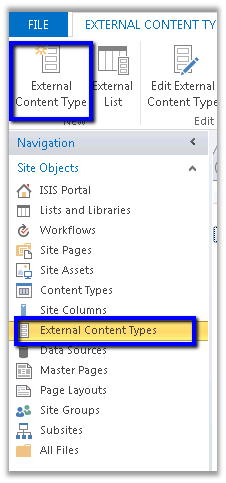
Create a new External Content Type
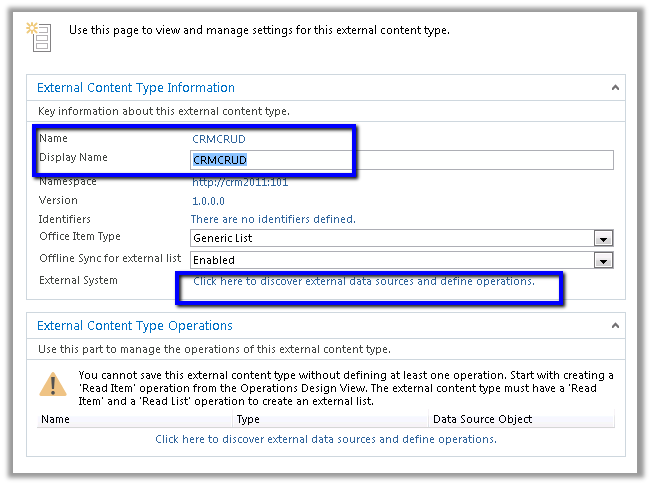
Specify name for the content type and click on the link for defining operations
Click on Add Connection and specify WCF Service as the connection type
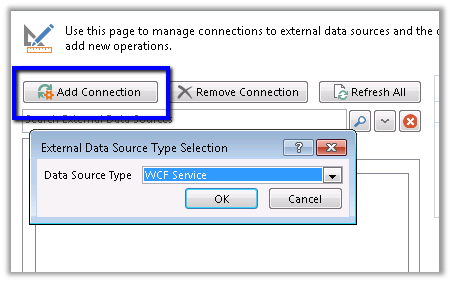
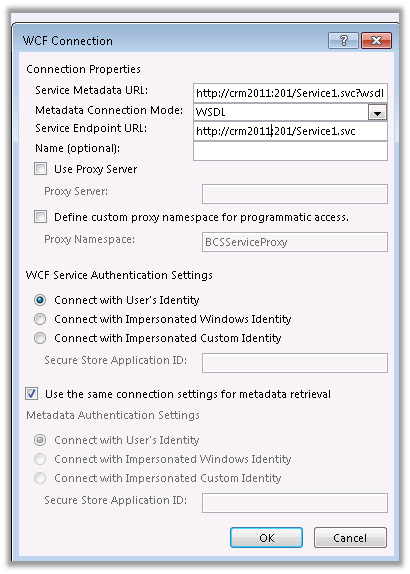
Specify the url of the WCF service
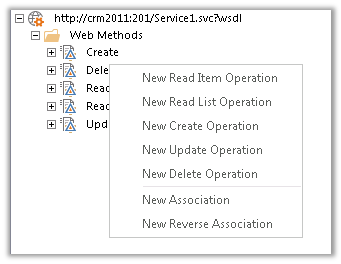
For each of the Web Methods, specify the corresponding operation.
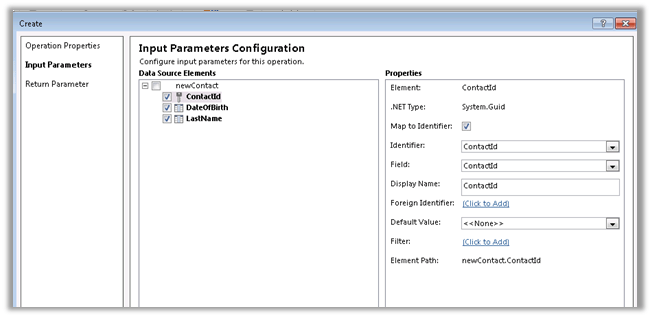
For each of the operations define ContactId as Identifier
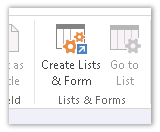
Once defined, select Create Lists and Form button
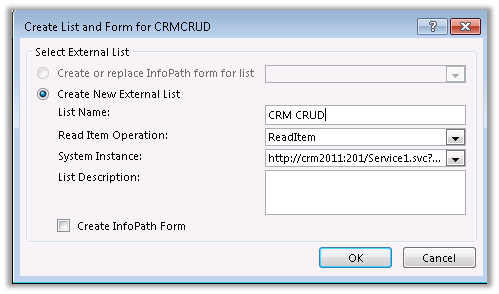
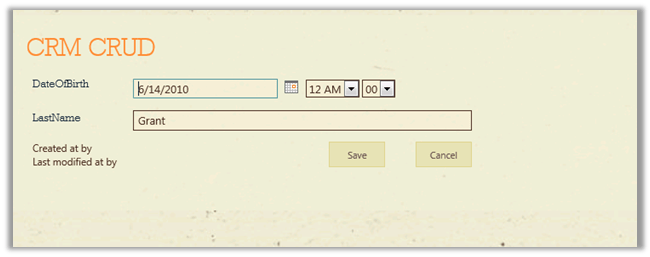
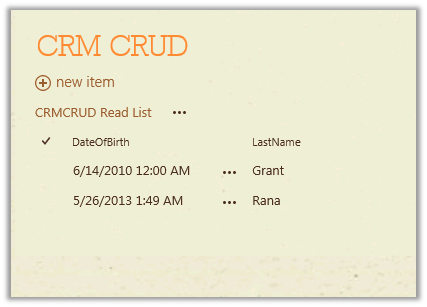
Open the SharePoint site and open the list created
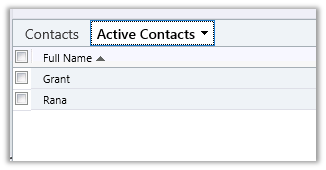
Corresponding contact records in CRM
Hope it helps.

Fixed: The form cannot be rendered. This may be due to a misconfiguration of the Microsoft SharePoint Server State Service error for InfoPath in SharePoint 2013.


Hi,

We had configured the InfoPath Form Services in our SharePoint server.

Now after creating and publishing an InfoPath form to a form library, while creating a new document we got the below error

To fix this, here first we need to check if the state service is up and running

Central Administration à Application Management à Manage Service Applications

The state service was up and running in our case.

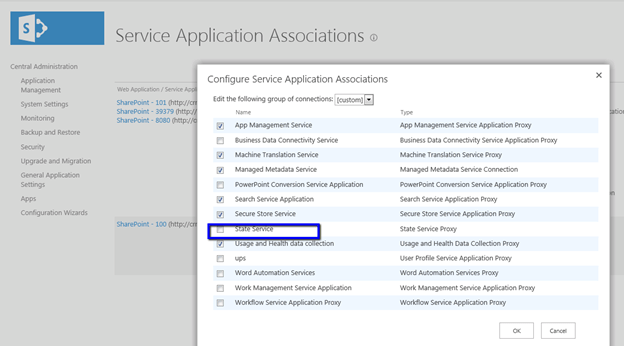
So the next thing to look out for was the Service Application Association i.e. whether our current web application is associated with the service or not.

Central Administration à Application Management à Configure Service Applications Associations

As it was in our case it wasn’t associated. After configuring the same, the error got resolved.

Hope it helps.
Fixed: Application Server Administration job failed for service instance Microsoft.Office.Server.Search.Administration.SearchServiceInstance error in SharePoint 2013


Hi,

We were getting the below error in the event log every time we were clicking on Populate Containers button while creating a new synchronization connection for User Profiles.


Error :

Application Server Administration job failed for service instance Microsoft.Office.Server.Search.Administration.SearchServiceInstance (90579710-4ed5-47e9-a3d8-de997f96262e).

Reason: An update conflict has occurred, and you must re-try this action. The object SearchDataAccessServiceInstance was updated by CONTOSO\administrator, in the OWSTIMER (2720) process, on machine CRM2011. View the tracing log for more information about the conflict.

Stopping the Timer Service, clearing the Configuration Cache and restarting the Timer Service helped us to fix the issue.

http://www.social-point.com/sharepoint-2010-event-id-6482-application-server-administration-job-failed-for-service-instance-microsoft-office-server-search-administration-searchserviceinstance

Bye.

Advertisements

Fixed: The given key was not present in the dictionary error in Register Managed Account in SharePoint 2013


Hi,

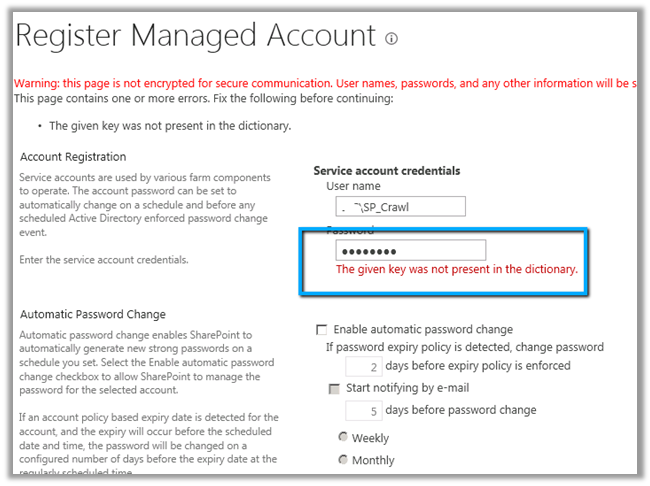
While trying to register a new managed account in SharePoint 2013 through Central Administration we were getting the below error.

To resolve this issue, we need to open the Active Directory Users and Computers console and select the account, right click Properties, select Authenticated Users in Security tab and
give Allow Permissions for Read Account Restrictions.

Hope it helps.
Fixed: Failed to create the configuration database. An exception of type System.Security.AccessControl.PrivilegeNotHeldException was thrown. Additional exception information: The process does not possess the ‘SeSecurityPrivilege’ privilege which is required for this operation.


Hi,

Got the below error while running the Configuration Wizard in SharePoint 2013.

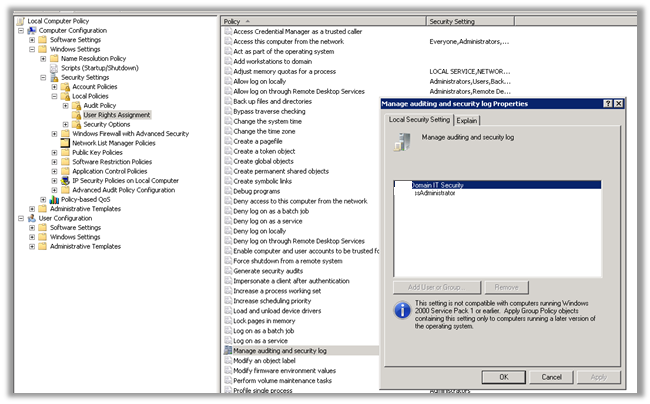
Adding the user under which the installation was running to the Manage Security and Audit Log resolved the issue for us.

gpedit.msc àcomputer configurationàWindows Settings àSecurity Settings àUser Rights Assignment

Hope it helps.
Integrating CRM 2011 Online and SharePoint 2013 Online using BCS oData Proxy


Here we will be creating an ASP.NET Data Service and host it in azure. This ASP.NET Data Service will be used to generate BCS Model in SharePoint 2013 online. The service will allow basic CRUD operation on Contact record in CRM 2011 from SharePoint 2013 online.

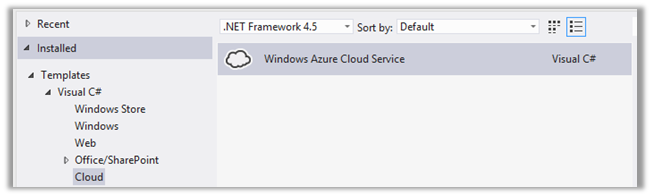
  • Create a new Windows Azure Cloud Service project in VS 2012

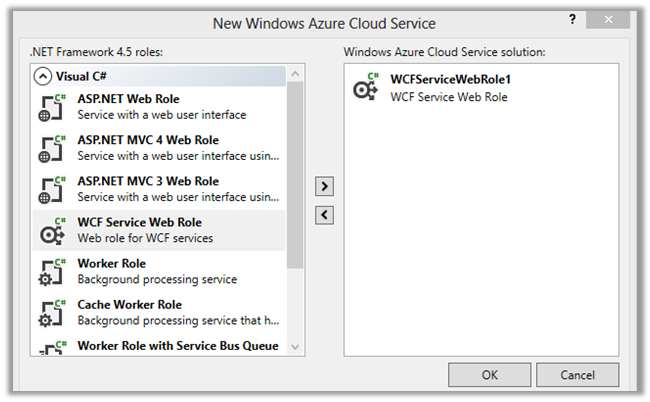
  • Select WCF Service Web Role

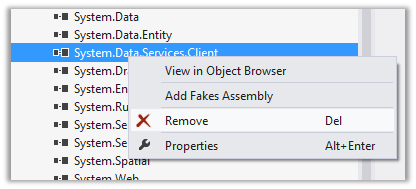
  • Remove the System.Data.Services.Client.dll from the References

  • Add a new item ASP.NET Data Service to the WCFServiceWebRole1 project


  • Add a new class to the project

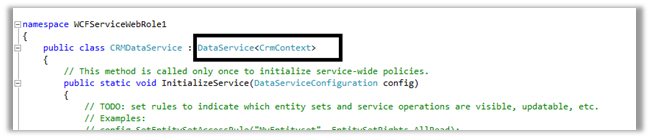
  • Specify the class name in the ASP.NET Data Service class

  • Add references to the following dll’s
  1. Microsoft.crm.sdk.proxy
  2. Microsoft.xrm.sdk
  3. Microsoft.IdentityModel
  • Set Copy Local as true for the Micrsoft.IdentityModel

  • Source Code for CrmContext.cs, for CRUD Operation (we need to implement IUpdatable Interface for CRUD)
</pre>
using Microsoft.Xrm.Sdk;
using Microsoft.Xrm.Sdk.Client;
using Microsoft.Xrm.Sdk.Query;
using System;
using System.Collections.Generic;
using System.Configuration;
using System.Data.Services;
using System.Data.Services.Common;
using System.Linq;
using System.Reflection;
using System.Runtime.Serialization;
using System.Web;
namespace WCFServiceWebRole1
{
 [DataServiceKey("ContactId")]
 [Serializable]
 public class Contact
 {
 [DataMemberAttribute()]
 public Guid ContactId
 {
 get;
 set;
 }
 [DataMemberAttribute()]
 public string FirstName
 {
 get;
 set;
 }
 [DataMemberAttribute()]
 public string LastName
 {
 get;
 set;
 }
 }

public class CrmContext : IUpdatable
 {
 public static List<Contact> lstContacts;
 public static OrganizationServiceProxy orgProxy = GetOrganizationService();

public static List<Contact> GetContacts()
 {
 List<Contact> lstContact = new List<Contact>();
 QueryExpression queryExpression = new QueryExpression("contact");
 ConditionExpression conditionExpression = new ConditionExpression("statuscode", ConditionOperator.Equal, 1);
 queryExpression.ColumnSet = new ColumnSet(new String[] { "contactid", "firstname", "lastname" });
 EntityCollection contactCollection = orgProxy.RetrieveMultiple(queryExpression);

Contact contactRecord;
 foreach (Entity entity in contactCollection.Entities)
 {
 contactRecord = new Contact();
 contactRecord.ContactId = (Guid)entity.Attributes["contactid"];
 if (entity.Contains("firstname"))
 {
 contactRecord.FirstName = entity.Attributes["firstname"].ToString();
 }
 if (entity.Contains("lastname"))
 {
 contactRecord.LastName = entity.Attributes["lastname"].ToString();
 }

lstContact.Add(contactRecord);
 }

return lstContact;
 }

public IQueryable<Contact> Contacts
 {
 get
 {
 return lstContacts.AsQueryable();
 }
 }

Contact currentEntry;
 bool NewEntry = false;
 bool Delete = false;

#region implemented methods
 object IUpdatable.CreateResource(string containerName, string fullTypeName)
 {
 var objType = Type.GetType(fullTypeName);
 var resourceToAdd = Activator.CreateInstance(objType);
 lstContacts.Add((Contact)resourceToAdd);
 currentEntry = (Contact)resourceToAdd;
 NewEntry = true;
 return resourceToAdd;
 }

void IUpdatable.DeleteResource(object targetResource)
 {
 orgProxy.Delete("contact", ((Contact)targetResource).ContactId);
 lstContacts.Remove(targetResource as Contact);
 Delete = true;
 }

object IUpdatable.GetResource(IQueryable query, string fullTypeName)
 {
 object result = null;
 var enumerator = query.GetEnumerator();
 while (enumerator.MoveNext())
 {
 if (enumerator.Current != null)
 {
 result = enumerator.Current;
 break;
 }
 }
 if (fullTypeName != null && !fullTypeName.Equals(result.GetType().FullName))
 {
 throw new DataServiceException();
 }

return result;
 }

object IUpdatable.GetValue(object targetResource, string propertyName)
 {
 return targetResource.GetType().GetProperty(propertyName).GetValue(targetResource, null);

}

object IUpdatable.ResolveResource(object resource)
 {
 return resource;
 }

void IUpdatable.SaveChanges()
 {
 if (!Delete)
 {
 if (!NewEntry)
 {
 Entity contactNewRecord = new Entity();
 contactNewRecord.LogicalName = "contact";
 contactNewRecord.Attributes["contactid"] = currentEntry.ContactId;
 contactNewRecord.Attributes["firstname"] = currentEntry.FirstName;
 contactNewRecord.Attributes["lastname"] = currentEntry.LastName;
 orgProxy.Update(contactNewRecord);
 }
 else if (NewEntry)
 {
 Entity contactUpdateRecord = new Entity();
 contactUpdateRecord.LogicalName = "contact";
 contactUpdateRecord.Attributes["contactid"] = currentEntry.ContactId;
 contactUpdateRecord.Attributes["firstname"] = currentEntry.FirstName;
 contactUpdateRecord.Attributes["lastname"] = currentEntry.LastName;
 orgProxy.Create(contactUpdateRecord);
 }
 }

}

void IUpdatable.SetValue(object targetResource, string propertyName, object propertyValue)
 {
 Type TargetType = targetResource.GetType();
 PropertyInfo property = TargetType.GetProperty(propertyName);
 property.SetValue(targetResource, propertyValue, null);
 currentEntry = targetResource as Contact;
 }
 #endregion

#region not implemented methods

void IUpdatable.RemoveReferenceFromCollection(object targetResource, string propertyName, object resourceToBeRemoved)
 {
 throw new NotImplementedException();
 }

void IUpdatable.AddReferenceToCollection(object targetResource, string propertyName, object resourceToBeAdded)
 {
 throw new NotImplementedException();
 }

void IUpdatable.ClearChanges()
 {
 throw new NotImplementedException();
 }
 object IUpdatable.ResetResource(object resource)
 {
 return resource;
 }
 void IUpdatable.SetReference(object targetResource, string propertyName, object propertyValue)
 {
 throw new NotImplementedException();
 }
 #endregion
 public static OrganizationServiceProxy GetOrganizationService()
 {

 IServiceManagement<IOrganizationService> orgServiceManagement =
 ServiceConfigurationFactory.CreateManagement<IOrganizationService>(new Uri(ConfigurationManager.AppSettings["OrganizationService"]));
 AuthenticationCredentials authCredentials = new AuthenticationCredentials();
 authCredentials.ClientCredentials.UserName.UserName = ConfigurationManager.AppSettings["UserName"];
 authCredentials.ClientCredentials.UserName.Password = ConfigurationManager.AppSettings["Password"];
 AuthenticationCredentials tokenCredentials = orgServiceManagement.Authenticate(authCredentials);
 return new OrganizationServiceProxy(orgServiceManagement, tokenCredentials.SecurityTokenResponse);

}

}
}
<pre>

Source Code for CRMDataService.svc


using System;
using System.Collections.Generic;
using System.Data.Services;
using System.Data.Services.Common;
using System.Linq;
using System.ServiceModel.Web;
using System.Web;

namespace WCFServiceWebRole1
{
 public class CrmContactService : DataService<CrmContext>
 {
 // This method is called only once to initialize service-wide policies.
 public static void InitializeService(DataServiceConfiguration config)
 {
 config.SetEntitySetAccessRule("*", EntitySetRights.All);
 config.SetServiceOperationAccessRule("*", ServiceOperationRights.All);
 config.DataServiceBehavior.MaxProtocolVersion = DataServiceProtocolVersion.V3;
 }

protected override CrmContext CreateDataSource()
 {
 CrmContext.lstContacts = CrmContext.GetContacts();
 return base.CreateDataSource();
 }
 }
}

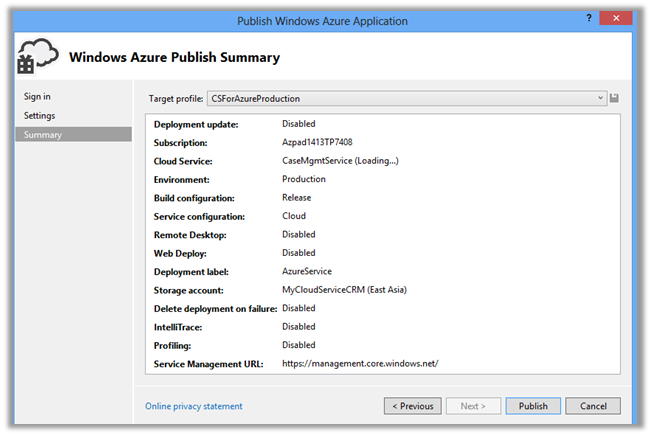
  • Build and Publish the service to Azure

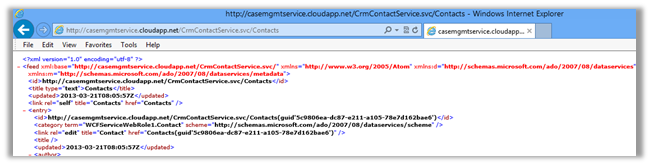
  • Test the service in browser

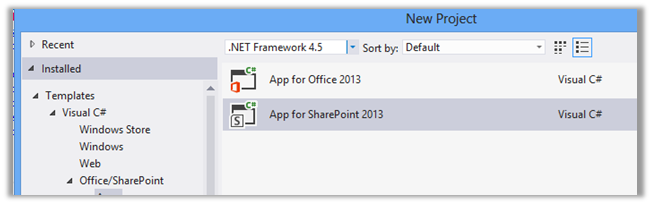
  • Create a new SharePoint App project in Visual Studio

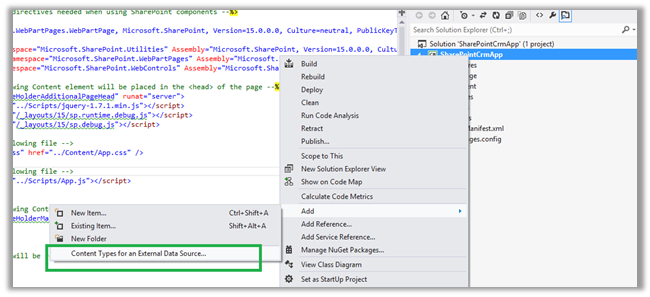
  • Right click the App Project and select the option “Content Types for an External Data Source”

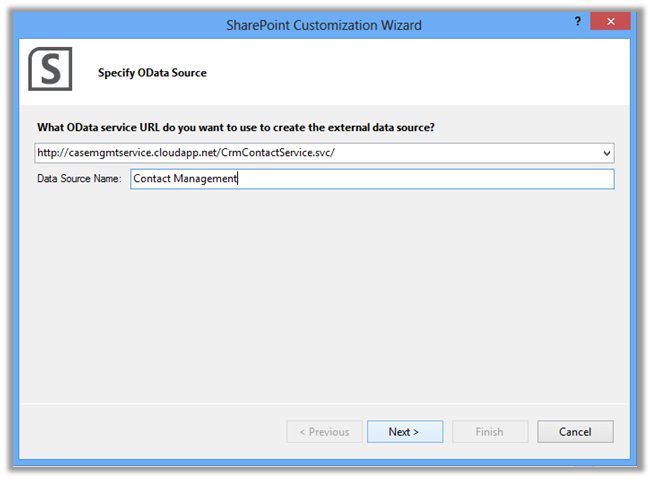
  • Specify the URL for the WCF Data Service and give a Data Source Name and select Next

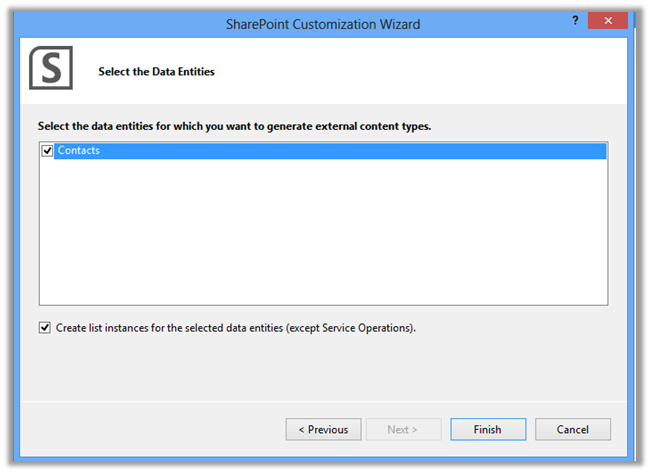
  • Select the Contacts data entity

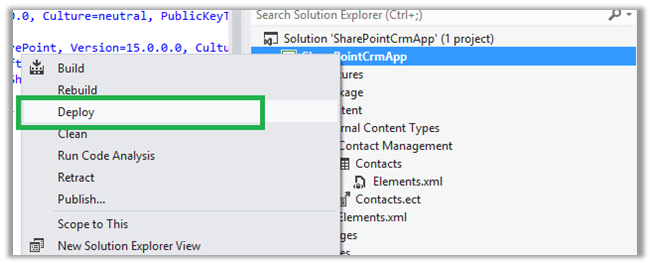
  • Deploy the app

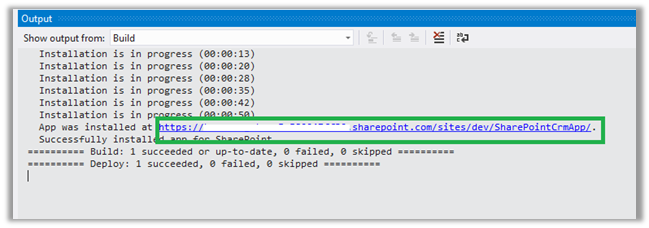
  • Get the URL where the app is installed

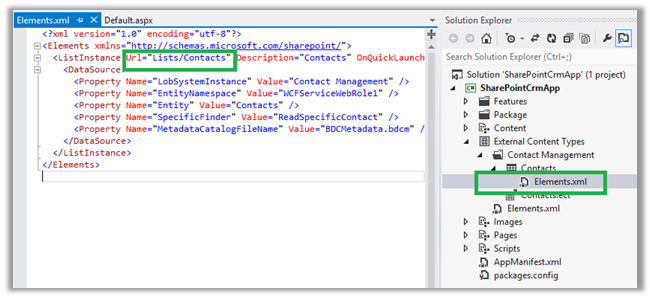
  • Append the External List path to the URL

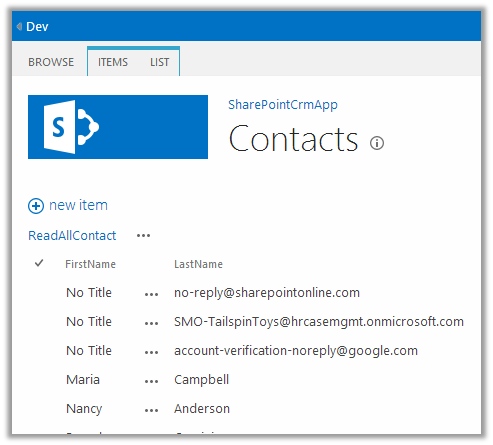
  • The Contact records will be displayed in the list in SharePoint.

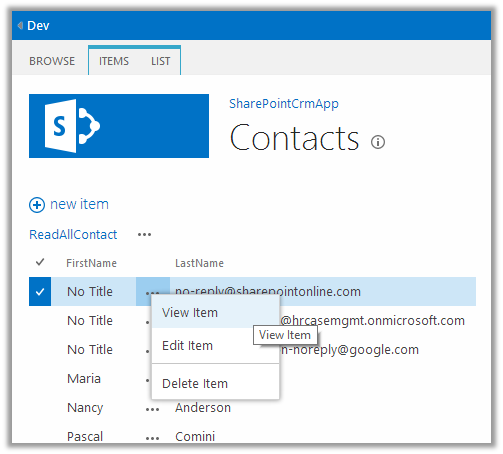
  • The list item also support update and delete operation

Hope it helps.