Use TryGetList to check if a list exist in SharePoint (SharePoint Object Model)


Hi,

We were getting the following error that “list doesn’t exist in the site” because the user was not having read permission on that list.

The code we were using was

SPList myList= spWeb.Lists[“mylist”];

A better approach would be

SPList myList = spWeb.Lists.TryGetList(“myList”);

If(myList != null )

// …

Bye ..

Fixed – Error creating web application in SharePoint 2013.


Hi,

We were facing issues while creating a new web application through central administration. The user was the farm administrator.

The way we got it fixed was by increasing the set the values for the properties in the Central Admin Sites’ App Pool

Followed by an IISRESET

Hope it helps ..

Using clientidmode property to get the id of the control in JavaScript in Visual Web Part


Hi,

In a Visual Web Part we were saving few values in a hidden input field and were retrieving it in the jScript. However the issue we were facing was the id of the control kept changing.

http://therightstuff.de/2006/02/14/Accessing-Controls-In-SharePoint-Web-Parts-Using-JavaScript-On-The-Client-Side.aspx

Here the clientidmode property came to rescue.

<input id=”hiddenobject” type=”hidden” clientidmode=”Static” runat=”server”/>

With the clientidmode set as static the id remains the same.

Hope it helps.

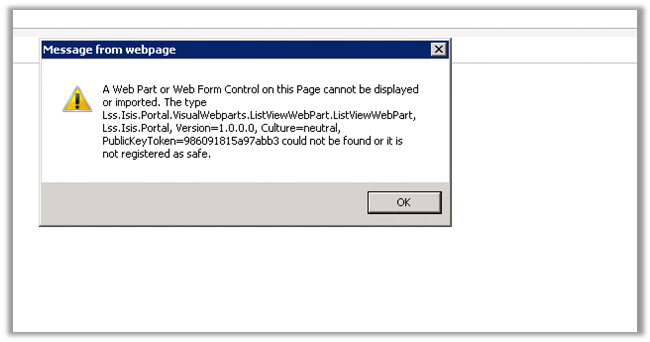
A web part or web form control on this Page cannot be displayed or imported. The type could not be found or it is registered as safe error in while deploying visual web part in SharePoint 2013.


Got this error while adding web part to one of the pages in SharePoint. It was all working fine earlier.


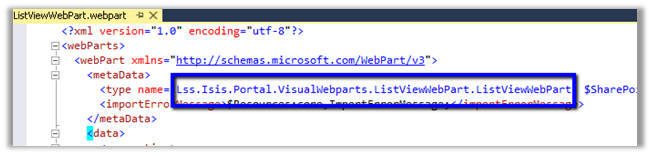
After much struggle, realized that the LiveVewWebPart.webpart had the incorrect namespace specified.

Correcting it resolved the issue.

The request for security token could not be satisfied because authentication failed error in CRM while developing Visual Web Part in SharePoint 2013.


Hi,

We recently developed a Visual Web Part which was using OrganizationService to interact with CRM.

We were initially using Network Credentials for OrganizationService and were setting appropriate username, password and domain. Later we changed it to Default Credentials and set the AppPool identity of the SharePoint portal’s app pool to a CRM User with appropriate access. It was then we started getting this error.

The reason was SharePoint web configuration settings has Identity Impersonation set as true.

If impersonation is set as true, then IIS uses the ‘NT AUTHORITY\IUSR’ but if disabled IIS will run under whatever account been set in the identity pool.

So one way of fixing the issue was setting impersonation as false.

Hope it helps.


PlatformNotSupportedException error while writing unit test for SharePoint 2013.


Hi,

Got the below error while writing unit test.

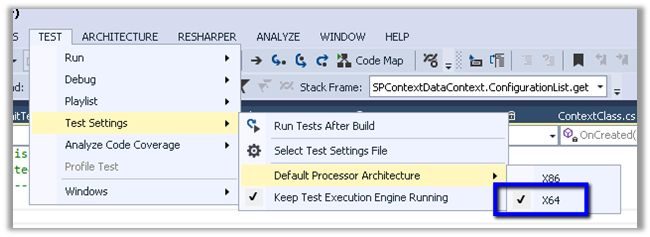
The solution was to set the Default Processor Architecture of the test project to X64.

Hope this helps.