Could not find stored procedure ‘sp_dboption’ while installing SharePoint 2010.


Hi,

Got the below error while running the configuration wizard for SharePoint 2010.

Installing Service Pack 1 for SharePoint 2010 resolved the issue.

http://www.microsoft.com/en-us/download/details.aspx?id=26623

Check out the following link

http://msdn.microsoft.com/en-us/library/hh231665(v=sql.110).aspx

http://simranjindal.wordpress.com/2011/09/09/getting-up-and-running-with-sql-server-denali-for-business-intelligence-crescent-and-powerpivot-in-ctp3-issues/

Bye.

Customizing the results of Search Core Results Web Part in SharePoint


Hi,

I was recently assigned a task to customize the Search Core Results Web Part’s search results to include few additional columns for SharePoint 2010 online.

Came across the following helpful links

http://andynoon.wordpress.com/2010/10/12/configuring-and-customising-sharepoint-2010-search/

http://www.sharepointsharon.com/2012/08/displaying-more-properties-in-search-results/

http://www.mindfiresolutions.com/How-to-customize-the-search-results-of-a-search-core-result-web-part-in-SharePoint–1096.php

http://sharepoint-videos.com/sp10-customize-search-results-using-xslt/

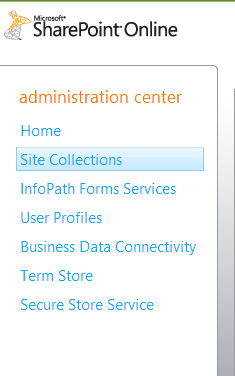
Here the first thing we need to do is to create a new Managed Property. After lot of struggle and searching came to know that this is not possible in case of SharePoint 2010 online.

SharePoint 2010 online administration center :-

However the good news was that creating managed property is now supported in case of SharePoint 2013 online.

Check out this article that explains all the differences in detail

http://nikspatel.wordpress.com/2012/10/14/whats-new-in-sharepoint-online-2013-administration-and-how-it-differs-from-spo-2010-version/

Hope it helps!

Adding a simple Silverlight application to SharePoint Online


Hi,

Say we have created a simple Silverlight 4 application that shows current date time.

Now we want to deploy it on the SharePoint Live. For this we can follow these simple steps:-

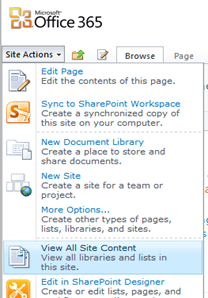
  1. Open the SharePoint site and click Site Actions |View All Site Content

  1. Click on Documents

  1. Select Upload Document

  1. Select and Upload the HelloWorld.XAP file. After uploading the document copy the url of the file. (e.g. http://my.sharepoint.com/TeamSite/Documents/HelloWorld.xap)

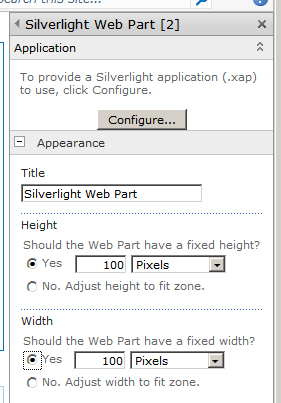
  1. Create a new web part page or open an existing web part page on the site. Click on “Add a Web Part” and select a “Silverlight Web Part” .

  1. Click on configure and specify the URL of the XAP file uploaded and select Apply.

  1. The page with the web part.

Hope it helps.

Creating a Custom Permission Levels with minimum rights for Managing Documents and Creating Folder in SharePoint 2010


In one of our project we were using out of box integration feature of SharePoint 2010 with CRM 2011.

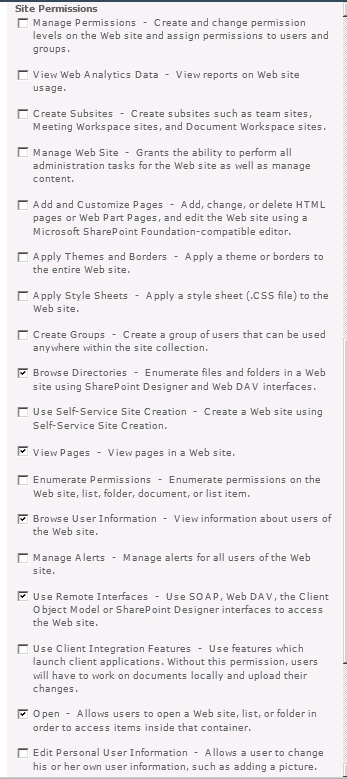
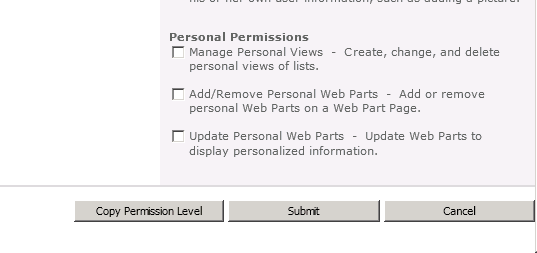
So we thought of creating a new permission levels that would allow users to manage the documents i.e. upload, delete etc. and create folder.

Below is the screenshot of the ribbon when user is inside a document library.

Below are the minimum sets of permissions we need to have

Hope it helps..

Helper Code for uploading a document to a SharePoint document library.


In one my projects we had a requirement to programmatically upload document to a SharePoint’s document library.

Below is the code we used to achieve that.


        // documentFileUrl would be :- http://server_name/doclibraryname/foldername (till doclibrary name or folder name to which doc
		// is to be uploaded
		// bytes :- byte array of the content
		// fileNameWithExtension would be :- test.docx
		// listName :- the display name of the list

	   public void UploadDoctofolder(string docfileurl, string fileNameWithExtension, byte[] bytes, string listName)
        {
            WebRequest request = WebRequest.Create(docfileurl + "/" + fileNameWithExtension);
            request.Credentials = this.credentials;
            request.Method = "PUT";

            byte[] buffer = new byte[1024];
            using (Stream stream = request.GetRequestStream())
            {
                using (MemoryStream ms = new MemoryStream(bytes))
                {
                    for (int i = ms.Read(buffer, 0, buffer.Length); i > 0; i = ms.Read(buffer, 0, buffer.Length))
                    {
                        stream.Write(buffer, 0, i);
                    }
                }
            }

            WebResponse response = request.GetResponse();
            response.Close();
        }

Hope it helps!

Helper Code to delete an existing document from a SharePoint document library.


In one my projects we had a requirement to programmatically delete document uploaded to SharePoint’s document library.

Below is the code we used to achieve that.


        // documentFullUrl would be :- http://server_name/sites/contact/volunteer/test.docx.
		// listName :- the display name of the list

		/// <summary>
        /// Deletes the existing document by URL.
        /// </summary>
        /// <param name="documentFullUrl">The document full URL.</param>
        /// <param name="listName">Name of the list.</param>
        public void DeleteExistingDocumentByUrl(string documentFullUrl, string listName)
        {
            //// Gets the file name with extension from the submitted document url
            string fileNameToBeDeleted = documentFullUrl.Substring(documentFullUrl.LastIndexOf("/") + 1);

            //// Removes the file name from url to get the folder name
            string folderUrl = documentFullUrl.Replace("/" + fileNameToBeDeleted, String.Empty);

            //// Get the file Id
            string fileId = this.GetListIdInSharePoint(listName, folderUrl, fileNameToBeDeleted);

            //// Delete the file
            if (!String.IsNullOrEmpty(fileId))
            {
                this.DeleteItem(fileId, documentFullUrl, listName);
            }
        }

		 /// <summary>
        /// Gets the list id of a file.
        /// </summary>
        /// <param name="documentLibraryName">Name of the document library.</param>
        /// <param name="folderUrl">The folder URL to search in e.g. "http://server_name/sites/contact/volunteer"</param>
        /// <param name="fileName">Name of the file to search for.</param>
        /// <returns></returns>
        public string GetListIdInSharePoint(string documentLibraryName, string folderUrl, string fileName)
        {
            this.CreateListService();

            //// Set up xml  doc for getting list of files under a folder
            XmlDocument doc = new XmlDocument();
            XmlElement queryOptions = doc.CreateElement("QueryOptions");
            queryOptions.InnerXml = "<Folder>" + folderUrl + "</Folder>";

            XmlNode listItemsNode = listService.GetListItems(documentLibraryName, null, null, null, null, queryOptions, null);

            XmlDocument xmlResultsDoc = new XmlDocument();
            xmlResultsDoc.LoadXml(listItemsNode.OuterXml);

            XmlNamespaceManager ns = new XmlNamespaceManager(xmlResultsDoc.NameTable);
            ns.AddNamespace("z", "#RowsetSchema");

            foreach (XmlNode row in xmlResultsDoc.SelectNodes("//z:row", ns))
            {
                if (fileName == row.Attributes["ows_LinkFilename"].Value)
                {
                    return row.Attributes["ows_ID"].Value;
                }
            }

            return String.Empty;
        }

        /// <summary>
        /// Deletes the item.
        /// </summary>
        /// <param name="listService">The list service.</param>
        /// <param name="fieldId">The field id.</param>
        /// <param name="fieldRef">The field ref.</param>
        /// <param name="listName">Name of the list.</param>
        public void DeleteItem(string fieldId, string fieldRef, string listName)
        {
            string strBatch = string.Empty;
            strBatch = "<Method ID='1' Cmd='Delete'>" + "<Field Name='ID'>" + fieldId + "</Field><Field Name='FileRef'>" + fieldRef + "</Field></Method>";

            this.CreateListService();
            XmlDocument xmlDoc = new System.Xml.XmlDocument();
            XmlElement batch = xmlDoc.CreateElement("Batch");
            batch.InnerXml = strBatch;

            XmlNode myNode = listService.UpdateListItems(listName, batch);
        }

Hope it helps.