ForceSubmit and Plug-In in CRM


Hi,

We had been facing one issue over here, it was regarding a particular field’s value getting set to blank on updating the SalesOrder record in CRM.

This used to occur when we were updating that record from within our SharePoint application which was using CrmService. However from within CRM, things were working absolutely fine.

After spending lot of time on that we realized that it was because of using ForceSubmit on that field/attribute.

If we are working from within the form in CRM, the value for that field would be passed to our plugin’s inputparameter, even if its value hasn’t been modified, in case of update event.

However if the record is getting updated using CrmService from an external application, the ForceSubmit thing won’t work as it is defined at form level, so the value for that field wouldn’t get passed. Its value will be passed only if that field’s value is modified.

So in our case we than modified our code to use Retrieve method to get that field’s value.

Bye..

Context’s InputParameters and InvalidPluginExecutionException


Hi,

This is something peculiar i found while throwing the InvalidPluginExecutionException for a pre-update plugin.

In our plugin as usual we will first convert the Target InputParameter property to DynamicEntity,

DynamicEntity entity = (DynamicEntity)context.InputParameters.Properties["Target"];

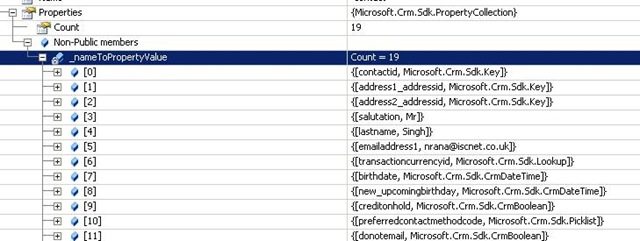
Ideally for a pre-update event, the inputparameters should contain only those attributes whose values have been modified.

For e.g. if i change the value for Salutation and FirstName field in the Contact form, i will get the following attributes in the InputParameter.

input

However if we throw InvalidPluginExecutionException and try to save the form again, we would receive almost all the attributes passed into inputparameters property bag.

input1

This is something we should be aware of while using InvalidPluginExectuionException.

Bye..

Loading External JavaScript files


Suppose this is our external javascript file content.

(customscript.js)

It consist of a simple function

function SayHello()
{
    alert(‘Hello World’);

}


It is placed at the following path   ..\ISV\ExtJS. i.e. within ExtJS folder inside ISV.

Place the following code in the form load of an entity’s form.

var scriptElement=document.createElement("<script type=’text/javascript’>");

scriptElement.src="/isv/ExtJs/customscript.js";

document.getElementsByTagName("head")[0].insertAdjacentElement("beforeEnd",scriptElement);

SayHello();

At times, it would work properly however sometimes it would throw “Object expected” error. It is because browser load JavaScript files asynchronously. If the script isn’t loaded we would get the error.

So here we need to make use of onreadystatechange event.

So we would modify our script as following


var scriptElement=document.createElement("<script type=’text/javascript’>");

scriptElement.src="/isv/ExtJs/customscript.js";

scriptElement.attachEvent("onreadystatechange",loadScript);

document.getElementsByTagName("head")[0].insertAdjacentElement("beforeEnd",scriptElement);

function loadScript()

{

if(event.srcElement.readyState=="loaded" || event.srcElement.readState=="complete")

{

    SayHello();

}

}


Or we could also using XmlHttp request object to load the external file.

var url="/isv/ExtJs/customscript.js";

var xmlHttp=new ActiveXObject("Microsoft.XMLHTTP");

xmlHttp.open("GET",url,false);

xmlHttp.send();

eval(xmlHttp.responseText);

SayHello();


Bye..

PreAuthenticate and UnsafeAuthenticatedConnectionSharing Property of CrmService


Hi,

While trying to understand the use of these properties, i found this wonderful article !

Speed Racer – Call CRM at speeds that would impress even Trixie!

https://community.dynamics.com/product/crm/crmtechnical/b/billoncrm/archive/2008/10/07/blog-move-58-speed-racer-call-crm-at-speeds-that-would-impress-even-trixie.aspx

Do check it out !

Bye..

A nice tool for working for CRM


Hi,

Check out this wonderful tool

CRM Configuration Manager


Bye..

Pre-generated XmlSerializers (CrmService)for Plugin


Please refer this article

http://uwekaessner.spaces.live.com/blog/cns!21916E8556D908E!175.entry?sa=260352433

I am just writing out the main steps from it and the steps where we need to strong sign the assembly so that it could be used within Plugin.

Add web reference to CrmService.asmx

http://servername/mscrmservices/2007/CrmService.asmx

Go to “web references” folder.

Copy Reference.cs file to a new folder.

Rename it to CrmServiceSerialized.cs

Open the CrmServiceSerialized.cs class, rename the class to CrmServiceSerialized.

namespace MyApplication.CrmServiceSerialized

Change the CrmService property

public CrmService(string url) {

           this.Url = url;

Complie it to a dll

If we want to use the Serialized dll within Plugin we need to strong sign it

sn.exe -k g.snk

csc /t:library /out:CrmServiceSerialized.dll CrmServiceSerialized.cs /keyfile:g.snk

To pre generate a strong named XmlSerializer dll

sgen.exe /p CrmServiceSerialized.dll /compiler:/keyfile:g.snk

Next again open CrmServiceSerialized.cs and comment out all occurrences of [System.Xml.Serialization.XmlIncludeAttribute using Find and replace.

Next we need to add the attribute

“[System.Xml.Serialization.XmlSerializerAssemblyAttribute(AssemblyName = "CrmServiceSerialized.XmlSerializers")]”

to the “CrmServiceSerialized” class.

Again generate the strong name assembly using the same key

csc /t:library /out:CrmServiceSerialized.dll CrmServiceSerialized.cs /keyfile:g.snk

Now we can add reference to CrmServiceSerialized.dll in our plugin to use it. Here also need to place CrmServiceSerialized.dll  and CrmServiceSerialized.XmlSerializers.dll to the GAC.

Check this link as well

http://blogs.javista.com/2009/03/18/best-practices-for-crm-memory-usage/

Bye..