Curious Case of Remove button for QueueItem SubGrid in CRM 2011


Hi,

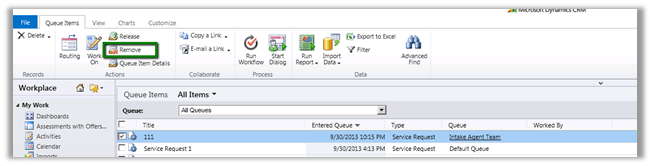
The QueueItem subgrid will normally have a Remove button associated to it in the ribbon.

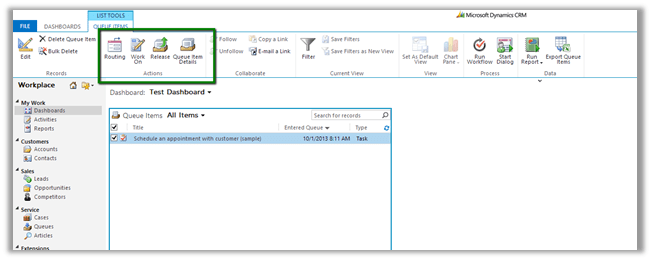
However when used in a view in Dashboard it goes missing.

One option to get it back is create a new custom ribbon button with the exact definition of the existing OOB Remove button.

http://www.mscrm-developer.com/2012/11/remove-button-missing-for-queue-items/

Hope it helps

Understanding Queues and QueueItem in CRM 2011


Hi,

I am currently working on a project that deals with queue management and the following posts were of immense help

http://xrmcubed.com/admin-101-queues-part1/

http://xrmcubed.com/admin-101-queues-part2/

http://xrmcubed.com/admin-101-queues-part3/

Thanks to the author !

MSCRMAuthentication cannot be found. Either the component that raises this event is not installed on your local computer or the installation is corrupted. You can install or repair the component on the local computer.


Hi,

We had created a WCF Service as wrapper over our OrganizationService.svc. It was all working fine until we installed UR 13. After installing UR 13, we started getting the below error for our WCF Service in the eventlog.

MSCRMAuthentication cannot be found. Either the component that raises this event is not installed on your local computer or the installation is corrupted. You can install or repair the component on the local computer.

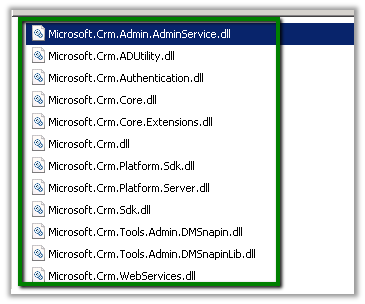
We had to replace the following assemblies from the CRM Server’s bin (latest one after installing UR 13) directory to WCF Service bin directory.

Hope it helps.


The data contract type cannot be serialized in partial trust because the member is not public while using Serialization in the sandboxed plugin in CRM 2011


Hi,

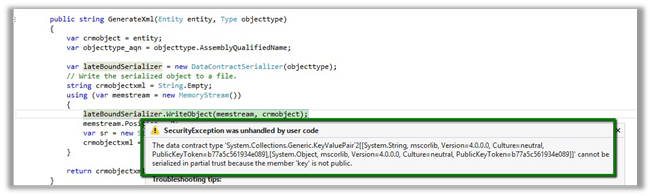
Was getting the below error while serializing the CRM Entity as mentioned here

Then gave it a try with a DataContract just to check if it works properly with it or not. It worked properly on the sandbox plugin.

Please check the below discussion for more details.

http://social.microsoft.com/Forums/en-US/d0332c9c-3cef-4b34-8c11-2b263369e21f/serializing-entity-in-sandbox-doesnt-work

Bye.

Calling WCF Rest Service from a Plugin in CRM 2011 (Online)


Let us take a simple rest service example here

http://www.rockycherry.net/services/Photos/photos.svc/photos

It returns the string “You have asked for photos”.

Within the plugin class add references to following assemblies.
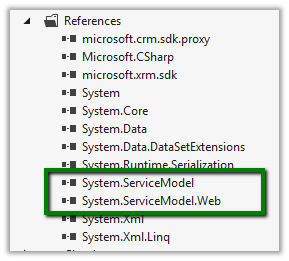
The sample code of the plugin


namespace TestPlugin
{
 public class Class1 : IPlugin
 {
 public void Execute(IServiceProvider serviceProvider)
 {
 IPluginExecutionContext context = (IPluginExecutionContext)serviceProvider.GetService(typeof(IPluginExecutionContext));

 if (context.InputParameters.Contains("Target") && context.InputParameters["Target"] is Entity)
 {

// using WebClient
 WebClient webClient1 = new WebClient();
 string data1 = webClient1.DownloadString("http://www.rockycherry.net/services/Photos/photos.svc/photos");

// using WebChannelFactory
 WebChannelFactory<IPhotos> factory = new WebChannelFactory<IPhotos>(new Uri("http://www.rockycherry.net/services/Photos/photos.svc"));
 IPhotos proxy = factory.CreateChannel();
 string photos = proxy.GetPhotos();

 }

 }
 }

[ServiceContract]
 public interface IPhotos
 {
 [WebGet(UriTemplate = "Photos")]
 [OperationContract]
 string GetPhotos();
 }
}


Register the plugin in Sandbox mode for CRM 2011 online.

Check this wonderful post for all the details

http://rockycherry.net/blog/?p=179

Hope it helps.

Enable Sub Grid for Contract Line (ContractDetail) entity in CRM 2011


Hi,

OOB if we try to add\insert sub grid for Contract Line entity in an Entity’s Form we would realize that the Contract Line entity doesn’t show up in the Entity drop down there.

The UNSUPPORTED way to get it enabled is to

Open the OrgName_MSCRM database

Run the following query

update metadataschema.entity

set  IsChildEntity=0

where name=‘contractdetail’

This will let us add the sub grid for the contract line entity.

Bye.