Validating Input Parameters in SSRS


We recently developed a report which had Days Input Parameter in it. Now the requirement was if the user enters any thing other then number (integer) over there they should get the appropriate error message.

Here if we define the Days parameter of type Integer and if we enter say for e.g. value = ‘x’ over there

We will get the following error message.

And if we upload the same report in the CRM, we will get the following error message, which doesn’t seem that user friendly.

Now to display proper error message to the end user we can take the following approach.

Change the parameter type to Text first. (From integer type)

Add a text box to report to show the error message, have following expression. If the value entered for Days parameter is not of numeric type display error message.

To hide the table if the Days field is not numeric, set the Hidden property with the following expression. If the Days parameter value is not numeric then hide the table.

And the following change in the DataSet’s query

Original Query

SELECT
Name, lss_First_Name, lss_Last_Name

FROM
Account

WHERE (DATEDIFF(day,CreatedOn,GETDATE())@Days)

New Query

If Days is not a numeric field then then modified select query to retrieve blank data from the table (using createdon field null criteria here in our case)

DECLARE
@SQL
Nvarchar(1000)

IF  ISNUMERIC(@Days)= 1 BEGIN

SET
@SQL ‘SELECT Name, lss_First_Name, lss_Last_Name FROM Account WHERE (DATEDIFF(day, CreatedOn, GETDATE())) >’+Convert(nvarchar,@Days)+

End

Else

Begin

SET @SQL=‘SELECT Name, lss_First_Name, lss_Last_Name FROM Account WHERE createdon=Null’

End

exec(@SQL)

The report with proper Days value for e.g. 1

If entered incorrect Days value for e.g. abc

Helpful post

http://geekswithblogs.net/Compudicted/archive/2012/08/14/validate-ssrs-report-input-parameters-the-proper-way.aspx

Hope it helps.

Unit Test RetrieveAttributeResponse in CRM using Microsoft Fakes.


Hi,

Recently we wrote a plugin that was using RetrieveAttribute class to get the label as well as value of the optionset field.

The issue that we faced over here is that the AttributeMetadata property of RetrieveAttributeResponse is read only, we cannot set it. The following post provided the solution i.e. writing a wrapper class over the RetrieveAttributeResponse

http://www.alexanderdevelopment.net/post/2013/01/13/How-to-unit-test-C-Dynamics-CRM-interface-code-part-III


organizationService.ExecuteOrganizationRequest = request =>
 {
 var retrievedPicklistAttributeMetadata = new PicklistAttributeMetadata();

if (request.Parameters["LogicalName"].ToString() == "lss_service_request_status")
 {
 var optionMetadata = new OptionMetadata(new Label("Closed", 1033), 10);
 optionMetadata.Label.UserLocalizedLabel = new LocalizedLabel("Closed", 1033);
 optionMetadata.Label.UserLocalizedLabel.Label = "Closed";

var serviceRequestTypeOptionSet = new OptionSetMetadata
 {
 Name = "lss_service_request_status",
 DisplayName = new Label("Service Request Status", 1033),
 IsGlobal = false,
 OptionSetType = OptionSetType.Picklist,
 Options = { optionMetadata }
 };

retrievedPicklistAttributeMetadata.OptionSet = serviceRequestTypeOptionSet;
 }

var retrAttResponse = new RetrieveAttributeResponseWrapper(new RetrieveAttributeResponse());
 retrAttResponse.AttributeMetadata = retrievedPicklistAttributeMetadata;
 return retrAttResponse;
 };

Hope it helps!


Cannot make a call on this channel because a call to Open() is in progress error in CRM 2011.


Hi,

We had developed a Visual Web Part for SharePoint 2013 that used IOrganizationService of CRM 2011. It was all working fine however yesterday it started throwing this error.

After some investigation we realized that the user whose credentials we were using as Client Credentials for the OrganizationService had recently been changed.

Updating it to the correct updated one fixed the issue for us.

Hope it helps.

‘_formHierarchy’ is undefined error in CRM 2011


Hi,

We recently faced this issue while opening one of our entity’s form.

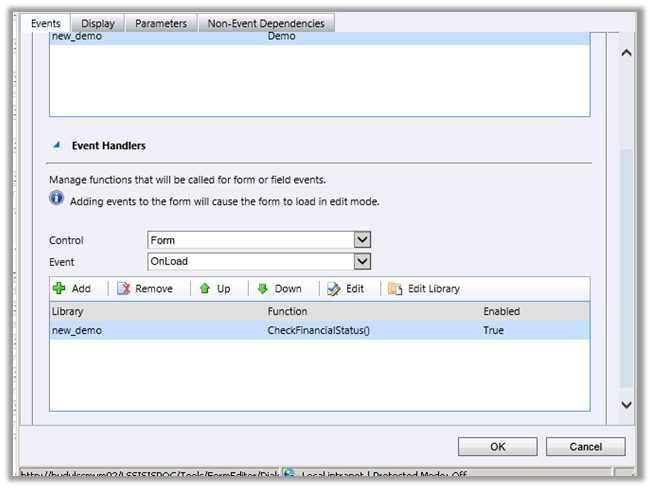
This issues comes if we have specified bracket while defining JavaScript function on form.

For e.g. CheckFinancialStatus()

Changing it back to
CheckFinancialStatus resolved the issue.

Hope this helps.

Using SharePoint CSOM (Client Side Object Model) in CRM 2011 On-Premise Plugin.


Hi,

We recently had a requirement to create List Item in SharePoint every time a case is resolved in CRM.

For this we decided to use SharePoint CSOM i.e.

Added reference to following assemblies in our plugin that will fire on Case Resolution

They can be found at

C:\Program Files\Common Files\Microsoft Shared\Web Server Extensions\15\ISAPI\

The plugin gets the content of the KB Article associated to the Case and creates a list item (for a Custom List) in SharePoint.

Sample Code


public void Execute(IServiceProvider serviceProvider)
 {
 IPluginExecutionContext context =
 (IPluginExecutionContext) serviceProvider.GetService(typeof (IPluginExecutionContext));
 if (context.InputParameters.Contains("Target") && context.InputParameters["Target"] is Entity)
 {

Entity entity = (Entity) context.InputParameters["Target"];

OptionSetValue serviceStage = (OptionSetValue) (entity.Attributes["statecode"]);
 if (serviceStage.Value == 1)
 {

IOrganizationServiceFactory serviceFactory =
 (IOrganizationServiceFactory)
 serviceProvider.GetService(typeof (IOrganizationServiceFactory));

IOrganizationService orgService = serviceFactory.CreateOrganizationService(context.UserId);

// Get the KB Article Associated
 ColumnSet cols = new ColumnSet();
 cols.AddColumn("kbarticleid");

// Get the content of the article
 Entity caseEntity = orgService.Retrieve("incident", context.PrimaryEntityId, cols);
 EntityReference entityRef = (EntityReference) caseEntity.Attributes["kbarticleid"];
 Guid kbId = entityRef.Id;
 Entity kbEntity = orgService.Retrieve("kbarticle", kbId, new ColumnSet(true));
 string title = kbEntity.Attributes["title"].ToString();
 string content = kbEntity.Attributes["content"].ToString();
 // create the custom list item in SharePoint using Client Side Object Model of SharePoint 2013

ClientContext clientContext = new ClientContext("http://sharepoint/sites/portal/");
 clientContext.Credentials = new System.Net.NetworkCredential("username", "password", "mydomain");
 List announcementsList = clientContext.Web.Lists.GetByTitle("Kb List");

ListItemCreationInformation itemCreateInfo = new ListItemCreationInformation();
 ListItem newItem = announcementsList.AddItem(itemCreateInfo);
 newItem["Title"] = title;
 newItem["Content"] = content;

newItem.Update();

clientContext.ExecuteQuery();

}
 }
 }

Hope it helps.

Mark Complete an Activity on create through Plugin in CRM 2011.


Hi,

We had a requirement to immediately close the Appointment record as completed after creating it. The initial thought was to call Set State Request on the Post Create plugin. That approach gave error. Then we tried passing statecode and statuscode value as input parameter in Pre Plugin. That approach also didn’t work.

Finally we registered a pre update plugin on appointment entity and set the values for statecode and statuscode attributes. This worked for us.

The learning is that on create of Appointment record, update message is also called.

Sample Code (Pre Update)

Hope it helps.