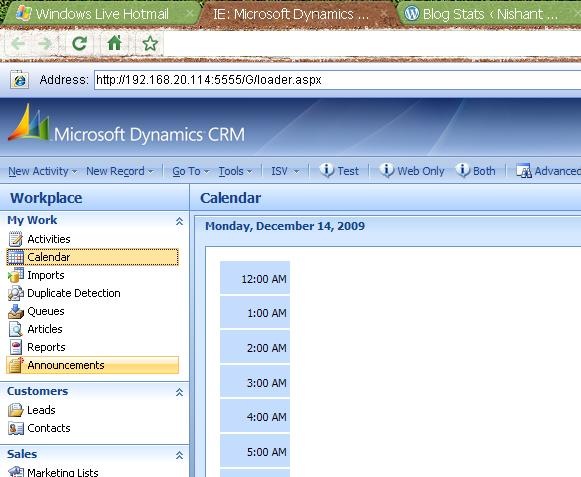
Using IE tab extension released for Google Chrome we could open our MS CRM inside Chrome.
IE tab extensions https://chrome.google.com/extensions/detail/hehijbfgiekmjfkfjpbkbammjbdenadd
Bye..
Using IE tab extension released for Google Chrome we could open our MS CRM inside Chrome.
IE tab extensions https://chrome.google.com/extensions/detail/hehijbfgiekmjfkfjpbkbammjbdenadd
Bye..
Hi,
We were receiving the above error on running a custom aspx page.
This page was configured to be called on click of an ISV.config button from an entity’s form.
The page was using CrmService web service to update the entity on which it was being called.
On checking the stack trace, we found that error was coming from within this function of the page
CrmService crmService = new CrmService(); crmService.Url = //web service url crmService.Credentials = System.Net.CredentialCache.DefaultCredentials; salesorder salesOrder = new salesorder(); salesOrder.new_issuer = userName; salesOrder.salesorderid = new Key(); salesOrder.salesorderid.Value = new Guid(poID); crmService.Update(salesOrder);
Hi,
I was trying to connect to report server (installed on my machine) from the virtual machine on which CRM is installed.(While creating a new organization using Deployment Manager MMC snap-in)
I was getting page not found error for the following url of the report server
http://servername/reportserver.
Later realized that it was because of the new anti virus tool that i had installed, the firewall was set enabled by default.
Disabled the firewall and then everything was fine.
Bye.
Hi,
I was getting the low disk space notification on my CRM 4 server . I realized that i had enabled Tracing for CRM 4. ( through CRM 4 Diagnosis Tool). I had enabled it some 4-5 months ago, while i was facing certain issue in CRM 4 installation.
I checked the size of the Trace folder, and i was surprised to see it’s size to be almost around 40 GB ! I think as suggested by Microsoft we need to carefully think before we enable tracing.
More on CRM 4 diagnosis tool http://blogs.msdn.com/benlec/archive/2008/03/04/crmdiagtool4-for-microsoft-crm-4-0-has-been-released.aspx
Bye..
Lets take a simple example for it !!
Suppose this is our Pre-Update Plugin
This plugin would update the value for lastname field for
the lead record on pre update. It is making use of a
custom function which is there in some other assembly.
The function is a simple function which would replace the
char ‘s’ with ‘m’
return a.Replace(‘s’, ‘n’);
}
}
If we register the above plugin without putting Calculate class’s assembly in GAC, we would get the following error
“Count not load the file or assembly ‘Calculator’ or one of its dependencies”
Here we need to put the referenced assembly in the GAC,
followed by an IISReset.
Or the other option with us is to use ILMerge tool. Using it we can combine multiple .NET assemblies into one.
Download and find more information about the tool here
http://research.microsoft.com/en-us/people/mbarnett/ILMerge.aspx
Using the following command we can merge multiple assembly into one
ilmerge /keyfile:g.snk Test.dll Calculator.dll /out:ILMergedLibrary.dll
keyfile –> valid key file
Test.dll—> the plugin’s dll
Calculator.dll—> the custom assembly.
ILMergedLibrary.dll –> The resulting assembly.
And register this newly merged assembly.
Bye.
Suppose we want to develop a context sensitive report for contact entity. This report, i should be able run on selected records and it should show information related to those records only.
Lets take an very simple example,
We could develop a report for contacts entity that would display firstname and lastname of the selected records from the grid within CRM.
So we could have our dataset like this
select CRMAF_FilteredContact.FirstName, CRMAF_FilteredContact.LastName
from FilteredContact as CRMAF_FilteredContact
Then while uploading we would select
“Conacts” for Related Record Types
“Related record types” for Display In.
Another way of creating the above report could be this
Our query for the dataset could be
declare @sql nvarchar(2000)
set @sql=’SELECT CO.firstname, CO.lastname FROM (‘+@CRM_FilteredContact +’) CO’
exec(@sql)
Here for @CRM_FilteredContact we would define a report parameter with
name=CRM_FilteredContact
DataType= String
Checked Internal option
Non queried for Available Values
Non queried for Default Values with the following value
select firstname,lastname from FilteredContact
Than we would upload it in CRM the way described above.
For a report that shows parent and child records information for e.g. contact and all its activities we can use the following query.
SELECT activitytypecodename, regardingobjectidname, subject, fullname FROM FilteredActivityPointer AS CRMAF_FilteredActivityPointer INNER JOIN FilteredContact As CRMAF_FilteredContact on CRMAF_FilteredContact.contactid = CRMAF_FilteredActivityPointer.regardingobjectid
Bye..