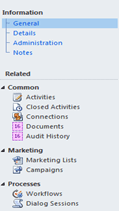
Suppose this is our custom entity named “new_mycustomentity” and we would like to show it in inside iframe within a custom aspx page.
Users can create the new record from within the custom page.
So we set the Iframe src to the url for creating new my custom entity record i.e.
<iframe
id=”IFRAME_NEWCUSTOMENTITY” frameborder=”0″ runat=”server“
src=”http://localhost/Contoso/main.aspx?etn=new_mycustomentity&pagetype=entityrecord”>
However this is how it appears within in IFrame with no ribbons in it.
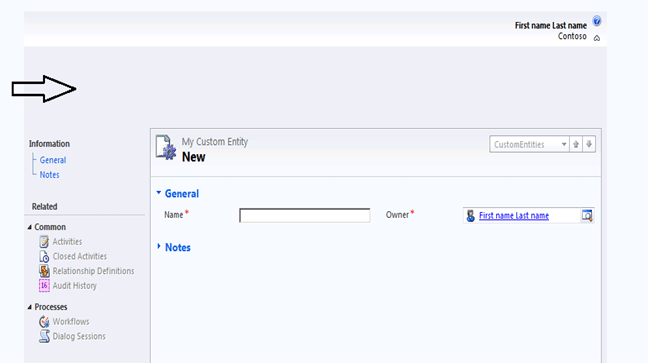
So the next step would be to hide the blank space on the top as well as left navigation bar.
Now we can use the following JavaScript that will hide the left navigation pane and blank ribbon.
http://bingsoft.wordpress.com/2010/09/09/mscrm-2011-hide-areas-of-a-form/
function HideArea() {
// Hide the Ribbon Toolbar and move the form Content area to the top of the window
window.parent.document.getElementById(“crmTopBar”).style.display = “none”;
// Move Form Content area up to top of window, initial style.top is 135px
// set it to the height of the iframe
window.parent.document.getElementById(‘contentIFrame’).style.height = “400px”;
// Hide Left Hand Nav bar / pane
document.getElementById(“crmNavBar”).parentElement.style.display = “none”;
document.getElementById(“tdAreas”).parentElement.parentElement.parentElement.parentElement.colSpan = 2;
// Hide the Form Footer Bar
document.getElementById(“crmFormFooter”).parentElement.style.display = “none”;
}
Now the form looks like this within the IFrame
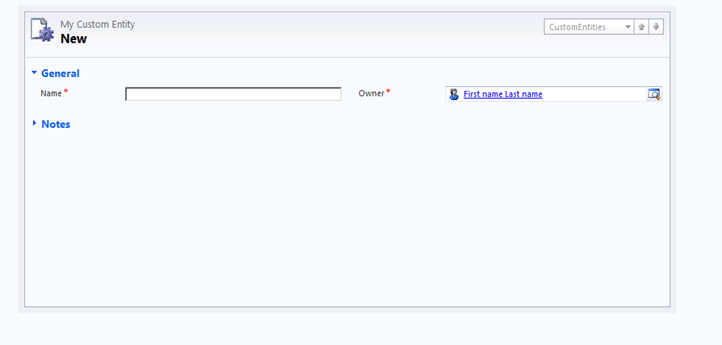
Next we will add an iframe in the entity’s form that will display a custom html page which has a Save Button in it to save the record.
However here we need to set the src of the IFrame dynamically through JavaScript in the form load otherwise our IFrame page won’t appear in the form.
So in form’s onload event add the following line
// set the IFrame src through JavaScript
crmForm.all.IFRAME_SAVE.src = “http://server:port/CustomCRMPage/SavePage.htm”;
This is how our custom page will now

On the save button click add the following Jscript code to save the record.
<input
id=”btnSave” type=”button” value=”Save” onclick=”return Save()”
/>
function Save() {
// call crmForm.Save
parent.document.forms[0].Save();
}
Now let’s click on save and try to save the record,
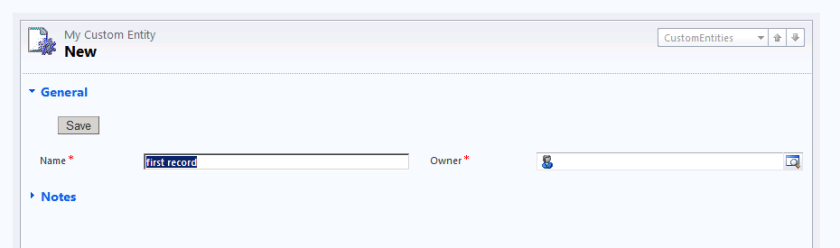
The record gets saved but here we can see two issues.
The top bar still shows “My Custom Entity – New” there.
And value for Owner field shows blank.
So here first we need to remove the Top Bar from the form using the following jScript in form’s onload
// hide the top bar
document.getElementById(“recordSetToolBar”).parentElement.parentElement.parentElement.parentElement.parentElement.parentElement.parentElement.parentElement.parentElement.parentElement.parentElement.style.display = “none”;
Now for the owner field ( lookup) we will have to do the following workaround.
Create a text field on the form, on save of form assign the Owner lookup’s name value to it. Hide this text field in the form onload.
Now in the onload event of the check if crmForm.ObjectId is null or not.
If not null than set the value of name for the owner’s lookup to this new hidden field’s value.
In form’s on save event à
function setOwner() {
var lookupItem = new Array;
lookupItem = crmForm.all.ownerid.DataValue;
// set the owner name in a separated text field
crmForm.all.new_hf.DataValue = lookupItem[0].name;
}
And in the onload do the following à
if (crmForm.ObjectId != null) {
var lookupItemOwner = new Array;
lookupItemOwner = crmForm.all.ownerid.DataValue;
var lookupData = new Array();
//Create an Object add to the array.
var lookupItem = new Object();
//Set the id, typename, and name properties to the object.
lookupItem.id = lookupItemOwner[0].id;
lookupItem.typename = lookupItemOwner[0].typename;
lookupItem.name = crmForm.all.new_hf.DataValue;
// Add the object to the array.
lookupData[0] = lookupItem;
// Set the value of the lookup field to the value of the array.
crmForm.all.ownerid.DataValue = lookupData;
}
Hope this helps …