Cannot make a call on this channel because a call to Open() is in progress error in CRM 2011.


Hi,

We had developed a Visual Web Part for SharePoint 2013 that used IOrganizationService of CRM 2011. It was all working fine however yesterday it started throwing this error.

After some investigation we realized that the user whose credentials we were using as Client Credentials for the OrganizationService had recently been changed.

Updating it to the correct updated one fixed the issue for us.

Hope it helps.

Disable wsstracing.exe in SharePoint


Hi,

At times we need to disable wsstracing.exe to improve the system’s performance at it uses too much CPU resources.

Open Command Prompt as Administrator

To Disable

  • sc stop “SPTraceV4”
  • sc config “SPTraceV4” start= disabled

To Delete

  • sc delete “SPTraceV4”

bye.

Hide “Personalize this Page” option in SharePoint for all the users.


Hi,

We recently had a requirement to hide the Personalize this Page option from the SharePoint Site for all the users.

The way we can do it is by commenting out the following element in the Welcome.ascx page

(\15\TEMPLATE\CONTROLTEMPLATES\Welcome.ascx)

The other option through central administration

http://donalconlon.wordpress.com/2011/04/28/hide-personalize-this-page-option-for-sharepoint-site/

Hope it helps.

Set SelectedDate for DateTimeControl in SharePoint.


While working on a visual web part wherein we were using SharePoint’s DateTimeControl, realized that it was not that straight forward to set the value for the DateTimeControl.

The following post came handy

http://blog.enderspsyche.com/2013/04/setting-datetimecontrol-date-in.html

Hope it helps!

Using SOAP and OData endpoint of CRM 2013 online in Windows Store App


Connecting to CRM 2013 Online SOAP and OData endpoint through Windows 8 App.

‘_formHierarchy’ is undefined error in CRM 2011


Hi,

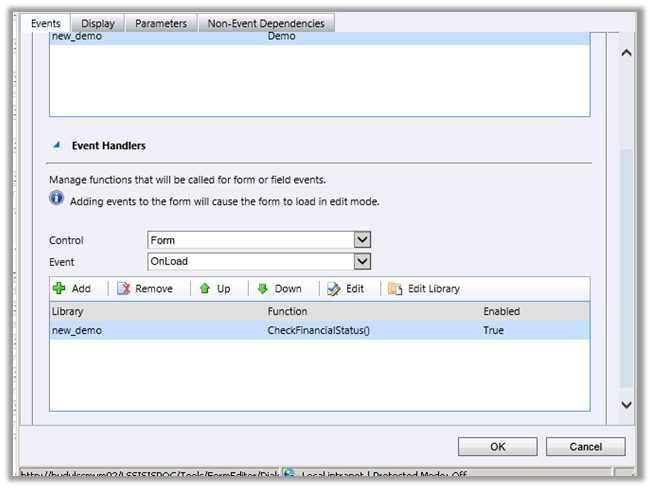
We recently faced this issue while opening one of our entity’s form.

This issues comes if we have specified bracket while defining JavaScript function on form.

For e.g. CheckFinancialStatus()

Changing it back to
CheckFinancialStatus resolved the issue.

Hope this helps.

Nishant Rana's Weblog

Everything related to Microsoft .NET Technology

Skip to content ↓