Hide “Personalize this Page” option in SharePoint for all the users.


Hi,

We recently had a requirement to hide the Personalize this Page option from the SharePoint Site for all the users.

The way we can do it is by commenting out the following element in the Welcome.ascx page

(\15\TEMPLATE\CONTROLTEMPLATES\Welcome.ascx)

The other option through central administration

http://donalconlon.wordpress.com/2011/04/28/hide-personalize-this-page-option-for-sharepoint-site/

Hope it helps.

Set SelectedDate for DateTimeControl in SharePoint.


While working on a visual web part wherein we were using SharePoint’s DateTimeControl, realized that it was not that straight forward to set the value for the DateTimeControl.

The following post came handy

http://blog.enderspsyche.com/2013/04/setting-datetimecontrol-date-in.html

Hope it helps!

Using SOAP and OData endpoint of CRM 2013 online in Windows Store App


Connecting to CRM 2013 Online SOAP and OData endpoint through Windows 8 App.

‘_formHierarchy’ is undefined error in CRM 2011


Hi,

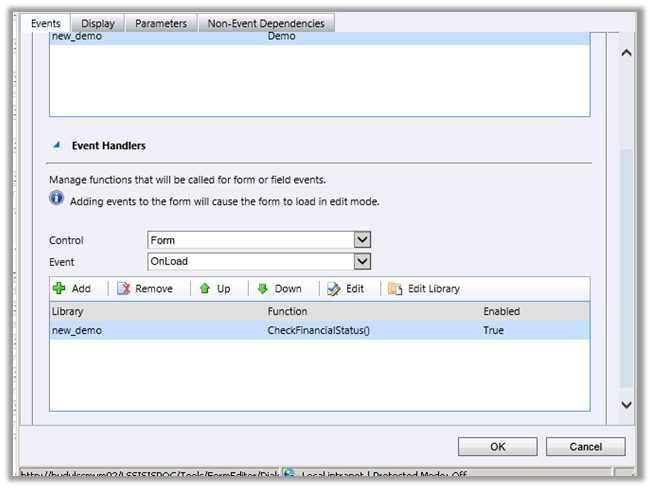
We recently faced this issue while opening one of our entity’s form.

This issues comes if we have specified bracket while defining JavaScript function on form.

For e.g. CheckFinancialStatus()

Changing it back to
CheckFinancialStatus resolved the issue.

Hope this helps.

Consuming SOAP and OData endpoints in CRM 2013 Online from external client applications


Consuming SOAP and OData endpoints in CRM 2013 Online from external client applications

Using JavaScript in custom master page for SharePoint 2013 that uses SP.js.


Hi,

We recently had a requirement to show no of listitems on a particular list on every page within the site. So we decided to use the JavaScript that does so in our custom master page itself.

This is how we got it working

Adding the SharePoint script link that refers to the SP.js file in our custom html master page.

<!–MS:<SharePoint:ScriptLink ID=”ScriptLink21″ Name=”sp.js” runat=”server” OnDemand=”false” LoadAfterUI=”true” Localizable=”false”>–>
<!–ME:</SharePoint:ScriptLink>–>

And then executing our script using the following method i.e. after SP.js is loaded

function GetCount() {

// code that uses CSOM to get the count

}


ExecuteOrDelayUntilScriptLoaded(GetCount, “sp.js”);

Hope it helps.

Nishant Rana's Weblog

Everything related to Microsoft .NET Technology

Skip to content ↓