“Insert failed for entity ‘TimeZoneLocalizedName’, batchRows=1144 with exception System.Data.SqlClient.SqlException: Cannot bulk load because the file "C:\Documents and Settings\\Application Data\Microsoft\MSCRM\BCP\.bcp" could not be opened” in Data Migration Manager


I got this error in data migration manager at the synchronizing stage.

While searching for it I found that this error occurs in case if we have installed Data Migration Manager on the CRM Server and have selected the SQL Server on a remote machine as database.

The error got resolved on re installing the Data Migration Manager with SQL Express.

Bye..

“The path is not of a legal form” error while installing Microsoft Data Migration Manager.


This error occurs while installing Data Migration Manager on CRM server.

To resolve this error we need to modify the following registry settings

Key:
[HKEY_LOCAL_MACHINE\SOFTWARE\Microsoft\Windows\
CurrentVersion\Installer\UserData\S-1-5-18\Products
59DD8CB00184F24E99A62CF4D6109FA\InstallProperties]
Value: InstallLocation

Set the value to C:\Program Files\Microsoft Dynamics CRM 
The installation would run without error after this.
Bye..

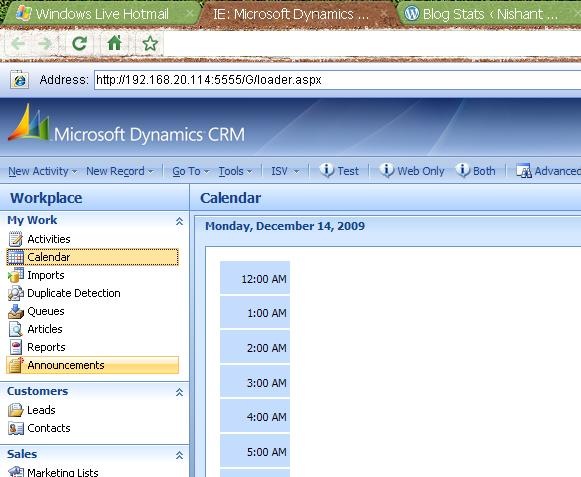
Opening Microsoft Dynamics CRM in Chrome browser.


Using IE tab extension released for Google Chrome we could open our MS CRM inside Chrome.

IE tab extensions https://chrome.google.com/extensions/detail/hehijbfgiekmjfkfjpbkbammjbdenadd

chromeMSCrm

Bye..

SoapException:Server was unable to process request on Update using CrmService.


Hi,

We were receiving the above error on running a custom aspx page.

This page was configured to be called on click of an ISV.config button from an entity’s form.

The page was using CrmService web service to update the entity on which it was being called.

On checking the stack trace, we found that error was coming from within this function of the page

CrmService crmService = new CrmService();
crmService.Url = //web service url
crmService.Credentials = System.Net.CredentialCache.DefaultCredentials;

salesorder salesOrder = new salesorder();
salesOrder.new_issuer = userName;

salesOrder.salesorderid = new Key();
salesOrder.salesorderid.Value = new Guid(poID);

crmService.Update(salesOrder);
There was nothing in the code that could have resulted in the above error as correct guid of the record was getting passed.
After a little more investigation we finally realized that the issue was with a post update callout. The post update callout was the one which was throwing the error.
And as we were updating the record using a custom page, the callout was also getting fired. So finally we corrected the post update callout and the custom page also started working fine.
Bye.

Error connecting to Report Server from virtual machine.


Hi,

I was trying to connect to report server (installed on my machine) from the virtual machine on which CRM is installed.(While creating a new organization using Deployment Manager MMC snap-in)

I was getting page not found error for the following url of the report server

http://servername/reportserver.

Later realized that it was because of the new anti virus tool that i had installed, the firewall was set enabled by default.

Disabled the firewall and then everything was fine.

Bye.

Trace file size almost 40 GB in CRM 4


Hi,

I was getting the low disk space notification on my CRM 4 server . I realized that i had enabled Tracing for CRM 4. ( through CRM 4 Diagnosis Tool). I had enabled it some 4-5 months ago, while i was facing certain issue in CRM 4 installation.

I checked the size of the Trace folder, and i was surprised to see it’s size to be almost around 40 GB ! I think as suggested by Microsoft we need to carefully think before we enable tracing.

More on CRM 4 diagnosis tool http://blogs.msdn.com/benlec/archive/2008/03/04/crmdiagtool4-for-microsoft-crm-4-0-has-been-released.aspx 

Bye..