Using Organization.svc in Silverlight Application


Hi,

While searching for how to use Organization.svc within a silverlight application, i found these 2 helpful posts

http://msdn.microsoft.com/en-us/library/gg594452.aspx#Y1145  

http://erikpool.blogspot.com/2010_12_01_archive.html

The other easier option that i can think of is creating a custom wcf service that uses Organization.svc and using this custom wcf service in the silverlight application.

Download the solution here 

http://www.box.net/shared/pgditixq1o

Bye.

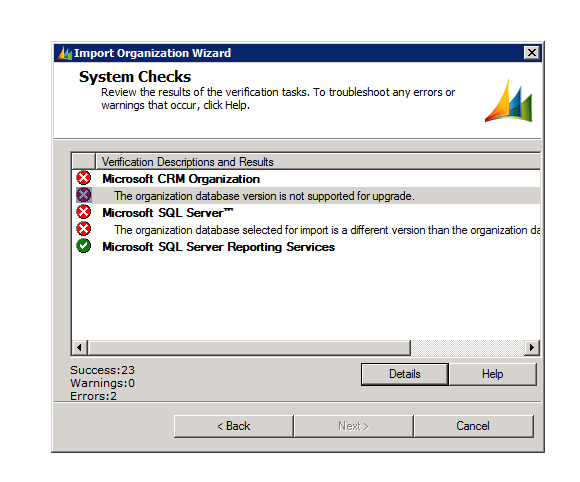
The organization database version is not supported for upgrade – error while importing organization in CRM 2011


After restoring the database to the server, I got the following error while importing the organization using the Deployment Manager

The build version of the database that I was importing was different than the build version of the database of the organization that I already had there.

http://support.microsoft.com/kb/946594 ( to find the build version of the database)

The one we were importing had higher build version.

Than we installed the update for Microsoft Dynamics CRM 2011 Release Candidate

http://support.microsoft.com/kb/2461082

Restarted the server and was able to import the organization successfully.

Hope it helps.

CrmService and Silverlight.


Two ways we can use consume CrmService within a Silverlight Application are as follows.

  1. Add Service Reference to CrmService in the Silverlight Project and work with CrmServiceSoapClient class.

    The things we need to consider here are

    We need to explicitly pass the Header information otherwise our CrmService won’t work.

    We need to make use of Dynamic Entity in case of Retrieve request as we might not receive values for certain fields. 

  2. The other easier option is to add a web service to the SilverlightApplication.Web application, which in turn will consume the CrmService. 

    In our Silverlight Application we will Add Service Reference to this custom web service (acting as a wrapper) instead of CrmService directly. 

    Download the solution here

    http://www.box.net/shared/3p5kkf7di2 

    MainPage.xaml àInteracts with CrmService directly.

    Page1.xamlàUses custom web service to interact with CrmService. 

Hope it helps.

CRM 2011 Developer Training Kit


Dynamics CRM 2011 Developer Training Kit is available now.

It has got presentations, videos, hands on labs etc. on different topics.

http://www.microsoft.com/downloads/en/details.aspx?FamilyID=78498c29-28ac-440b-9c20-ec5da6ee6e98

Bye.

Call Timer for CRM 4.0


We had a requirement to use Call Timer which would record the duration for the phone call activity.

Already there is a solution for this for CRM 3.0.

http://code.msdn.microsoft.com/MSCRM3/Release/ProjectReleases.aspx?ReleaseId=96

I am posting the screen shot of it and the updated isv.config file for it to be used in CRM 4.0

<Entity
name=phonecall>

<ToolBar
ValidForCreate=1
ValidForUpdate=0>

<Button
Icon=/ISV/CallTimer/timer.gif
Url=/ISV/CallTimer/timer.htm
WinMode=2
WinParams=dialogHeight:240px;dialogWidth:340px;>

<Titles>

<Title
LCID=1033
Text=Time this call />

</Titles>

<ToolTips>

<ToolTip
LCID=1033
Text=Use this to time the duration of this call />

</ToolTips>

</Button>

</ToolBar>

</Entity>

Bye..

Escalate Workflow CRM


Recently we had a requirement to write a workflow which would be sending mail to the manager of the owner if a record is not updated within 5 days of it being created or updated.

So here we created two workflows over here one for create and other for update.

For create it would look like this
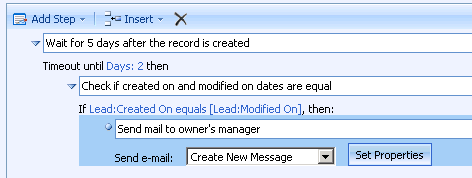
First we’ll have wait condition where we will set the timeout duration to 5 days. After 5 days the workflow will come out of its wait condition and will check if the “created on” and “modified on” values are equal or not. If equal it means the record has not been updated. So it will send a mail to owner’s manager.

In case of update, things would be little tricky as we need to store the “modified on” date value. This value would later be used to compare against the “modified on” date of the record after workflow comes out of the wait condition.

So here we need to write a custom workflow activity with one input and one output parameter. It will take current modified on date value as input and would pass the same value to the output parameter.

Code would be something this

[CrmWorkflowActivity(“Save Date Variable Value”)]

public partial class WorkflowVariable: SequenceActivity{

public WorkflowVariable(){

InitializeComponent();

}

protected override ActivityExecutionStatus Execute(ActivityExecutionContext executionContext){

this.InitialDateOutput = this.InitialDate;
return
ActivityExecutionStatus.Closed;}


public static DependencyProperty InitialDateProperty = DependencyProperty.Register(“InitialDate”, typeof(CrmDateTime), typeof(WorkflowVariable));

[CrmInput(“Initial Date Input”)] //Input Label
public CrmDateTime InitialDate {

get{
return (CrmDateTime)base.GetValue(InitialDateProperty);}

set{
base.SetValue(InitialDateProperty, value);}

}

public static DependencyProperty InitialDateOutputProperty = DependencyProperty.Register(“InitialDateOutput”, typeof(CrmDateTime), typeof(WorkflowVariable));

[CrmOutput(“Initial Date OutPut”)] //Input Label
public CrmDateTime InitialDateOutput {

get {
return (CrmDateTime)base.GetValue(InitialDateOutputProperty);}

set{

base.SetValue(InitialDateOutputProperty, value);}

}}

This is how the final workflow would look for update

Bye.