Snapshot in Azure Data Lake (Dynamics 365 / CDS) – Azure Synapse Link


In the previous post, we saw how to export CDS data to Azure Data Lake Gen 2

https://nishantrana.me/2020/09/07/export-data-from-common-data-service-to-azure-data-lake-storage-gen2/

Here let us have a look how the sync and snapshot work.

We have already done the configuration and have synced the Account and Contact entity.

As the diagram depicts – there is initial sync followed by incremental writes for both entity data and metadata.
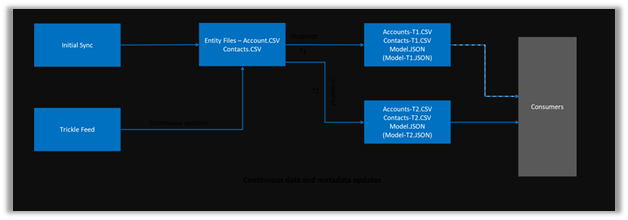
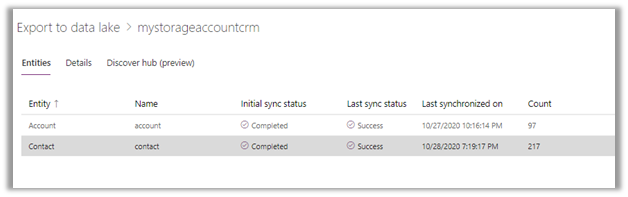
Below we can see we had initial sync completed for both contact and account entity, followed by an update in contact record which triggered another incremental sync – last synchronized on.
Within our storage container, we can see a folder created for each of the entities selected for sync.

As a part of initial sync or export, the entity data is written in CSV files
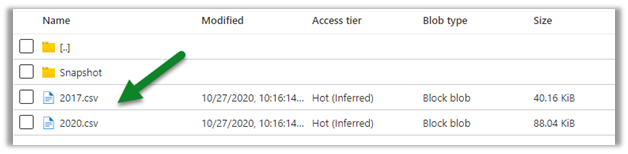
Changes in CDS are pushed to the CSV files continuously. (create, update and delete) along with a snapshot.

Within the Snapshot folder, we can see the snapshot added if there any change in the entity’s data.

Here for an account, we had no change.
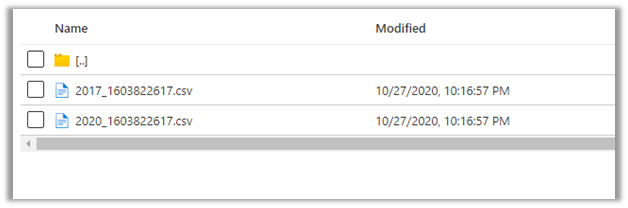
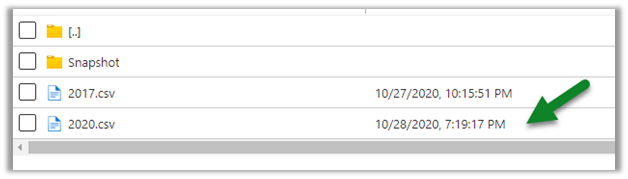
Now let us look at the contact entity, here we can see the update in the 2020.csv file.
Let us look at the snapshot generated for contact; it shows no update as we have checked it within a 1-hour window of the update.

Snapshot is a read-only copy of data, which is updated at regular interval i.e. 1 hour, this ensures that the user is looking at a data which is not constantly getting refreshed.
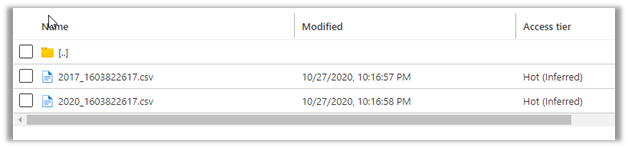
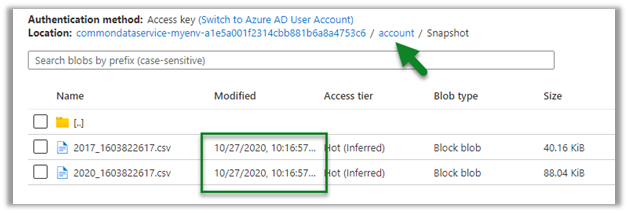
Refreshing after some time, we can see the new snapshot added for the Contact entity.

As expected, no new snapshot for the Account entity as there was no change.
Let us create a new contact record, and see when we see the update in the CSV file and when does the new snapshot gets created.

We have created a new contact record around 8:30.

This was earlier before the update was made
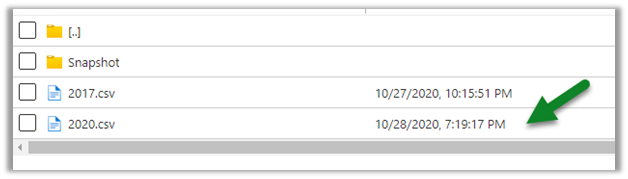
Within 5 minutes we can see the update in the CSV file
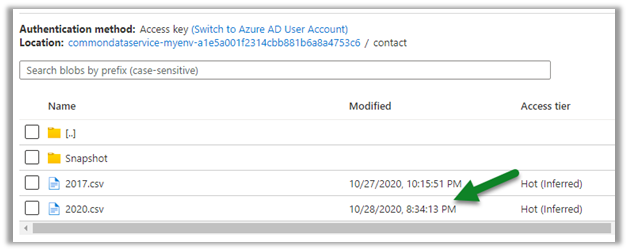
And as expected another snapshot at 9:16 exactly after one hour of the first snapshot.

Get all the details here

https://docs.microsoft.com/en-us/powerapps/maker/common-data-service/export-to-data-lake

Posts on Azure Data Lake

Hope it helps..

Advertisements

Dynamics 365 Attachments on Azure Blob Storage using the Attachment Management Add-in


Virendra Agrawal's avatarVirendra Agrawal's Blog

The Attachment Management Add-in is out there on the AppSource for quite some time, I recently enabled it for an internal Dynamics 365 implementation where the native SharePoint integration couldn’t be used due to the multiple tenant authentication issues and the new storage model licence wasn’t there to store/attach documents on default CDS file storage.

This add-on feature is to manage note and email attachments using the Azure Blob storage which will enable users to create and maintain files stored on Azure Blob via the Dynamics 365 app.

If someone is previously using this add-on, in the latest release, we also have a choice to move to default CDS file storageinstead of a Custom Blob storage.


View original post 916 more words

Replicate / Export Dynamics 365 (CDS) data – different options


The most common use case to export Dynamics 365 or Common Data Service data to an external database/datastore is to have more control over the data (without going through API route) with the ability to run analytics such as Power BI Reporting, Machine Learning, Data Warehousing, Integration, etc.

For analytics, we can also use our Microsoft Dynamics 365 AI apps that use Dynamics 365 data as a source

https://docs.microsoft.com/en-us/dynamics365/ai/

Below listing down few of the options –

Data Export Service – Configuration

It is a free Add on-service provided by Microsoft for exporting Dynamics 365 or CDS Data to Microsoft Azure SQL Database or Microsoft Azure SQL Server on Microsoft Azure Virtual Machine.

Microsoft recommends Azure SQL Database Premium P1 or a better plan for Data Export Service

https://docs.microsoft.com/en-us/power-platform/admin/replicate-data-microsoft-azure-sql-database

Notes on Data Export Service –

https://nishantrana.me/2018/10/04/my-notes-on-dynamics-365-data-export-service/ 

Export to Data Lake Service – Configuration

The service enables continuous replication of CDS Data to Azure Data Lake Gen 2.

https://docs.microsoft.com/en-us/powerapps/maker/common-data-service/export-to-data-lake

Few posts on Azure Data Lake

https://nishantrana.me/category/azure-data-lake/

Azure Data Factory – GUI based integration tool

Cloud-based integration service.

https://docs.microsoft.com/en-us/azure/data-factory/connector-dynamics-crm-office-365

Check out the informative posts on Azure Data Factory –https://dynamicscrmgirl.wordpress.com/tag/azure-data-factory/

We can also run SSIS Packages on Azure Data Factory

https://nishantrana.me/2020/10/21/posts-on-azure-data-factory/

Scribe Online Replication Services – GUI based integration tool

Cloud-based integration service.

https://nishantrana.me/2019/01/09/using-scribe-online-replication-services-rs-to-replicate-dynamics-ce-data/

Another option is to use Scribe Insight

https://trellispoint.com/quickly-copy-dynamics-365-online-data-to-sql-server-using-scribe-insight/

Skyvia’s Data Integration service

Informatica

Cloud-based integration service.

https://nishantrana.me/2019/11/13/easily-set-up-dynamics-365-ce-crm-replication-incremental-to-azure-sql-sql-on-premise-using-skyvias-data-integration-services/

Another GUI based integration tool that can be considered is Informatica

https://network.informatica.com/cloud/index.htm#page/cloud-microsoft-dynamics-365-for-sales-connector-guide/Introduction_to_Microsoft_Dynamics_365_for_Sales_Connector.html

KingswaySoft Integration Components – SSIS

Leading data integration software – provide SSIS components to integrate applications/databases.

http://www.kingswaysoft.com/blog/2017/04/04/How-to-Retrieve-Incremental-Changes-from-CRM-in-your-ETL-Process

Another SSIS based option is CozyRoc

https://www.cozyroc.com/ssis/dynamics-crm

Or we can use Script Component instead of using 3rd party components/ tool

https://nishantrana.me/2020/10/19/connect-to-dynamics-365-through-script-component-ssis/

More on SSIS and Dynamics 365

https://nishantrana.me/2020/10/16/ssis-kingswaysoft-and-dynamics-365/

Use SQL to query CDS data (Preview)

The capability to query CDS Data.

https://docs.microsoft.com/en-us/powerapps/developer/common-data-service/cds-sql-query

Check out all the articles on CDS T-SQL

https://markcarrington.dev/category/msdyn365/t-sql/

https://nishantrana.me/2020/05/21/setting-up-using-sql-to-query-data-in-dynamics-365-preview/

Query CDS data using Web API / Organization Service – Development

Write a custom tool using Dynamics 365 APIs

https://docs.microsoft.com/en-us/powerapps/developer/common-data-service/webapi/query-data-web-api

https://docs.microsoft.com/en-us/powerapps/developer/common-data-service/org-service/entity-operations

Hope it helps..

Advertisements

Azure Data Factory Data Flow vs SQL Stored Procedure Comparison


dynamicscrmgirl's avatardynamicscrmgirl

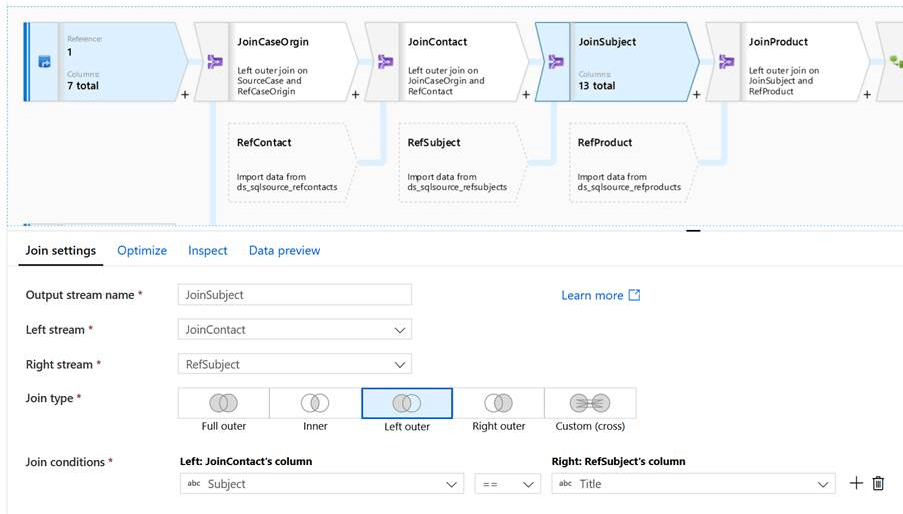
Recently I wrote about using Azure Data Factor (ADF) pipelines to migration test data into a target Dynamics 365 Customer Engagement environment (e.g. here). In this post I used SQL Stored Procedure to transform data. Someone asked me recently when I did not consider no-code ADF dataflow instead? This post explains why….


View original post 1,047 more words

What are the Different Ways to connect from Azure to On-Premise SQL Server?


Paul Az's avatarMicrosoft Azure Articles..

Here I would like to list down the different ways to connect from Azure to On-Premise SQL Server.

VPN

We can create a site-to-site VPN for connecting from Azure to On-Premise.  Here the VPN device on Azure takes care of transmitting the request to the On-Premise network.

https://docs.microsoft.com/en-us/office365/enterprise/connect-an-on-premises-network-to-a-microsoft-azure-virtual-network

Azure Data Factory

Azure Data Factory requires running an Integration Runtime service in the On-Premise machine to make the connectivity happen.  It also requires Outbound port opening from On-Premise machine if there is any Outbound connection required back to the Azure SQL.

https://azure.microsoft.com/en-us/services/data-factory/

Azure Hybrid Connections

Hybrid Connections are created within the App Service.

https://docs.microsoft.com/en-us/azure/app-service/app-service-hybrid-connections

https://nishantrana.me/2018/02/19/using-azure-hybrid-connections-to-connect-to-sql-on-prem-database-from-azure-webjob/

Azure Service Bus Relays

Relays create endpoints on the On-Premise application which can be accessed by the Outside World.

Link: https://www.c-sharpcorner.com/article/overview-of-azure-service-bus-relay/

Express Route

Express Route is a highly secured option as it creates a new connectivity other than Public Internet.

https://docs.microsoft.com/en-us/azure/expressroute/expressroute-introduction

On-Premises Data Gateway

If you…

View original post 39 more words

Power Automate: “Set Variable” Action fails inside “Switch” Action


Ajit Patra's avatarAjit Patra

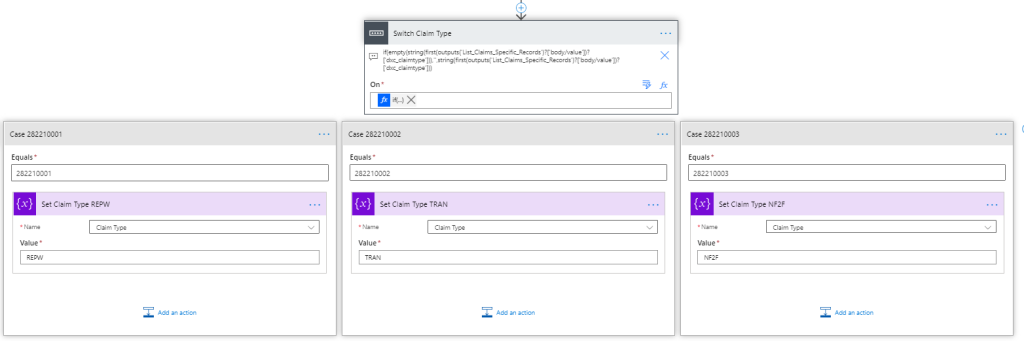
Recently, we were working on Power Automate where we were supposed to set a variable for further use based on the value of an option set field in an entity.

We used Switch action and inside Case block we were trying to set the variable as shown below:

While executing the Power Automate, unfortunately, we were getting error: Action ‘Set_Claim_Type_REPW’ failed.

Surprisingly, there was no additional details to the error message for which we spent significant amount of time finding the root cause. We tried to tweak the sequence of Set Variable action and it was working fine. So, we made sure that at least there is nothing wrong with the Set Variable action.

Finding no other way to address this issue, we changed the Switch action to multiple Condition actions which we avoided initially as it’d look messy but ended up accepting that as the workaround.

So, finally our…

View original post 69 more words