CRM 2011 Parental Relationship Behaviour (the Reparent action) in Practise


James Wood's avatarWOODSWORKBLOG

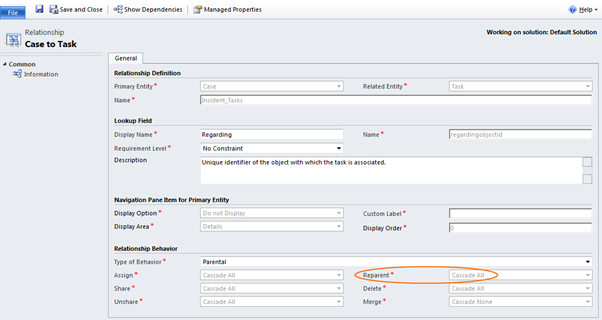
Parental relationships in Mscrm do a couple of things, in this post I’m going to focus on the reparent action.

(As a side note, reparent isn’t exclusively used in the parental behaviour, but is where it is most commonly used).

View original post 333 more words

FetchXML Formatter Tool


Arun Potti's avatarArun Potti's Power Platform blog

It is a Light weight windows application and this tool will be helpful when you are extensively working with FetchXML in Javascript / C# code to get desired result.

Functionality:

It will take FetchXML from Advance Find as an input and convert that into desired format, which can be used into Javascript / C# for further coding.

Pros:

  1. No Need to spend time for FetchXML formatting
  2. It is easy to use.
  3. Works for both Javascript and C# code

Example:

Let us take a simple example of the below FetchXML,

 <fetch version="1.0" output-format="xml-platform" mapping="logical" distinct="false">
  <entity name="contact">
    <attribute name="fullname" />
    <attribute name="telephone1" />
    <attribute name="emailaddress1" />
    <attribute name="contactid" />
    <order attribute="fullname" descending="false" />
    <filter type="and">
      <condition attribute="ownerid" operator="eq-userid" />
      <condition attribute="statecode" operator="eq" value="0" />
    </filter>
  </entity>
</fetch>

Provide this as an input to FetchXML formatter Tool, 1. Check Javascript radio…

View original post 140 more words

SSRS Extension Installation does not display SSRS Instances – CRM 2011


Rajeev Pentyala's avatarRajeev Pentyala – Technical Blog on Power Platform, Azure and AI

The other day to configure CRM environment, we were installing “Microsoft Dynamics CRM 2011 Reporting Extension” and to our surprise

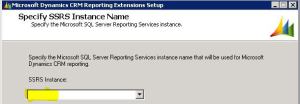
“SSRS Instance” dropdown was blank and we could not proceed further

Reporting Extensions Setup Reporting Extensions Setup

Reason

  • We had 2 machines one with CRM application server and another with both “SQL server” & “SSRS Reporting services”
  • The reason in our case was, we were trying to install “Microsoft Dynamics CRM 2011 Reporting Extension” on the CRM application server machine

Fix

  • You must run CRM Reporting Extensions Setup on a computer that has Microsoft SQL Server 2008 Reporting Services or Microsoft SQL Server 2008 R2 Reporting Services installed

Here is the MSDN’s  CRM 2011 Reporting Extensions Installation Guide

🙂

View original post

CRM 2011 Web Resource Part 2: How to use “ClientGlobalContext.js.aspx”


Siva Polisetty's avatarSiva's Dynamics CRM 2011 Blog

When you work with HTML web resources, There might be situations where you need data about the CRM.

“ClientGlobalContext.js.aspx” gives the Context information out side of the CRM FORM.

when we do reference to the above file, what comes next is How to refer the above file., it takes some time to figure out.,

Way1: http://”ClientGlobalContext.js.aspx” << refer like this when you use a web resource with out having folder conventions>>

Way2: http://”../ClientGlobalContext.js.aspx” << refer like this when you use web resource with a folder like structure

For example:Web resource name is referred as “test_/new_HTMLResource.htm”>>

Way 3: http://”../../ClientGlobalContext.js.aspx” << refer like this if the web resource looks like this “ test_/testing1/new_HTMLResource.htm”

I hope this would help and save lot of time of yours when you start working with Web resources

View original post

Unable to delete default Out of the box Reports from Dynamics CRM 2011


Brian Illand's avatarBrian Illand

If you try to delete the out of the box reports from a Dynamics CRM 2011 system, you will find you will get the error :

“You cannot complete this action for this component because of the configuration of it’s managed properties”.

Now, a lot of people don’t like to have the Sales or Marketing reports there. Maybe you are just using CRM for straightforward case management, or maybe you’ve got all your own custom entities and the users are confused about what is in their sales pipeline report!

One way to get around this (as of CRM 2011 Rollup 12 – Feb 2013), is to flick the isManaged switch in the database for each report. This can be achieved by running the following SQL query against the organisation database :

Once you’ve done this, simply go to the UI and try to delete the reports again.

EDIT 1

If you…

View original post 54 more words

“Profiler AppDomain Unloaded” error while using Plugin Registration Tool for debugging CRM 2013 Online Plugin. (Plugin Profiler)


On clicking Start Execution button in Plugin Registration Tool for profiling I was getting the AppDomain Unloaded error.

On opening up the error detail the message was

“Could not load file or assembly Microsoft.Xrm.Sdk, Version=5.0.0.0″

Updating the Plugin Project to use the Version 6 assembly that was part of the SDK, from which I was using Plugin Registration tool fixed the issue.

To understand more check the below links

https://crmbusiness.wordpress.com/2015/03/24/crm-2015-understanding-the-plugin-profiler-and-puzzling-error/

https://social.microsoft.com/Forums/en-US/9709c5b3-a035-4c1a-bdd3-6d8054db31d0/profiler-plugin-type-does-not-exist-in-assembly-error?forum=crmdevelopment

http://blogs.msdn.com/b/devkeydet/archive/2015/02/17/debug-crm-online-plugins.aspx

Hope it helps..