Unable to browse Active Directory Object error while installing CRM 2011


Hi,

Got the above error while trying to install Microsoft Dynamics CRM 2011. The error was because the  Windows Server 2008 on which we were trying to install was not running as domain controller.

Running the Active Directory Domain Services Installation Wizard (dcpromo.exe) resolved the issue for us.

Check out this informative video

http://www.youtube.com/watch?v=MK8pkoDs96M

Bye.


Using RetrieveEntityRibbonRequest to get the ribbon definition of an Entity


Hi,

Recently I was assigned a task to find out programmatically if a particular button is already defined on an entity or not. For this we can make use RetrieveEntityRibbonRequest class.

Sample C# Code


// Initialize RetrieveEntityRibbonRequest
RetrieveEntityRibbonRequest ribbonReq = new RetrieveEntityRibbonRequest();

// RibbonLocationFilters

// All - Retrieve all Ribbons. Equivalent to Default. Value = 7.
// Default - Retrieve all Ribbons. Equivalent to All. Value = 7.
// Form - Retrieve just the form ribbon. Value = 1.
// HomepageGrid -  Retrieve just the ribbon displayed for entity grids. Value = 2.
// SubGrid -  Retrieve just the ribbon displayed when the entity is displayed in a subgrid or associated view. Value = 4.
// if not specified it returns only the definition
ribbonReq.RibbonLocationFilter = RibbonLocationFilters.All;

// specify the entity schema name
ribbonReq.EntityName = currentEntityName;
RetrieveEntityRibbonResponse ribbonRes = (RetrieveEntityRibbonResponse)_serviceProxy.Execute(ribbonReq);
Byte[] bytes = unzipRibbon(ribbonRes.CompressedEntityXml);
string ribbonDiffString = System.Text.Encoding.GetEncoding("utf-8").GetString(bytes);
if (ribbonDiffString.Contains("RibbonButtonID"))
{
// logic
}

public byte[] unzipRibbon(byte[] data)
{
System.IO.Packaging.ZipPackage package = null;
MemoryStream memStream = null;
memStream = new MemoryStream();
memStream.Write(data, 0, data.Length);
package = (ZipPackage)ZipPackage.Open(memStream, FileMode.Open);
ZipPackagePart part = (ZipPackagePart)package.GetPart(new Uri("/RibbonXml.xml", UriKind.Relative));
using (Stream strm = part.GetStream())
{
long len = strm.Length;
byte[] buff = new byte[len];
strm.Read(buff, 0, (int)len);
return buff;
}
}

Bye.

A managed solution cannot overwrite a Saved Query component on the target system that has unmanaged base instance error while importing a managed solution in CRM 2011


Hi,

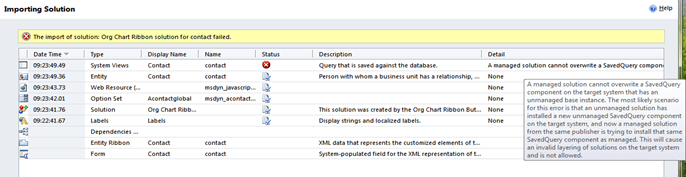
While trying to import a managed solution I was getting the below error.

The reason being the SavedQuery component created by the Activity Feeds Solution in source and target environment has the same id. And it is unmanaged component in the target environment and the managed solution that we were trying to import has the same component as managed.

http://social.microsoft.com/Forums/br/crm/thread/83f66edd-0ec3-45f0-bc82-b63122d1ff7f

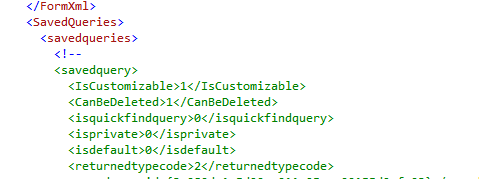
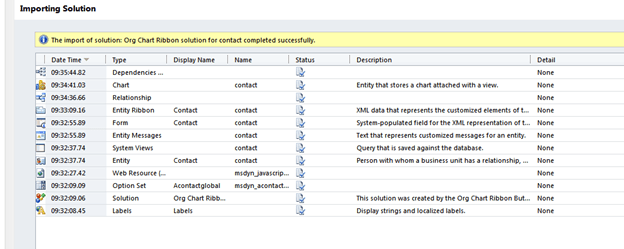
Commenting out all the savedquery from the customizations.xml and importing the solution back solved the issue

Hope it helps.

Cleared MB5 858 Managing Microsoft Dynamics CRM Implementations Exam


I took and cleared the MB5 858 exam today. It had 70 questions divided into 3 sections with 140 minutes to answer them.

I used following resources for preparation

The questions were more or less intuitive. Someone who implemented Sure Step methodology in the project and have gone through the above resources would be able to answer them easily.

Bye.

NotSupportedException : Security settings for this service require ‘Anonymous’ Authentication but it is not enabled for the IIS application that hosts this service while trying to access OrganizationService.svc in CRM 2011


Hi,

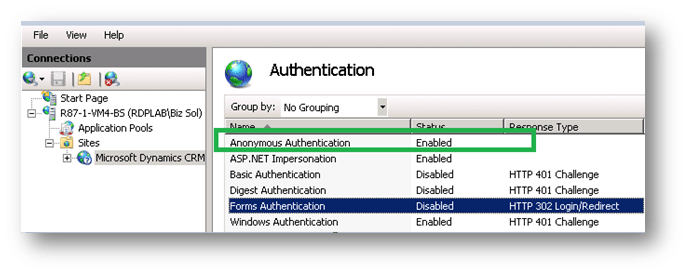
One of my colleagues was facing the above issue while trying to access the OrganizationService.svc in CRM 2011. The issue as indicated by the exception message was because of the Anonymous Authentication being disabled for the Microsoft Dynamics CRM web application. Enabling it resolved the issue.

Bye.

Microsoft Dynamics CRM Compatibility List


Hi,

Found this article that lists the minimum version of products compatible with Microsoft Dynamics CRM 4.0 and 2011.

Do check it out

http://support.microsoft.com/kb/2669061

Bye.