Fatal error during installation- Microsoft Dynamics CRM Report Authoring Extension Setup.


Hi,

Was getting the below error while trying to install

Microsoft Dynamics CRM 2013 Report Authoring Extension (with SQL Server Data Tools support)

https://www.microsoft.com/en-us/download/details.aspx?id=40343g

The solution was to delete the following registry key

HKLM\SOFTWARE\Microsoft\Windows\CurrentVersion\Installer\UserData\S-1-5-18\Components\0EF1E6B4EFCDA2649B26A424D56DAACD


After deleting the key the installation was successful.


https://support.microsoft.com/en-us/kb/2988630

Hope it helps..

Reports in Dynamics CRM 2013


List of OOB reports in CRM

CRMCONSULTANT's avatarMicrosoft Dynamics CRM Blog

Microsoft Dynamics CRM 2013 includes reports that provide useful business information to the user. These reports are based on Microsoft SQL Server Reporting Services, and provide the same set of features that are available for the Microsoft SQL Server Reporting Services reports. The report definition (data and layout) of Microsoft Dynamics CRM reports are contained in an .rdl file, and the contents of the .rdl file conform to the Microsoft SQL Server Report Definition Language Specification.

1. System Reports (Out-of-box Reports):

Dynamics CRM 2013 comes with 25 out-of-box reports for viewing your business data. The following table shows a list of available reports and what data they get when you run.

NameDescription
Account DistributionIdentify patterns in top revenue-generating accounts.
Account OverviewView a one-page overview of an account.
Account SummaryView a chronological summary of an account.
ActivitiesDisplay a list of activities.
Campaign Activity StatusTrack campaign…

View original post 723 more words

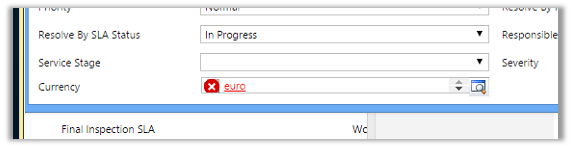
“The entity referenced by this process includes a currency value that does not exist in your organization. Select a different currency and try again.” Error in Workflow in CRM.


After importing one of the solution was getting the below error in one of the processes

The solution was to find out the Currency field and set it to the currency that existed in our organization.

Hope it helps..

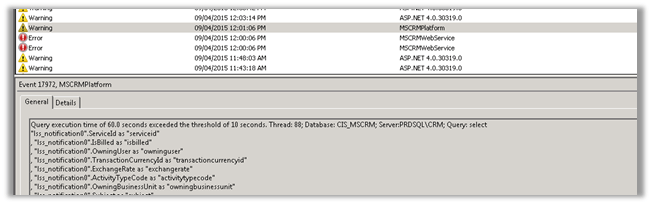
Query execution time of 60 seconds exceeded the threshold of 10 seconds warning in CRM 2013.


Query execution time of 60 seconds exceeded the threshold of 10 seconds warning in CRM 2013.

We were getting the below warning in one of our test environment

On analyzing figured out that one of the plugin was using retrieve with ColumnSet(true) option i.e. retrieving all the columns of the entity which was not required in this case.

Fetching only the required columns fixed the warning.

The other option could have been indexing or increate the value for LongQueryThersholdInSeconds column in ServerSetingProperties table of MSCRM_Config.

Helpful posts

http://blog.edgewater.com/2013/01/07/microsoft-dynamics-crm-querying-data-using-late-binding-versus-early-binding/

http://www.dynamicscrmpros.com/mscrmplatform-warning-in-event-viewer-in-microsoft-dynamics-cr-event-id-17972/

Hope it helps..


Fiscal date query operators in FetchXML


deepeshsomani2013's avatarMSDYNAMICSBLOG BY DEEPESH

A FetchXML query in Microsoft Dynamics CRM 2015 and Microsoft Dynamics CRM Online 2015 Update can use special fiscal date values in queries. For example, a FetchXML query can find all orders fulfilled in the last fiscal month.

noteNote

The FetchXML query uses the organization’s fiscal year settings for all fiscal date queries.

Using FetchXML fiscal date conditional operators

The following example shows a FetchXML expression that finds all orders fulfilled in the last fiscal period, according to the organization’s fiscal year settings. For example, if the organization uses fiscal months, the query returns orders fulfilled in the last fiscal month. If the organization uses fiscal quarters, the query returns orders fulfilled in the last fiscal quarter. If the organization uses fiscal semesters, orders fulfilled in the last fiscal semester are returned.

XML

<fetch> <entity name="order">  <attribute name="name"/>  <filter type="and">   <condition attribute="datefulfilled"              operator="last-fiscal-period"/>  </filter> </entity></fetch>

The following example shows a…

View original post 319 more words

{How To} Using Xrm.Utility.openEntityForm to clone all fields of one record to another in Dynamics CRM.


Debajit's avatarDebajit's Dynamic CRM Blog

Looking at the title of the topic, you must be wondering what’s new in here. I think many of us by this time already know that we can clone one record of an entity to create another record easily using the Xrm.Utility.openEntityForm method. For e.g suppose we have an account record and we have a functionality provided to clone the account record. The cloned record would contain the same values and the parent record.

To do this in CRM, all you need to do is the following.

Now comes the big question. Although its pretty simple to copy field values from one record to another using the above method, imagine of a situation where there are lot of fields on the form to clone. Even for that matter there can be situations where the field is not even in the form of the parent record but you would still need…

View original post 145 more words