Hi,
Had a requirement to split a List in 3 smaller lists.
For e.g. if a list has 13 different elements.
It has to split into 3 list containing 5, 5 and 3 elements in it.
The helpful post
Hope it helps !
Advertisements

Hi,
Had a requirement to split a List in 3 smaller lists.
For e.g. if a list has 13 different elements.
It has to split into 3 list containing 5, 5 and 3 elements in it.
The helpful post
Hope it helps !

Hi,
Suppose we need to call the service created here in our plugin
https://nishantrana.me/2014/09/05/configure-a-wcf-service-for-windows-authentication/
As plugin don’t have configuration file, we need to specify binding information in Code.
The sample code to call the WCF Service by passing Network Credentials
private static void CallWCFService()
{
BasicHttpBinding binding = new BasicHttpBinding();
binding.Security.Mode = BasicHttpSecurityMode.TransportCredentialOnly;
binding.Security.Transport.ClientCredentialType = HttpClientCredentialType.Windows;

// Specify the endpointAddress
EndpointAddress endpointAddress = new EndpointAddress(new Uri("http://servername:port/Service1.svc"));

ServiceReference1.Service1Client client = new ServiceReference1.Service1Client(binding, endpointAddress);
if (client.ChannelFactory.Credentials != null)
client.ChannelFactory.Credentials.Windows.ClientCredential = new System.Net.NetworkCredential("username", "password", "domain");
if (client.ClientCredentials != null)
client.ClientCredentials.Windows.AllowedImpersonationLevel = System.Security.Principal.TokenImpersonationLevel.Delegation;
MessageBox.Show(client.GetData(1));
}
Hope it helps ..

Just sharing a sample code to remove duplicates from a list using LINQ
public class MyClass
{
public string ID { get; set; }
public string Value { get; set; }

}

List<MyClass> myList = new List<MyClass>();
var xrmOptionSet = new MyClass();
xrmOptionSet.ID = "1";
xrmOptionSet.Value = "100";
var xrmOptionSet1 = new MyClass();
xrmOptionSet1.ID = "2";
xrmOptionSet1.Value = "200";
var xrmOptionSet2 = new MyClass();
xrmOptionSet2.ID = "1";
xrmOptionSet2.Value = "100";
myList.Add(xrmOptionSet);
myList.Add(xrmOptionSet1);
myList.Add(xrmOptionSet2);

// here we are first grouping the result by label and then picking the first item from each group
var myDistinctList = myList.GroupBy(i => i.ID)
.Select(g => g.First()).ToList();
Hope it helps..
Load your programming emulators on the cloud & access it conveniently on virtual desktops with your preferred mobile device (iOS/Android/windows) remotely with CloudDesktopOnline.com. For effective team collaboration use a hosted SharePoint and exchange from Apps4Rent.

Hi,
Suppose this is our InfoPath form
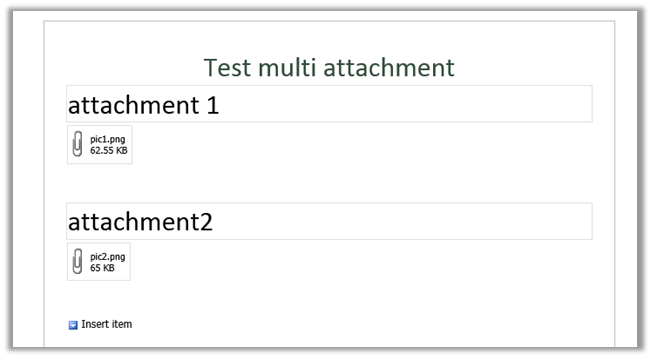
First we will generate the class for the above InfoPath form
https://nishantrana.me/2014/07/13/generate-a-c-class-from-an-infopath-form/
The sample code
myFields invoice = null;
WebClient webclient = new WebClient();
webclient.UseDefaultCredentials = true;

using (Stream fileStream = webclient.OpenRead("http://server:5000/formlibrary/FirstForm.xml?NoRedirect=true"))
{
if (fileStream != null)
{
XmlTextReader reader = new XmlTextReader(fileStream);

reader.Read();
reader.MoveToContent();

XmlSerializer xser = new XmlSerializer(typeof(myFields));
myFields invoiceInfopath = (myFields)xser.Deserialize(reader);
byte[] b = invoiceInfopath.field2;

// filename
int nameBufferLen = b[20] * 2;
byte[] fileNameBufffer = new Byte[nameBufferLen];

for (int i = 0; i < nameBufferLen; i++)
{
fileNameBufffer[i] = b[24 + i];
}

char[] charFileName = UnicodeEncoding.Unicode.GetChars(fileNameBufffer);
string fileName = new string(charFileName);
fileName = fileName.Substring(0, fileName.Length - 1);

// attchment
byte[] fileContent = new byte[b.Length - (24 + nameBufferLen)];

for (int i = 0; i < fileContent.Length; i++)
{
fileContent[i] = b[24 + nameBufferLen + i];
}

FileStream fs = new FileStream(@"C:\test\" + fileName, FileMode.Create);
fs.Write(fileContent, 0, fileContent.Length);
fs.Close();
}
Hope it helps.

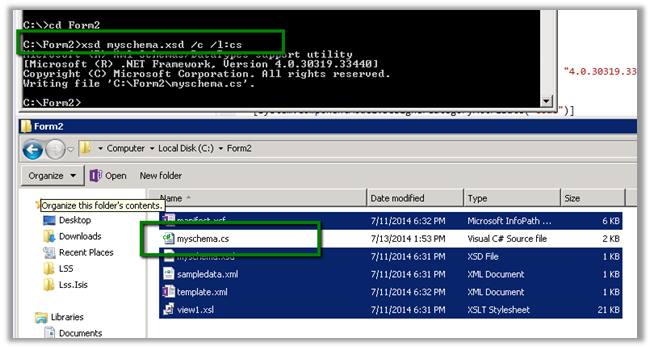
To generate a C# class from change the extension to .cab from .xsn.

Open and copy the content of cab file to a separate folder

Open the Visual Studio Developer Command Prompt and run the XSD.exe to generate the class
Hope it helps…

Check out this wonderful post on understanding HashSet
http://dotnetcodr.com/2014/01/08/using-hashset-in-net-to-allow-unique-values-only/
http://alicebobandmallory.com/articles/2012/10/18/merge-collections-without-duplicates-in-c
The Message box will show the count as 2.
HashSet will remove the duplicate entry.

Bye

 Nishant Rana's Weblog