

We had a business requirement to block the closing of a Quote as Lost under certain conditions. Instead of leaving the quote in an Active state, we wanted the system to explicitly move it back to Draft and show a clear error message to the user explaining why the close action was not allowed.
We initially registered our plugin on the Close message in the PreOperation stage. The logic was simple: detect the Lost status, set the quote back to Draft, and throw an exception to cancel the close operation.
The plugin executed exactly as expected. However, the result was not what we intended. Although the quote closure was blocked, the quote never moved to Draft. This happened because PreOperation runs inside the same transaction as the Close message. When we threw an InvalidPluginExecutionException, Dataverse rolled back everything in that transaction, including our SetStateRequest.
To fix this, we moved the same plugin logic to the PreValidation stage, and the behavior immediately changed. PreValidation runs outside the main transaction, before Dataverse starts processing the Close request. This allowed us to:
- Update the quote state to Draft
- Throw an exception to cancel the Close
- Keep the quote in Draft without rollback
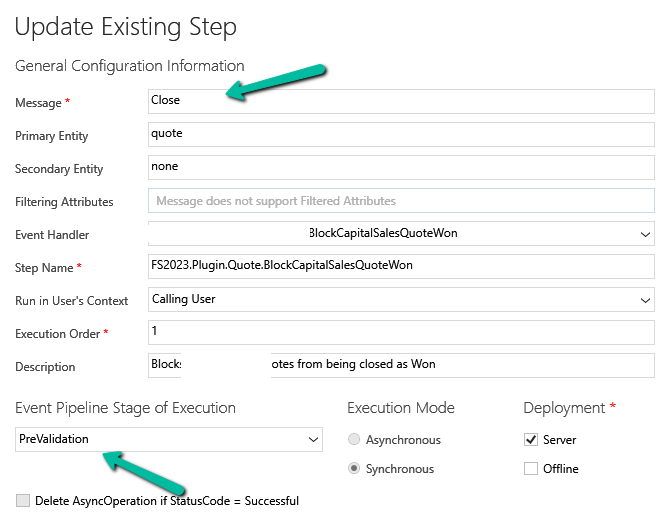
Sample Code for reference –
using Microsoft.Xrm.Sdk;
using Microsoft.Xrm.Sdk.Messages;

public class BlockQuoteCloseAndRevertToDraft : IPlugin
{
    public void Execute(IServiceProvider serviceProvider)
    {
        var context =
            (IPluginExecutionContext)serviceProvider.GetService(typeof(IPluginExecutionContext));

        if (!context.InputParameters.Contains("QuoteClose") ||
            !context.InputParameters.Contains("Status"))
            return;

        var status = (OptionSetValue)context.InputParameters["Status"];

        // Custom Lost status value
        const int LostStatusValue = 100000001;

        if (status.Value != LostStatusValue)
            return;

       // other business logic / check, return if not valid else continue and throw exception

        var quoteClose = (Entity)context.InputParameters["QuoteClose"];
        var quoteRef = quoteClose.GetAttributeValue<EntityReference>("quoteid");

        if (quoteRef == null)
            return;

        var serviceFactory =
            (IOrganizationServiceFactory)serviceProvider.GetService(typeof(IOrganizationServiceFactory));
        var service = serviceFactory.CreateOrganizationService(context.UserId);

        service.Execute(new SetStateRequest
        {
            EntityMoniker = new EntityReference("quote", quoteRef.Id),
            State = new OptionSetValue(0),   // Draft
            Status = new OptionSetValue(1)   // Draft status
        });

        throw new InvalidPluginExecutionException(
            "This quote cannot be closed at this stage and has been reverted to Draft."
        );
    }
}
Hope it helps..
Discover more from Nishant Rana's Weblog
Subscribe to get the latest posts sent to your email.
Share It -


 Nishant Rana's Weblog
One thought on “Why We Switched Our Plugin from PreOperation to PreValidation – Dataverse / Dynamics 365”