

While reviewing our Dataverse environment’s storage usage, we noticed something surprising—over 13 GB of our file capacity was being consumed by the WebResourceBase table alone. This table typically stores JavaScript files, HTML web resources, images, and other files tied to customizations in Dynamics 365. However, the volume was unexpectedly high, prompting us to investigate further.
We started by examining the capacity usage charts available under:
Power Platform Admin Center > Resources > Capacity > File Usage
It was evident that the WebResourceBase table was consistently occupying around 13,027 MB (13 GB), far more than any other table.
Realizing that this wasn’t just normal customization data, we raised a support request with Microsoft to understand what was happening behind the scenes.
After a quick investigation, Microsoft Support responded with the following:
“Upon review, we have found that the WebResourceBase table is indeed occupying a significant amount of storage—13.027 GB. There are instances of ‘orphaned’ WebResourceBase records, which can occur due to solution uninstalls or as leftover artifacts from other entities that depend on WebResources. To address this issue, we can run a script to remove these orphaned web resources, which will help in reducing the storage used in your environment.”
These “orphaned” records are essentially detached or unused web resources—files that are no longer tied to any solution or customization but remain in storage. They commonly appear in environments where unmanaged solutions are frequently installed and removed.
Upon our approval, Microsoft executed a backend script to safely identify and remove these orphaned entries.
Post-Cleanup Results –
Before: 13,027 MB
After: 10009MB
Recovered: 3,018 MB (~3 GB)
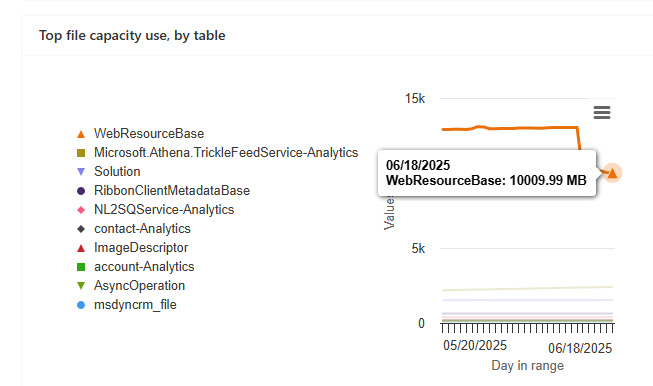
This led to around a 24 percent reduction in the file capacity used by the WebResourceBase table.
Microsoft also confirmed that no further reduction was possible at this time—the remaining content is either actively referenced or structurally required by the platform.
Hope it helps..
Discover more from Nishant Rana's Weblog
Subscribe to get the latest posts sent to your email.
Share It -


 Nishant Rana's Weblog
One thought on “How We Reclaimed Storage from the WebResourceBase Table in Dataverse”