

We were using the below code to create a sharepointdoucmentlocation record through a C# Console App.
        private void CreateAssociateSharePointDocumentLocation(string folderName, Guid recordGuid, ServiceClient serviceClient)
        {
            var documentLocation = new Entity("sharepointdocumentlocation");
            documentLocation["name"] = "Documents on Default Site 1";
            documentLocation["relativeurl"] = folderName;
            documentLocation["parentsiteorlocation"] = new EntityReference("sharepointdocumentlocation", new Guid(parentSiteorLocation));
            documentLocation["regardingobjectid"] = new EntityReference("schemanametable", recordGuid);
            serviceClient.Create(documentLocation);
        }
For folderName we were using the below format, similar to what CRM does, when someone opens the document tab for the record, to create the sharepointdocument location record.
{name} + “_” + {GUID}
However, while creating one particular record we got the below error which was because the name field had “&” in it.
The relative URL contains invalid characters. Please use a different name. Valid relative url names cannot end with the following strings: .aspx, .ashx, .asmx, .svc, cannot begin or end with a dot, cannot contain consecutive dots, and cannot contain any of the following characters: ~ ” # % & * : ? / \ { | }.

As the error message suggests we need to either remove/replace the special characters in the name field before creating the folder in SharePoint and associating it with the SharePoint Document Location record in the CRM.
Sample code to check if a Folder exists else create it (SharePoint Online / PnP Framework / C#)
Say for e.g. we have the following record having the name as
“..N ” I & S * H : A | N T.aspx .ashx..”
CRM / Dynamics 365 will create the corresponding folder and SharePoint document location record for it.

The folder created will have all the special characters replaced with “–“ and suffixed with GUID of the record.
–N – I – S – H – A – N T-aspx -ashx–_03DED211E259EF11BFE2000D3A9B4E06
So if we are creating the folder / SharePoint document location record through code (C#), we can use the below Regular Expression to do the same.
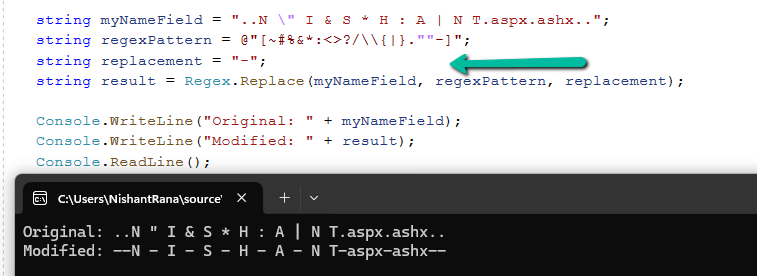
 string myNameField = "..N \" I & S * H : A | N T.aspx.ashx..";
            string regexPattern = @"[~#%&*:<>?/\\{|}.""-]";
            string replacement = "-";
            string result = Regex.Replace(myNameField, regexPattern, replacement);

            Console.WriteLine("Original: " + myNameField);
            Console.WriteLine("Modified: " + result);
            Console.ReadLine();







Hope it helps..
Discover more from Nishant Rana's Weblog
Subscribe to get the latest posts sent to your email.
Share It -


 Nishant Rana's Weblog
One thought on “Fixed – “The relative url contains invalid characters. Please use a different name. Valid relative url names cannot ends with the following strings: .aspx, .ashx, .asmx, .svc , cannot begin or end with a dot, cannot contain consecutive dots and cannot contain any of the following characters: ~ ” # % & * : ? / \ { | }. “ error while creating SharePoint Document Location – Dynamics 365 / Dataverse”