

Recently while trying to retrieve OptionSet Metadata using our favorite KingswaySoft SSIS Toolkit we got the below error.
Same error for prod also – [CDS Source [2]] Error: An error occurred with the following error message: “KingswaySoft.IntegrationToolkit.DynamicsCrm.CrmServiceException: CRM service call returned an error: An error has occurred when retrieving metadata for CRM entity ‘copilotexamplequestion’: The source argument contains duplicate keys. (SSIS Integration Toolkit for Microsoft Dynamics 365, v23.2.2.32701 – DtsDebugHost, v16.0.5270.0)System.ArgumentException. : The source argument contains duplicate keys.”.
More on Metadata Source in CDS Source Component – https://www.kingswaysoft.com/blog/2022/10/18/Introducing-the-Metadata-Source-Type-in-CRMCDS-Source-Component

Interestingly we were getting this issue while running the package in the UAT and Production environment, it was working fine for the Dev environment. Also, it was OOB Table and we could compare and see it to be the same across all the environments.
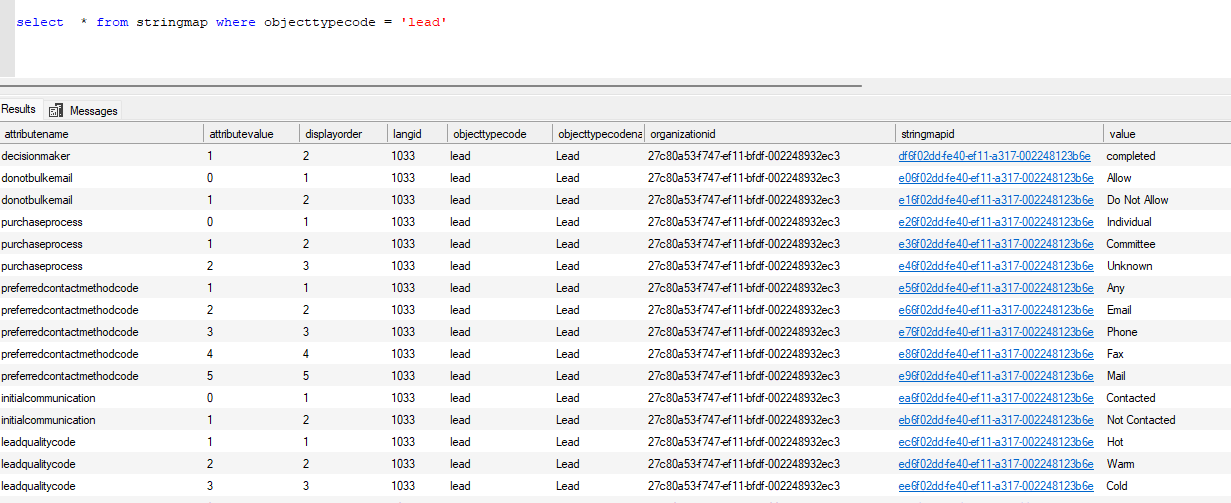
Well, the way we could progress here is to query and get the required details from the stringmap table.
e.g.
Hope it helps..
Discover more from Nishant Rana's Weblog
Subscribe to get the latest posts sent to your email.
Share It -


 Nishant Rana's Weblog
Thank you for sharing this. I have also noticed it that on some envs it stills works on other it doesn’t.
LikeLiked by 1 person
Thanks for your comment and sharing your experience.
LikeLike
Great troubleshooting guide! Dealing with metadata errors in Dynamics 365 can be quite challenging. For businesses using Salesforce, collaborating with a Salesforce Managed Support Consultant can help prevent similar issues by ensuring proper data management and seamless integration. Thanks for sharing this helpful solution!
Zivoke – The Salesforce Managed Support Consultant
https://zivoke.com/salesforce-consulting-chicago-il/
LikeLike