

Recently we had a requirement to implement an approval workflow when a document is added to a SharePoint library.
Below is how we can implement it.

|
Details – |
|
Trigger – When a file is created (properties only) |
|
Specify the Site Address, Library Name, and the Folder on which the flow should run. |
|
Initialize Variable
Initialize a variable VarComments to save all the responses. |
|
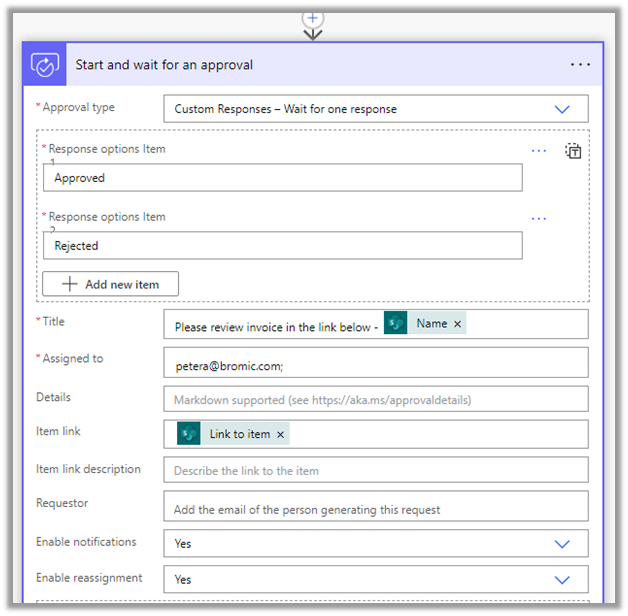
Start and wait for an approval
Here we have used the Approval type as Custom Response – Wait for one response, we could also Approve / Reject – First to respond or any approval type based on the requirements. The Assigned to field contains the name of the user who needs to review it. The item link contains the link to the item. Enable reassignment as Yes will allow the approver to reassign the approval to another user from the Approval Center. |
|
Apply to each
Append the approval response to the variable VarComments. |
|
Condition If Outcome is Approved |
|
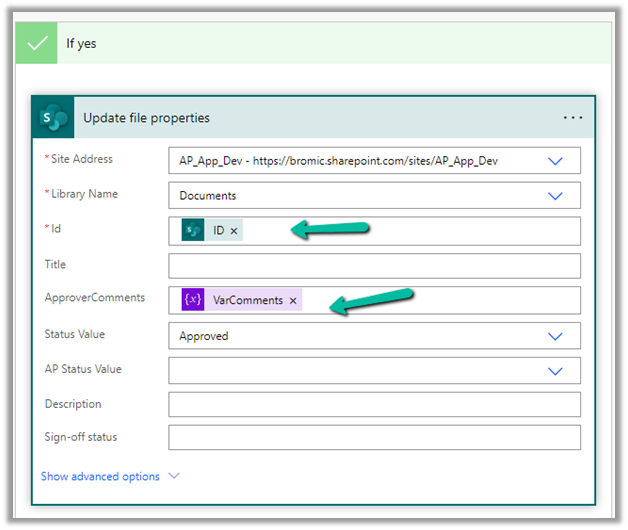
If Yes – Update File Properties Update the properties of the file using the ID. Update the Approval Comments property with the variable. Update the status value as Approved. Repeat the same step for any other Outcome. |




Check other blog posts on Approvals – https://nishantrana.me/2020/08/31/approvals-power-automate-dynamics-365/
Hope it helps..
Discover more from Nishant Rana's Weblog
Subscribe to get the latest posts sent to your email.
Share It -


 Nishant Rana's Weblog
One thought on “Approval / When a file is created (properties only) – when a file is added to the folder in the SharePoint library”