
Hi,
Just created a simple SSRS report that shows the Hierarchy of the users and their manager.
This is how the report looks like

The DataSet query used

Select the row, right click and select group properties option

Select Grouping based on systemuserid

Toggle the visibility based on FullName

Select parentsystemuserid as Recursive Parent from the Advanced option

Set the Left Padding property for the fullname TextBox.

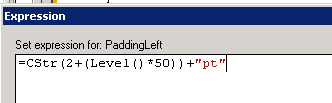
Set the expression for level as Level()

The posts from which I learned creating the hierarchical reports
http://blog.davyknuysen.be/2010/04/16/parent-child-hierarchies-in-reporting-services/
Bye.
Discover more from Nishant Rana's Weblog
Subscribe to get the latest posts sent to your email.
Share It -


Hi,
Can you please share the SQL query to find the Hierarchy of the users and their manager. I also need to build a similar report.
Thanks in advance.
LikeLike
Hi Nishant,
I have created recursive ssrs report successfully, I want to apply search option of “full name” on top of that report, when I am applying the parameter search then it is giving result but not with hierarchy. can you suggest me how I would get the result with search having hierarchy.
LikeLike