
Suppose these are our two tables, Person and Person Details, having one to many relationships to each other.
Person:-

Person details:-
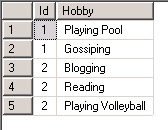
Now first create a report having following simple query for the data set
SELECT Id, [First Name], [Last Name], Email FROM Person
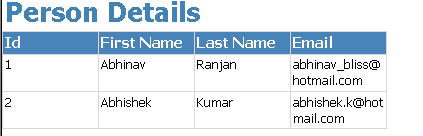
Now create one more report which we would be using as a Subreport with the following query
SELECT Hobby FROM [Person Details] WHERE (Id = @Id)
Now go to our main report, select id column, right click it and select add column to the right.
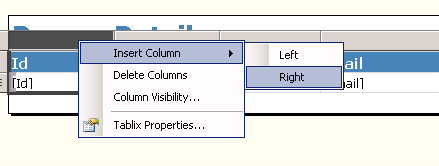
Drag Subreport control from the toolbox there in the new column added

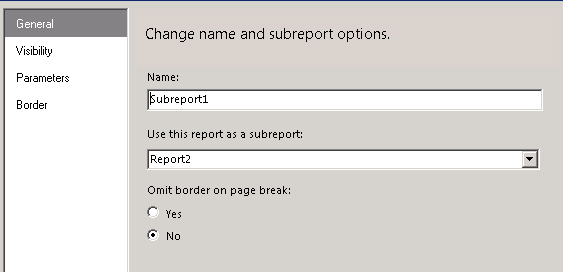
Next right click it and select Subreport properties
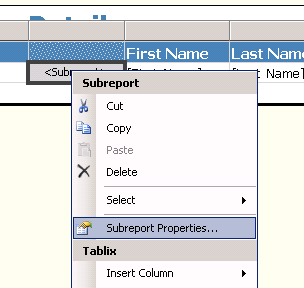
Specify the detail report as Subreport.
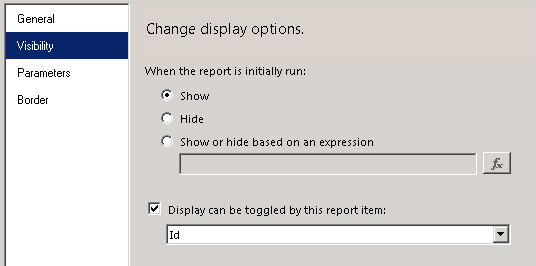
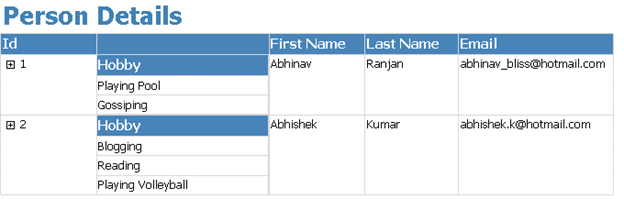
For visibility specify the following options (report would be auto expanded and we will have + sign in front of our id column through which we can toggle the visibility of the subreport)
For Parameters specify value for the id to be passed from the main report.

That’s it. We are done J
Hope it is helpful.
Discover more from Nishant Rana's Weblog
Subscribe to get the latest posts sent to your email.
Share It -


 Nishant Rana's Weblog
I loved as much as you’ll receive carried out right here.
The sketch is tasteful, your authored material stylish.
nonetheless, you command get bought an nervousness over that you wish be delivering the following.
unwell unquestionably come further formerly again as exactly the same nearly a llot often inside
case you shield this increase.
LikeLike
I tried to replicate the same thing you did above, however my UI is same as yours. I see lot of blank space in the subview control. One more issue, when I click on the expand (+ sign), it does not display the result. Any idea what is the issue there?
LikeLike