
Hi,
I recently worked on a report project having InfoPath form in SharePoint’s InfoPath library as it’s Data Source.
For understanding purpose let’s start with a very simple InfoPath form having two text boxes in it named txtFirstName and txtLastName.
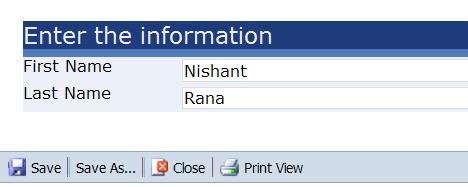
Let’s first define a Data Source for our report.
Name:- InfoPathDataSource
Type:- XML
Connection String : (Suppose the url for our InfoPath library is following
http://nrana-1710-vm1:2575/Sample/Forms/AllItems.aspx and the name of the InfoPath form is PersonalInfo.
So in this case our connection string would be
http://nrana-1710-vm1:2575/Sample/PersonalInfo.xml
Now let’s create a new DataSet having InfoPathDataSource as its data source.
Name :- InfoPathDataSet
Data source :- InfoPathDataSource
Command Type :- Text
Query String :- ( For defining query string we need to first open up the PersonalInfo.xml file. Paste the following url in IE http://nrana-1710-vm1:2575/Sample/PersonalInfo.xml and download and open the xml file.
Suppose this is the content of the PersonalInfo.xml file
<?xml version="1.0" encoding="utf-8"?>
<?mso-infoPathSolution
name="urn:schemas-microsoft-com:office:infopath:Sample:-myXSD-2010-05-26T09-16-03"
solutionVersion="1.0.0.10"
productVersion="12.0.0.0"
PIVersion="1.0.0.0"
href="http://nrana-1710-vm1:2575/Sample/Forms/template.xsn"?>
<?mso-application
progid="InfoPath.Document"
versionProgid="InfoPath.Document.2"?>
<my:myFields xmlns:my="http://schemas.microsoft.com/office/infopath/2003/myXSD/2010-05-26T09:16:03" xml:lang="en-US">
<my:txtFirstName>Nishant </my:txtFirstName>
<my:txtLastName>Rana</my:txtLastName>
</my:myFields>
The Query String to retrieve First and Last name value would be
<Query xmlns:xsi="http://www.w3.org/2001/XMLSchema-instance"
xmlns:my="http://schemas.microsoft.com/office/infopath/2003/myXSD/2010-05-26T09:16:03"
xmlns:xd="http://schemas.microsoft.com/office/infopath/2003" xml:lang="en-us">
<ElementPath>
my:myFields
{
my:txtFirstName(String),
my:txtLastName(String)
}
</ElementPath>
</Query>
We also define a parameter in our data set to which we would pass the url to the infopath form i.e.
http://nrana-1710-vm1:2575/Sample/PersonalInfo.xml
That’s it, now if we run the query we can get values for first name and last name.
In case if your InfoPath xml form is looks like this
<my:myFields xmlns:my="http://schemas.microsoft.com/office/infopath/2003/myXSD/2010-05-12T05:10:51" xml:lang="en-US">
<my:group1>
<my:group2>
<my:field1>2</my:field1>
<my:field2>nishu</my:field2>………….
Than the Element Path of Query String would be like
<ElementPath>
my:myFields/my:group1/my:group2
{
my:field1(String),
my:field2(String)
}
</ElementPath>
Bye…
Discover more from Nishant Rana's Weblog
Subscribe to get the latest posts sent to your email.
Share It -


 Nishant Rana's Weblog
Hi, i’m thinking about using InfoPath forms in a leave management system for submitting applications, my only concerin is whether i would be able to generate reports out of these infopath forms stored in a Sharepoint forms library, is there a viable solution for implementing reporting on InfoPath forms stored in sharepoint. The information you wrote is very useful as a start up but how extensible is this approach for reporting??
LikeLike
Hi Uzair,
I think you can write reports for Infopath forms without much trouble. We have worked on few reports that were using Infopath forms as their data source.
This example might be of some use
https://nishantrana.wordpress.com/2010/05/26/displaying-image-from-file-attachment-control-in-infopath-form-inside-ssrs-report
LikeLike
dear NISHANT ,
In my case I’m retrieving and infopath’s xml that stored in DB , via web service , in my web service i use data reader to store in List, when I consume this service the following xml structure appears:
–
–
–
Tareq
27
…………………..
how this query could be applied here !!
thanks
LikeLike
something went wrong with my xml upthere ,,
Tareq
55
LikeLike
I have the following errore with Reporting Services 2008 and Sharepoint 2010:
DTD is prohibited in this XML document.
Some ideas??
LikeLike