Hi,
One of our clients was having issue wherein images in CRM 2011 were not appearing.
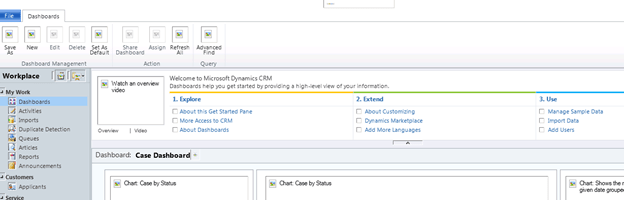
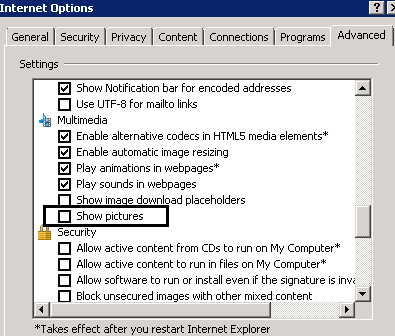
To resolve this issue we need to open Internet Explorer.
Then ToolsàInternet OptionsàAdvanced Tabà check Show Pictures option
Hope this helps.

Hi,
One of our clients was having issue wherein images in CRM 2011 were not appearing.
To resolve this issue we need to open Internet Explorer.
Then ToolsàInternet OptionsàAdvanced Tabà check Show Pictures option
Hope this helps.

Hi,
Get the update rollup 6 for CRM 2011.
http://www.microsoft.com/download/en/details.aspx?id=28712
More information on the fixes and updates
http://support.microsoft.com/kb/2600640
Bye.

Hi,
I got the following error while creating report using report wizard
“Web service request CreateReport to Report Server http://servername/ReportServer/ReportService2005.asmx failed with SoapException. Error: The Value expression for the textrun ‘txtExecutionDateTimeLabel.Paragraphs[0].TextRuns[0]’ contains an error: [BC30456] ‘ConvertUtcToLocalTime’ is not a member of ‘Microsoft.Crm.Reporting.RdlHelper.DateTimeUtility'”
Re installing Reporting Extensions resolved the issue.
Hope it helps.

Hi,
I’ve recently started working on the Grants Manager Accelerator
http://grantsmanager.codeplex.com/
After deploying the solution from cloud to on-premise, i had to populate the on premise instance with some sample data.
For this i exported the data from online for most of the entities and converted them to csv.
I am just sharing all the csv files that i have used. (might be helpful)
https://nishantrana.me/wp-content/uploads/2012/01/grants-management-sample-data.doc
After downloading the file change the extension from .doc to .zip
Bye.

Hi,
I cleared the CRM 2011 Applications exam today. There were total 75 questions in it.
When compared to Customization exam this one was little easier as the Application part in CRM 2011 is more or less like CRM 4.0 only, apart from addition of few new features.
There were question around Marketing List (Static and Dynamic), Campaigns (and quick campaigns), Lead conversion, Service Scheduling etc. These official training materials should be more than sufficient
Bye.

Hi,
Sharing a basic example using which we can create Parent entity and the related entity records in the same operation\
http://msdn.microsoft.com/en-us/library/gg309638.aspx
Check out this helpful post
http://inogic.blogspot.com/2011/12/odata-properties-and-methods-explored.html
public MainPage()
 {
 InitializeComponent();
 }

GGContext context;

private void UserControl_Loaded(object sender, RoutedEventArgs e)
 {
 var orgServiceUrl = "http://servername/orgname/XRMServices/2011/OrganizationData.svc";

 // initialize the context
 context = new GGContext(new Uri(orgServiceUrl));

// using client http stack
 context.HttpStack = System.Data.Services.Client.HttpStack.ClientHttp;
 context.UseDefaultCredentials = false;
 context.Credentials = new NetworkCredential("administrator", "password", "domain");
 // create contact record
 Contact contact = new Contact();
 contact.LastName = "Rana";
 contact.FirstName = "Nisha";

 // create two tasks and one email activity
 var myTask1 = new Task();
 myTask1.Subject = "Task1 created at " + DateTime.Now.ToLongTimeString();
 var myTask2 = new Task();
 myTask2.Subject = "Task2 created at " + DateTime.Now.ToLongTimeString();
 var myEmail = new Email();
 myEmail.Subject = "Email created at " + DateTime.Now.ToLongTimeString();

// add the tasks and email to their respective set
 context.AddToTaskSet(myTask1);
 context.AddToTaskSet(myTask2);
 context.AddToEmailSet(myEmail);

// add contact to be created to the contact set
 context.AddToContactSet(contact);

// add the related records
 contact.Contact_Tasks.Add(myTask1);
 contact.Contact_Tasks.Add(myTask2);
 contact.Contact_Emails.Add(myEmail);

 // add the link
 // http://inogic.blogspot.com/2011/12/odata-properties-and-methods-explored.html
 context.AddLink(contact, "Contact_Tasks", myTask1);
 context.AddLink(contact, "Contact_Tasks", myTask2);
 context.AddLink(contact, "Contact_Emails", myEmail);

context.BeginSaveChanges(CreateContactHandler, contact);
 }
 private void CreateContactHandler(IAsyncResult result)
 {
 // in the call back method call the EndSaveChanges method
 // it returns DataServiceResponse object.
 // we can get the error information from this object in case an operation fails
 context.EndSaveChanges(result);
 // id of the created contact record
 Guid createdContactGuid = ((Contact)result.AsyncState).ContactId;
 }
Hope it helps

 Nishant Rana's Weblog