Calling WCF Rest Service from a Plugin in CRM 2011 (Online)


Let us take a simple rest service example here

http://www.rockycherry.net/services/Photos/photos.svc/photos

It returns the string “You have asked for photos”.

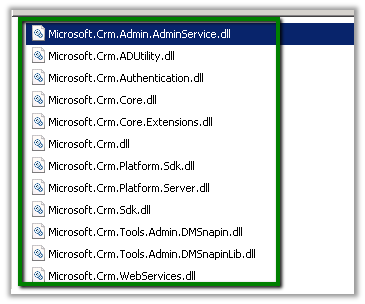
Within the plugin class add references to following assemblies.
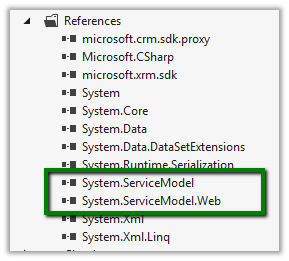
The sample code of the plugin


namespace TestPlugin
{
 public class Class1 : IPlugin
 {
 public void Execute(IServiceProvider serviceProvider)
 {
 IPluginExecutionContext context = (IPluginExecutionContext)serviceProvider.GetService(typeof(IPluginExecutionContext));

 if (context.InputParameters.Contains("Target") && context.InputParameters["Target"] is Entity)
 {

// using WebClient
 WebClient webClient1 = new WebClient();
 string data1 = webClient1.DownloadString("http://www.rockycherry.net/services/Photos/photos.svc/photos");

// using WebChannelFactory
 WebChannelFactory<IPhotos> factory = new WebChannelFactory<IPhotos>(new Uri("http://www.rockycherry.net/services/Photos/photos.svc"));
 IPhotos proxy = factory.CreateChannel();
 string photos = proxy.GetPhotos();

 }

 }
 }

[ServiceContract]
 public interface IPhotos
 {
 [WebGet(UriTemplate = "Photos")]
 [OperationContract]
 string GetPhotos();
 }
}


Register the plugin in Sandbox mode for CRM 2011 online.

Check this wonderful post for all the details

http://rockycherry.net/blog/?p=179

Hope it helps.

Enable Sub Grid for Contract Line (ContractDetail) entity in CRM 2011


Hi,

OOB if we try to add\insert sub grid for Contract Line entity in an Entity’s Form we would realize that the Contract Line entity doesn’t show up in the Entity drop down there.

The UNSUPPORTED way to get it enabled is to

Open the OrgName_MSCRM database

Run the following query

update metadataschema.entity

set  IsChildEntity=0

where name=‘contractdetail’

This will let us add the sub grid for the contract line entity.

Bye.

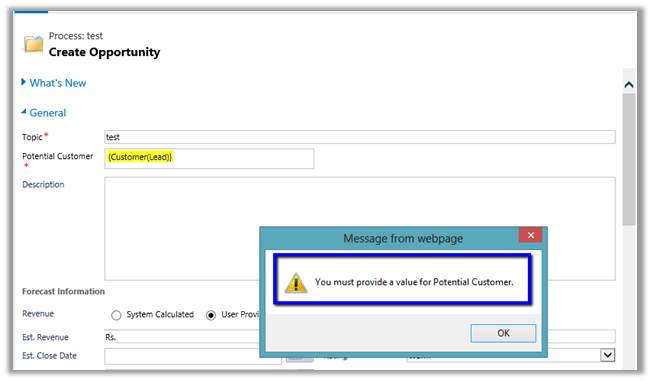
“You must provide a value for Potential Customer” error while creating opportunity record through Create Step in Process in CRM 2011 Online


Hi,

Got the below error message while defining the Create Step in Workflow in CRM 2011 online instance. It seems like it is a bug in new online environment that have UR 13 applied.

Check out this thread

http://social.microsoft.com/Forums/en-US/crm/thread/51a63a3e-bd81-471e-a9d8-617bfe033271/

The workaround would be to remove the requirement level, edit and publish the workflow and the set the requirement level back.

Bye.

List of Error Codes in CRM 2011


Hi,

Was wondering where we can get the list of error codes in CRM 2011.

For CRM 4.0 we used to have the following link (page in SDK)

http://msdn.microsoft.com/en-in/library/cc151248.aspx

In CRM 2011, we can get it in SDK at the following path

\sdk\samplecode\cs\helpercode

Do check this post as well

http://mscrmuk.blogspot.com/2009/01/crm-error-codes.html

Bye.

Advertisements

Error Activating Microsoft Dynamics CRM 2011 List Component for SharePoint


Hi,

After adding the crmlistcomponent.wsp solution to the SharePoint’s team site, while trying to Activate the solution we were getting some error.

The solution for which was to start the SharePoint User Code Host service. However in our case we were not able to start the service, as it would stop after few seconds. The reason was because the service account under which that service was running was not a member of Performance Monitor Users group for the machine. Adding the user to the group fixed the issue for us.

Hope it helps.

Republishing SSRS Report in CRM 2011.


Hi,

We were recently doing installation of CRM 2011 and faced issue while installing CRM 2011 Reporting Extension (SRS Data Connector).

https://community.dynamics.com/crm/b/crmcustomereffective/archive/2011/12/05/microsoft-dynamics-crm-2011-reporting-extension-srs-data-connector-installation-service-account-warning.aspx#.UY3ITbWnwQY

After resolving the issue and completing the installation, we saw that there were no reports published. It was because of a flag being set in MSCRM_CONFIG when the installer ran first.

Check out this helpful post to resolve this issue

http://blog.customereffective.com/blog/2011/10/crm-2011-and-restoring-the-ssrs-server.html

Hope this helps.