Converting html to text for email in CRM


Hi,

Please check out these links

C# code

http://aliraza.wordpress.com/2007/07/05/how-to-remove-html-tags-from-string-in-c/

JavaScript code

http://mscrm4ever.blogspot.com/2008/08/stripping-html-tags-from-email.html

A sample plugin

http://blogs.msdn.com/ukcrm/archive/2008/07/10/converting-html-e-mail-to-plain-text.aspx

Bye..

Pre-generated XmlSerializers for CrmService


Hi,

While looking for a way to boost performance while using CrmService, these are the two good articles that i found.

http://blogs.msdn.com/crm/archive/2009/02/02/boost-performance-with-pre-generated-xmlserializers.aspx

http://uwekaessner.spaces.live.com/blog/cns!21916E8556D908E!175.entry?sa=202741036

Bye..

Nice events and recordings for XRM


Hi,

Have a look at these recorded events.

http://www.xrmvirtual.com/events

Bye..

Calling a custom web service which uses CrmService from within a plug-in.


Suppose we have a simple web service which uses CrmService to create contact records. Now we want to call this custom web service from within our plug-in.

On doing so, we might receive following errors

System.Net.WebException: The request failed with HTTP status 401: Unauthorized.

or

Microsoft.Crm.CrmException: No Microsoft Dynamics CRM user exists with the specified domain name and user ID

It could be because the credentials of the user are not getting passed from the plugin to the custom webservice.

Here we could the following

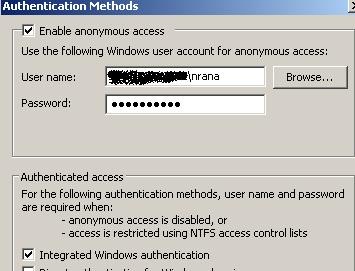
We can enable anonymous access and specify a valid CRM user’s credential there.

access

Bye..


Web.config settings for Custom Web Application in CRM 4


These are few of the configuration settings we need to consider while deploying our custom web application within ISV folder of CRM.

If we want the page to run under the context of the logged in user than we need to enable impersonation.

    <authentication mode="Windows"/>
    <identity impersonate="true"/>


If we are using view state or session state we need to enable them as well.

  <pages enableSessionState="true" enableViewState="true" >


CRM 4 implements http modules for multi-tenancy support. Here we need to remove these modules from being called for our custom web application.

<httpModules>
      <remove name ="CrmAuthentication"/>
      <remove name ="MapOrg"/>
</httpModules>
 
Bye..


The key specified to compute a hash value is expired, only active keys are valid. Expired Key – CRM.


I got this error while opening CRM!!

Starting the Microsoft CRM Asynchronous Processing Service on the server solved the problem for me!!!

or if that doesn’t work try this

“C:\Program Files\Microsoft Dynamics CRM\Tools >Microsoft.Crm.Tools.WRPCKeyRenewal.exe /R”

Bye.