Calling a custom web service which uses CrmService from within a plug-in.


Suppose we have a simple web service which uses CrmService to create contact records. Now we want to call this custom web service from within our plug-in.

On doing so, we might receive following errors

System.Net.WebException: The request failed with HTTP status 401: Unauthorized.

or

Microsoft.Crm.CrmException: No Microsoft Dynamics CRM user exists with the specified domain name and user ID

It could be because the credentials of the user are not getting passed from the plugin to the custom webservice.

Here we could the following

We can enable anonymous access and specify a valid CRM user’s credential there.
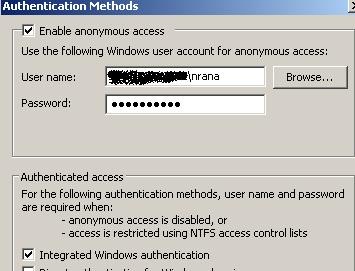
access

Bye..


Web.config settings for Custom Web Application in CRM 4


These are few of the configuration settings we need to consider while deploying our custom web application within ISV folder of CRM.

If we want the page to run under the context of the logged in user than we need to enable impersonation.

    <authentication mode="Windows"/>
    <identity impersonate="true"/>


If we are using view state or session state we need to enable them as well.

  <pages enableSessionState="true" enableViewState="true" >


CRM 4 implements http modules for multi-tenancy support. Here we need to remove these modules from being called for our custom web application.

<httpModules>
      <remove name ="CrmAuthentication"/>
      <remove name ="MapOrg"/>
</httpModules>
 
Bye..


The key specified to compute a hash value is expired, only active keys are valid. Expired Key – CRM.


I got this error while opening CRM!!

Starting the Microsoft CRM Asynchronous Processing Service on the server solved the problem for me!!!

or if that doesn’t work try this

“C:\Program Files\Microsoft Dynamics CRM\Tools >Microsoft.Crm.Tools.WRPCKeyRenewal.exe /R”

Bye.

Building URL to the CRM record that triggers the workflow.


Hi,

I was just looking for the various options for the above scenario.

These are the different options that i found

http://www.dynamicscrmtrickbag.com/2009/09/13/email-record-links/

http://www.powerobjects.com/blog/2009/02/23/crm-40-links-in-workflow-emails-part-2/

http://blog.powerobjects.com/2008/09/16/crm-40-links-to-entities-in-workflow-email/

http://a33ik.blogspot.com/2009/06/creation-of-shortcut-to-record-in.html

and finally using ‘Url Functions’ extensions found in

Business Productivity Workflow Tools

find more information on it over here

http://blog.customereffective.com/blog/2009/10/make-microsoft-dynamics-crm-workflow-more-useful.html

Bye.

Passing parameters to NavBarItem’s url property in CRM.


For passing custom attribute values as parameter to the navBarItem on an Entity, we could use the following similar JavaScript


// get the id of navbaritem using IE Dev tool

var navBarItem = document.all.navBarItemID;

// get the value of the field to pass as parameter

var fname=crmForm.all.firstname.DataValue;

// if it is not null than attach a function that uses openIsvWin function of CRM

// there you could pass your parameters for the url

if (navBarItem != null) {

navBarItem .onclick = function() {

openIsvWin(‘http://localhost/default.aspx?fname=’+fname, false, -1, ”);

}

}

http://www.eggheadcafe.com/software/aspnet/29468928/navbaritem-url-property.aspx


Bye..

“Insert failed for entity ‘TimeZoneLocalizedName’, batchRows=1144 with exception System.Data.SqlClient.SqlException: Cannot bulk load because the file "C:\Documents and Settings\\Application Data\Microsoft\MSCRM\BCP\.bcp" could not be opened” in Data Migration Manager


I got this error in data migration manager at the synchronizing stage.

While searching for it I found that this error occurs in case if we have installed Data Migration Manager on the CRM Server and have selected the SQL Server on a remote machine as database.

The error got resolved on re installing the Data Migration Manager with SQL Express.

Bye..