Sorting on Link Entity’s Attribute in Fetch XML (CRM 2011)


Hi,

We had a requirement where we wanted our resultset to be sorted based on the associated link entity’s attribute.

This is how we need to write our fetch xml query.

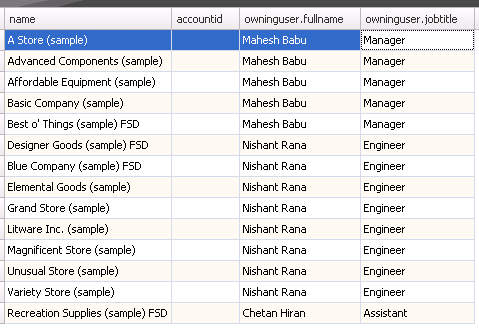
Suppose we want to get all the Accounts records and its owner information sorted based on Owner’s Job Title. (Descending)

For this our Fetch XML query be something like this

The result

Bye.

Advertisements

Using Multivalued Parameter in Fetch XML based report in CRM 2011 online.


Hi,

Say for e.g. we want a report that shows all the contacts based on owners selected.

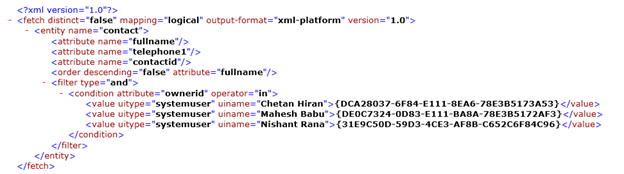
If we create the query using advanced find, our query will look like this

Here we have selected three users for owner.

From the query we get the initial impression that it won’t be possible to use the above Fetch XML in our report as the Value Tag needs to dynamic based on the no. of the owners selected.

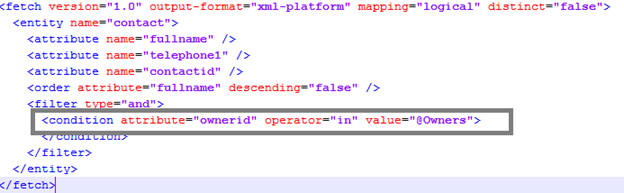
However to use it in the report we need to make the following change in the query

Here @Owners Query Parameter will takes its value from a Multivalued Report Parameter.

Hope it helps.

CRM 2011 Online Fetch XML based SSRS Report and the In condition.


Hi,

Suppose I have a simple Fetch XML based report that shows all the contact’s Full name and their Email Id.
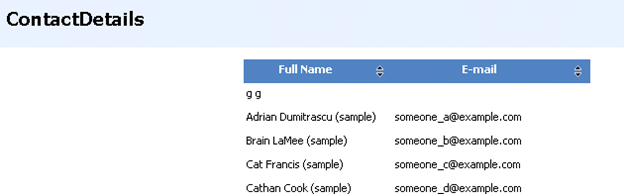
The query for it
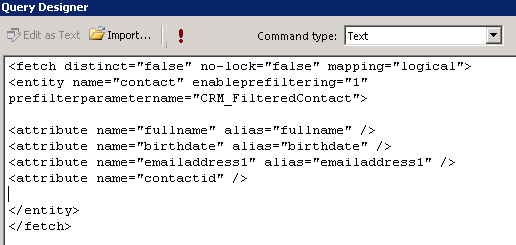
Now let us add a like condition to it. (i.e. get all the contacts where fullname like)
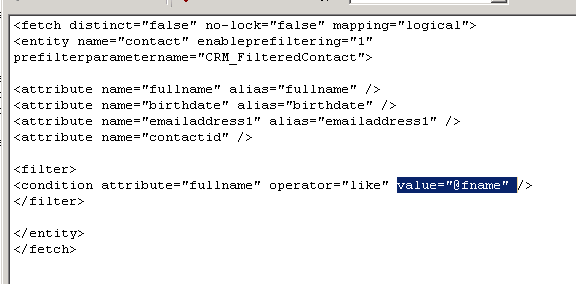
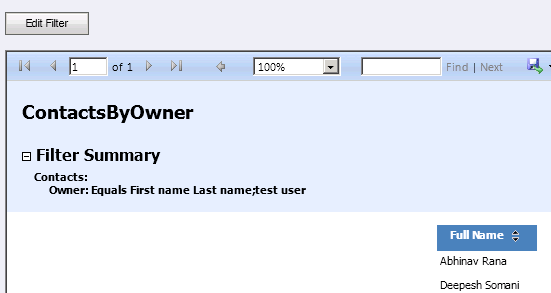
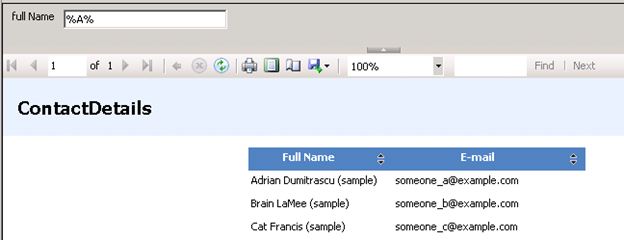
The full name parameter will appear in the report.
Now comes the tricky part.

Suppose we have to find all the contact records based on the owners selected.

For owners we will have drop down field in the report.

The fetch xml query would look like below (if we specify two owners)
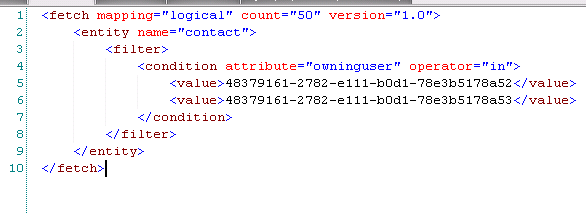
But here the issue is that value (tag) part would be dynamic, it has to be equal to the values selected by user in the drop down owner parameter of the report. It seems that we can’t dynamically change the Fetch Xml query in runtime for the report.

So the “In” operator won’t be of much use in case of fetch xml based report.

One way we can overcome this issue is by using Default filters.
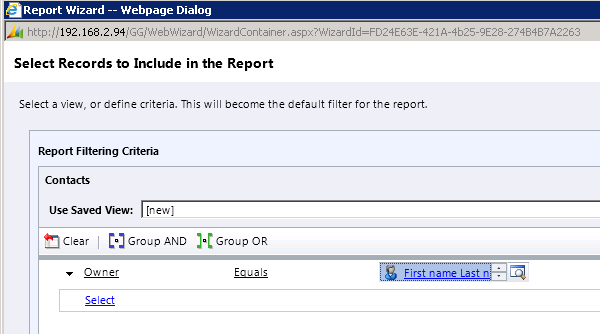
Here users will have option of editing the filter and specifying the values for the owner which would be then passed down to the report.

This is one way I can think of getting the multiselect thing working in Fetch XML based report.

Please share and suggest your ideas for the same.

Update :-

The multivalue can be passed in the following comma separated way, so we can make use of Multiselect Report Parameter here.


<fetch mapping="logical" count="50" version="1.0">
 <entity name="contact">
 <filter>
 <condition attribute="ownerid" operator="in">
 <strong><value>48379161-2782-e111-b0d1-78e3b5178a51,48379161-2782-e111-b0d1-78e3b5178a52,A81F00C-D4E4-E011-B58C-00155D2A49C7</value></strong>
 </condition>
 </filter>
 </entity>
</fetch>

The fetch XML will have condition in the following format

<condition attribute=”ownerid” operator=”in” value=”@ActivityOwner”>

Bye.

List of all the tools and resources for Microsoft Dynamics CRM 2011.


Hi,

Got to know about this wonderful CRM Wiki page today, so just thought of sharing it.

http://social.technet.microsoft.com/wiki/contents/articles/2490.microsoft-dynamics-crm-2011-development-resources.aspx

Thanks George Doubinski and Ben Hosking for publishing it.

Bye.

Determining the Update Rollup Version of the CRM installed


Hi,

Just sharing two useful posts which would help us to identify the update rollup version installed in our CRM environment.

For CRM 2011

http://crmdynamo.com/2011/09/crm-2011-update-rollup-release-build-numbers-and-how-to-find-them/

For CRM 4.0

http://crmdynamo.com/2010/03/check-which-update-rollup-version-is-installed-on-your-crm-environments/

Bye.

Try out – Ribbon Workbench for Dynamics CRM 2011


Hi,

Today i came across this new tool for Ribbon editing in CRM 2011.

http://www.develop1.net/public/page/Ribbon-Workbench-for-Dynamics-CRM-2011.aspx

The tools looks really wonderful.

Will try it out soon.

Bye.