Add JavaScript to NavBarItem in CRM 2011.


Suppose we want to add a new link on an entity’s form and want to call JavaScript on onclick of that link.

For doing so first we need to add a Navigation link on the form.

Click on Insert tab and Select Navigation Link button.

Specify Name and Icon and click on OK.

Save and Publish the customization, then open the form in IE Developer tool to get its id. We will use that id in our JavaScript function for onload of the form.

Our function


function OpenBing()
{
// get the navItem
var navItem = document.getElementById('navLink{6daba50b-300a-824b-453c-660e5b10781b}');

// override the onclick to call the connection page
navItem.onclick =function()
{
window.open("http://www.bing.com");
};
}

Clicking on Open Bing link opens up the Bing page.

Hope it helps.

Filtered Lookup for Add Existing Button in CRM 2011.


Hi,

(This works for 1-n relatinship)

For n-n these are the two links that could be of help

http://www.mscrmking.com/2011/06/crm-2011-how-to-filter-add-existing/

http://blogs.huddle.com.ar/sites/Dynamics/Lists/Posts/Post.aspx?ID=14

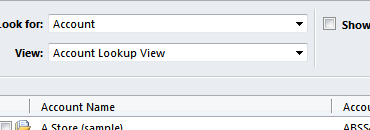
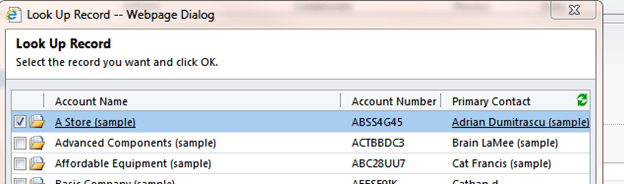
Let us take a very simple scenario in which for a given contact record, when I add the Sub-Contacts using Add Existing Button, then I should only see those contacts having last name equal to the last name of the current record.

I have following contact records in the system

Now clicking on Add Existing Contact button on the ribbon should only show those contact records which have last name equal to “Rana”

To achieve this I have created a plugin and registered the following step for it

The trick here is to replace the InputParameter named Query with our own QueryExpression.

This the url that is being used for the lookup

From the url we can get the LookupStyle (single or multi) and Id of the record i.e. currentid in our plugin.

The source code

using System;
using System.Collections.Generic;
using System.Linq;
using System.Text;
using Microsoft.Xrm.Sdk;
using System.Web;
using Microsoft.Xrm.Sdk.Query;

namespace Plugins1
{
 public class Class1 : IPlugin
 {
 public void Execute(IServiceProvider serviceProvider)
 {
 if (HttpContext.Current.Request.QueryString["currentid"] != null && HttpContext.Current.Request.QueryString["LookupStyle"].ToString() == "multi")
 {
 string lookupId = HttpContext.Current.Request.QueryString["currentid"].ToString();
 Microsoft.Xrm.Sdk.IPluginExecutionContext context =
 (Microsoft.Xrm.Sdk.IPluginExecutionContext)serviceProvider.GetService(typeof(Microsoft.Xrm.Sdk.IPluginExecutionContext));
 if (context.InputParameters.Contains("Query"))
 {
 // Get the id of the record on which we have our subgrid
 Guid contactGuid = new Guid(HttpContext.Current.Request.QueryString["currentid"].ToString());

// Get the OrgService
 IOrganizationServiceFactory serviceFactory =
 IOrganizationServiceFactory)serviceProvider.GetService(typeof(IOrganizationServiceFactory));
 IOrganizationService service = serviceFactory.CreateOrganizationService(context.UserId);

// Get the lastname value of the conact record
 ColumnSet colsContactLastName = new ColumnSet();
 colsContactLastName.AddColumn("lastname");
 Entity contactEntity = service.Retrieve("contact", contactGuid, colsContactLastName);
 string lastName = contactEntity.Attributes["lastname"].ToString();

// Create the queryexpression to find all the contacts that have last name equal to the record on which we have our subgrid
 QueryExpression newQueryExpression = new QueryExpression();

ConditionExpression condition1 = new ConditionExpression();
 condition1.AttributeName = "lastname";
 condition1.Operator = ConditionOperator.Equal;
 condition1.Values.Add(lastName);

ConditionExpression condition2 = new ConditionExpression();
 condition2.AttributeName = "contactid";
 condition2.Operator = ConditionOperator.NotEqual;
 condition2.Values.Add(contactGuid);

newQueryExpression.EntityName = "contact";
 newQueryExpression.ColumnSet = new ColumnSet();
 newQueryExpression.ColumnSet.AllColumns = true;
 newQueryExpression.Criteria.AddCondition(condition1);
 newQueryExpression.Criteria.AddCondition(condition2);

// Replace the existing Query - Input Parameter with our custom query expresssion
 context.InputParameters["Query"] = newQueryExpression;

}
 }
 }
 }
}

It hasn’t been tested thoroughly though.

Hope it helps.

Using Organization.svc in Silverlight for CRM 2011 Online/OnPremise


  • Create a new Silverlight 4 Application named CRM2011OnlineSilverlightApp.
  • Add Service Reference to the Organization.Svc (https://orgname.crm4.dynamics.com/XrmServices/2011/Organization.svc).
  • crm for North America
  • crm4 for Europe
  • crm5 for Asia
    • Give the namespace as OrgServiceReference
  • Open the reference.cs and replace System.Collections.Generic.KeyValuePair with KeyValuePair
  • Add the following helper files from the SDK (..\sdk\samplecode\cs\silverlight\soapforsilverlight\soapforsilverlightsample)
  • silverlightextensionmethods.cs
  • silverlightutility.cs
  • Rename namespace SoapForSilverlightSample.CrmSdk to CRM2011OnlineSilverlightApp.OrgServiceReference in silverlightextensionmethods.cs file.
  • Add a Button and a TextBlock to our Silverlight application.
  • Add the following code.
 private void btnCreateContact_Click(object sender, RoutedEventArgs e)
 {
 // Get IOrganizationService instance
 IOrganizationService myOrgService = SilverlightUtility.GetSoapService();

Entity myContact = new Entity();
 myContact.LogicalName = "contact";

// Create the AttributeCollection
 myContact.Attributes = new AttributeCollection();

// Specify Last Name and First Name for the contact to be created
 KeyValuePair<string, object> myKVPLastName = new KeyValuePair<string, object>();
 myKVPLastName.Key = "lastname";
 myKVPLastName.Value = "Twain";

 KeyValuePair<string, object> myKVPFirstName = new KeyValuePair<string, object>();
 myKVPFirstName.Key = "firstname";
 myKVPFirstName.Value = "Shania";

myContact.Attributes.Add(myKVPLastName);
 myContact.Attributes.Add(myKVPFirstName);

 OrganizationRequest myOrgRequest = new OrganizationRequest();
 myOrgRequest.RequestName = "Create";

// call the Create method
 myOrgService.BeginCreate(myContact, myCreateHandler, myOrgService);
 }

private void myCreateHandler(IAsyncResult ar)
 {
 IOrganizationService orgService = ar.AsyncState as IOrganizationService;

Dispatcher.BeginInvoke(() =>
 {
 txtStatus.Text = "Contact Guid - " + orgService.EndCreate(ar);
 });
 }
  • Create a web resource in CRM and upload the XAP, and to test it add it to any form inside CRM.
  • Click on create to create the contact record.
  • Download the project.  (change the extension to zip from docx)
Hope it helps.

https://nishantrana.me/wp-content/uploads/2011/11/crm2011onlinesilverlightapp.docx

Adding a simple Silverlight application to SharePoint Online


Hi,

Say we have created a simple Silverlight 4 application that shows current date time.

Now we want to deploy it on the SharePoint Live. For this we can follow these simple steps:-

  1. Open the SharePoint site and click Site Actions |View All Site Content

  1. Click on Documents

  1. Select Upload Document

  1. Select and Upload the HelloWorld.XAP file. After uploading the document copy the url of the file. (e.g. http://my.sharepoint.com/TeamSite/Documents/HelloWorld.xap)

  1. Create a new web part page or open an existing web part page on the site. Click on “Add a Web Part” and select a “Silverlight Web Part” .

  1. Click on configure and specify the URL of the XAP file uploaded and select Apply.

  1. The page with the web part.

Hope it helps.

querySelector and querySelectorAll – Selectors API


Hi,

Apart from our usual document.getElementsById and document.getElementsByTagName method to select element from the DOM we can now make use of document.querySelector and document.querySelectorAll .

With them we can use the same selectors that we use in CSS to select elements for styling.

A simple example

<html>
<head>
    <title>Selectors API</title>
    <script>
        window.onload = function () {

            // select div element with id myDivId
            var myDiv = document.querySelector("#myDivId");

            // select p element with text "Paragraph 1"
            var paragraph1 = myDiv.querySelector("span>p");

            // select p element having class as p1Class
            var paragraph2 = document.querySelector("p.p2Class");

            // select all p element
            var allParagraph = document.querySelectorAll("div>span>span>p");
        }

    </script>
</head>
<body>
    <div id="myDivId" class='divClass'>
        <span><span class='spanClass'>
            <p>
                Paragraph 1</p>
            <p id="p2" class="p2Class">
                Paragraph 2</p>
        </span></span>
    </div>
</body>
</html>

More details

http://msdn.microsoft.com/en-us/ie/cc307217.aspx

http://msdn.microsoft.com/en-us/library/cc288326(v=vs.85).aspx

Browser supported

http://caniuse.com/queryselector

Making cross domain call using JSONP (JSON with padding)


Hi,

Just created a simple html page that uses JSONP to make cross domain call to twitter’s API.

Source Code:-

<!DOCTYPE html>
<html>
<head>
    <title>JSONP Example</title>
    <script>

        function getTweets(tweets) {

            var tweetDiv = document.getElementById("tweet");

            for (var i = 0; i < tweets.results.length; i++) {
                var tweet = tweets.results[i];

                // create div element for each result
                var div = document.createElement("div");
                div.innerHTML = "<img src= " + tweet.profile_image_url + "></img> ";
                div.innerHTML += tweet.from_user + " : <b><i>" + tweet.text + "</b></i>";

                // append it to tweet div
                tweetDiv.appendChild(div);
            }
        }
    </script>
</head>
<body>
<div id="tweet">
</div>
<!--Specifying search term and callback function-->
<script src="http://search.twitter.com/search.json?q=Sachin%20Tendulkar&rpp=10&callback=getTweets"></script>
</body>
</html>

Bye

Nishant Rana's Weblog

Everything related to Microsoft .NET Technology

Skip to content ↓