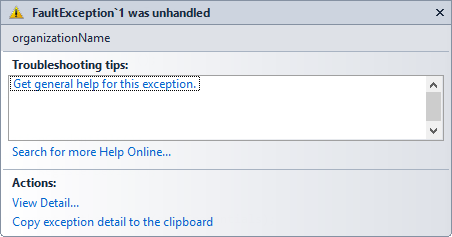
The search request was unable to connect to the Search Service in SharePoint 2013


Hi,

After installing and configuring the SharePoint 2013 server on my of VM’s, created a new site collection and did some search and got the below error.


Then realized that we need to create the Enterprise Search Service Application first to get the Search Service running.

Open Central Administration à Select Application Management à Service Applications à Manage Service Applications

 

Create a new Search Service Application
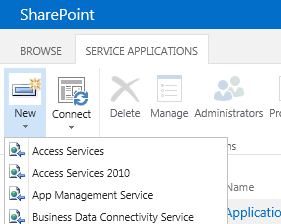
 

Once created,

Open the application and set up the Content Sources in it and start the crawl.
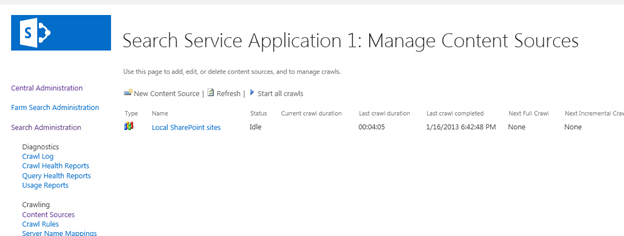
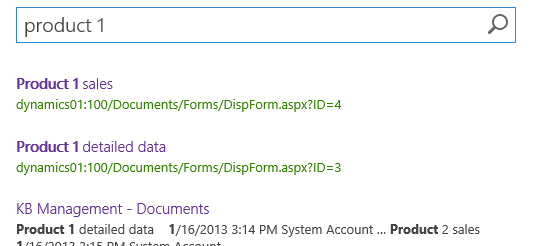
Once the crawling was complete, the search results showed up properly.
Bye.

ExecuteMultipleRequest and RetrieveMetadataChangesRequest in CRM 2011


Hi,

Check out the following MSDN articles to know how to use these new messages added in SDK.

http://msdn.microsoft.com/en-us/library/jj863631.aspx

http://msdn.microsoft.com/en-us/library/jj863599.aspx

Bye.

2012 in review


The WordPress.com stats helper monkeys prepared a 2012 annual report for this blog.

Here’s an excerpt:

About 55,000 tourists visit Liechtenstein every year. This blog was viewed about 410,000 times in 2012. If it were Liechtenstein, it would take about 7 years for that many people to see it. Your blog had more visits than a small country in Europe!

Click here to see the complete report.

Sample code to connect Office 365 users to CRM 2011 online


Sharing a sample code that can be used to connect to CRM 2011 online with Office 365.

// Add refereneces to the following dll
 // microsoft.crm.sdk.proxy
 // microsoft.xrm.sdk
 // system.runtime.serialization
 // system.servicemodel

IServiceManagement<IOrganizationService> orgServiceManagement =
 ServiceConfigurationFactory.CreateManagement<IOrganizationService>(new Uri("https://democrm.api.crm5.dynamics.com/XRMServices/2011/Organization.svc"));

AuthenticationCredentials authCredentials = new AuthenticationCredentials();
authCredentials.ClientCredentials.UserName.UserName = _userName;
authCredentials.ClientCredentials.UserName.Password = _password;
AuthenticationCredentials tokenCredentials = orgServiceManagement.Authenticate(authCredentials);

OrganizationServiceProxy organizationProxy = new OrganizationServiceProxy(orgServiceManagement, tokenCredentials.SecurityTokenResponse);
Guid userid = ((WhoAmIResponse)organizationProxy.Execute(new WhoAmIRequest())).UserId;

Sample Code – Dynamics 365 Web API / Organization Service

Bye.

Advertisements

FaultException was unhandled ‘organizationName’ while using DiscoveryService in CRM 2011


Hi,

I was getting the below error while using DiscoveryService

The reason was I was unknowingly using RetrieveOrganizationRequest class instead of RetrieveOrganization(s)Request class.

http://social.microsoft.com/Forums/is/crmdevelopment/thread/d5d00302-8f7b-4efc-873b-c54b3e29749d

Hope it helps.

KB2600640 is not installed on this computer in CRM 2011


Hi,

Recently got this error while installing a new rollup version for CRM 2011.

Basically it talks about installing the Update Rollup 6.

http://support.microsoft.com/kb/2600640?wa=wsignin1.0

http://www.microsoft.com/en-us/download/details.aspx?id=28712

Bye.

Nishant Rana's Weblog

Everything related to Microsoft .NET Technology

Skip to content ↓