Hiding form assistant in CRM


Hi,

We could use the following script to hide the form assistant in Crm , we would use it in the form load event

document.getElementById(‘RelatedInformationPane’).style.display=’none’;

// ToggleInformationPane() to toggle the form assistant pane

document.all.RelatedInformationPane.ToggleInformationPane();

For CRM 4.0, go to customization ->customize entities-> select your entity–> select form properties->select Display tab and uncheck enable form assistant check box !!

Bye..

Recalculate and SubmitCrmForm JavaScript function in CRM


Hi,

I was trying to figure out what the recalcuate button does in case of Order and Quote form. Got to know that it calculates the total based on the Products added to that record. Behind the scene this is the html code for the recalculate button

<li tabIndex=”-1″ title=”Recalculate” id=”_MBcrmFormSubmitCrmForm1truetruefalse”
onclick=”window.execScript(action)”
action=”crmForm.SubmitCrmForm(1, true, true, false);”>

So basically it calls SubmitCrmForm function.

SubmitCrmForm triggers the save event even if there are no modifications made on the form.

SubmitCRMForm( Mode, Validate, ForceSubmit, closeWindow)        // we could use this function but it is unsupported

Different Mode could be -1,2,7,58,59

or alternatively we could use the below function

Save
Code: 1
Function: crmForm.Save();

SaveAndClose
Code: 2
Function: crmForm.SaveAndClose();

Send
Code: 7
Function: send();

SaveAsCompleted
Code: 58
Function: SaveAsCompleted();

SaveAndNew
Code: 59
Function: crmForm.SubmitCrmForm(59, true, true, false);

Bye…

Finding the id of the element using IE Developer tool.


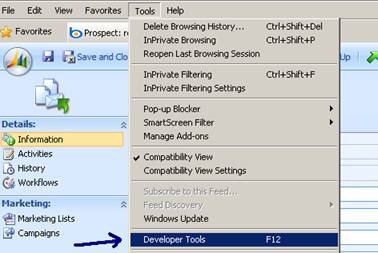
With IE Developer Tool, to find the id, we need to do the following

Select developer tools and

clip_image001

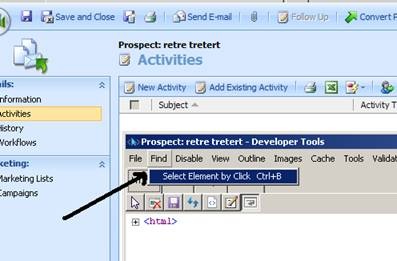
then “select element by click” in find menu of dev tool.

clip_image002

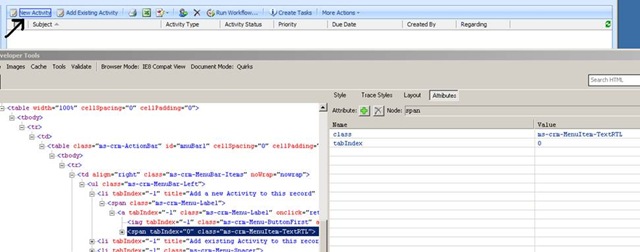
And then select the element whose id we want

clip_image003

The id would be within the Li element within the attributes tab, select it

clip_image004


That’s  it ..

Managing JavaScript Code in CRM


Hi,

Most of the time while writing JavaScript in CRM, we end up writing duplicate code i.e.

For e.g. if there are two fields say field1 and field2  and on selection of a particular value in field1,  we would like to make field2 mandatory.

Here we would first write the code for that in the onSave event of the field1.

Than again we would have to put the same code in the onload event also to reflect the same condition.

After some time it becomes really difficult to maintain it!

However there is a solution to that, just browsing through stunnware site, got this particular article on reusing Javascript.

Please go through that !!

Reusing code in OnLoad and OnChange event handlers

Just thought of sharing it ….


Cancelling OnSave event CRM JavaScript.


Hi,

To cancel save event we need to use this line of code

event.returnValue=false;

followed by

return false;

To know more about it

http://msdn.microsoft.com/en-us/library/cc150868.aspx

To understand difference between event.returnValue=false and return false, check out this informative article

http://webdevelopersjournal.com/articles/jsevents2/jsevents2.html

Bye..

CrmSecurityException: Could not find GUID for server — servername


Hi,

I was getting the following error “Invalid domain name. Domain name is either invalid or unreachable” while trying to register a plugin.

Found this kb article

http://support.microsoft.com/kb/948593/EN-US/

So installed update rollup 4.0

http://www.microsoft.com/downloads/details.aspx?FamilyID=0ddf8e83-5d9c-4fe7-9ae6-f2713a024071&displaylang=en

After that on trying to open CRM started getting the could not find GUID error.

Not very sure, but it has something to do with ActiveDirectory i guess.

Anyways uninstalled the Rollup 4 and to my surprise everything started working normally, even i was able to register plugin without any issues!!

Just thought of sharing the same !!