
Download the Enterprise Library 5 from here
http://www.microsoft.com/en-in/download/details.aspx?id=15104
Create a new windows application.
We need the configuration information to setup the caching.
Open the EntLib Configuration console.

Open the app.config file of the windows application created.
Select Blocks à Add Caching Settings
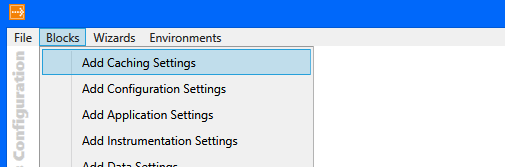
It will add the required configuration information to the config file of the windows application.
Sample code implementing Caching block to save dictionary object in Cache.
public static class Configuration
{
public static Dictionary<string, string> GetConfigSettings()
{
// get the cache manager
ICacheManager cacheManager = CacheFactory.GetCacheManager();
var configSettings = (Dictionary<string, string>)cacheManager["configSettings"];

if (configSettings == null)
{
configSettings = new Dictionary<string, string>();
configSettings.Add("key1", "value1");
configSettings.Add("key2", "value2");

// add the dictionary object
cacheManager.Add("configSettings", configSettings);
}
else
{
// get from the configsettings object from the cache
configSettings = (Dictionary<string, string>) cacheManager["configSettings"];
}

return configSettings;
}
}
Bye.



 Nishant Rana's Weblog