Dynamics CRM 2011 Developer Training Kit is available now.
It has got presentations, videos, hands on labs etc. on different topics.
http://www.microsoft.com/downloads/en/details.aspx?FamilyID=78498c29-28ac-440b-9c20-ec5da6ee6e98
Bye.

Dynamics CRM 2011 Developer Training Kit is available now.
It has got presentations, videos, hands on labs etc. on different topics.
http://www.microsoft.com/downloads/en/details.aspx?FamilyID=78498c29-28ac-440b-9c20-ec5da6ee6e98
Bye.

In case of OnChange event, at times we need to do some validation and if the validation fails we want the focus to be set back to the same attribute.
We can make use of the following JScript for that
var oField = crmForm.all.crm_myfield;
oField.onblur = function() {
oField.SetFocus();
oField.onblur = null; }
oField.SetFocus();
or
set focus on some other field and then setting it back to our field
Bye..

To deploy our custom web application inside ISV folder of CRM 2011 we need to follow the below steps
Make following changes in the web.config
<configuration>
<configSections>
<remove name=“crm.authentication“ />
</configSections>
<system.web>
<httpModules>
<clear/>
</httpModules>
……………………
And after deploying the application within the ISV folder, place the following dlls within its bin folder
We can find these dll’s inside
../Microsoft Dynamics CRM/Server/Bin folder.
The above solution worked perfectly for Beta Versions of CRM 2011.
Recently we upgraded to RTM, and we had to deploy a WCF Service and custom web site inside isv.
For WCF service we had to make following changes to the web.config apart from the changes mentioned above
<serviceHostingEnvironment aspNetCompatibilityEnabled=”false”>
</serviceHostingEnvironment>
</system.serviceModel>
And in case of custom web site we had to add the following additional dll’s
Hope it helps!

One of my colleagues faced a situation where he had installed a plugin assembly into database but was not able to locate its dll, and now he wanted to deploy it in some other server.
These are the steps he followed
Get the encoded base 64 string representation of the plugin from PluginAssemblyBase table.
select name,content,*
from PluginAssemblyBase
Use that content and get the dll from the following site.
http://www.motobit.com/util/base64-decoder-encoder.asp
Set decode and export to binary file option there with filename having extension as .dll
Open the dll in the reflector tool and use the source code to build that assembly.
http://reflector.red-gate.com/download.aspx
Bye..

To create a custom view for a lookup, we can refer to this blog post
https://nishantrana.wordpress.com/2010/12/31/filtered-lookup-in-crm-2011/
Here
lookupControl.addCustomView(viewId, entityName, viewDisplayName, fetchXml, layoutXml, true);
Setting last parameter as “true” sets the custom view as default. However this was not happening in case of connection entity lookups.
So to finally achieve this we did the following
Modify the lookupinfo.aspx “..\Microsoft Dynamics CRM\CRMWeb\_controls\lookup”.
Find the function named handleView and modify it to show our custom view as default.
function handleView(o, entity){
var selObjectsDropdown = (typeof (selObjectsList) == Mscrm.TypeNames.undefinedType) ? selObjects : selObjectsList;
if (o.innerHTML.indexOf(‘Case Member View’)!=-1){
var sOriginalViewId = “{C0F1DD64-1BF3-450D-BCDE-DF4732DE1001}”;
}
else {
var sOriginalViewId = crmGrid.GetParameter(“viewid”);
if (selObjectsDropdown.selectedIndex != -1 && selObjectsDropdown.options.length > 0) {
var tempDefaultViewId = selObjectsDropdown.options[selObjectsDropdown.selectedIndex].guid;
if (!IsNull(tempDefaultViewId)) {
sOriginalViewId = tempDefaultViewId;}}}
. . . . . . . .
. . .
It is an unsupported customization!!!!
Bye..

Hi,
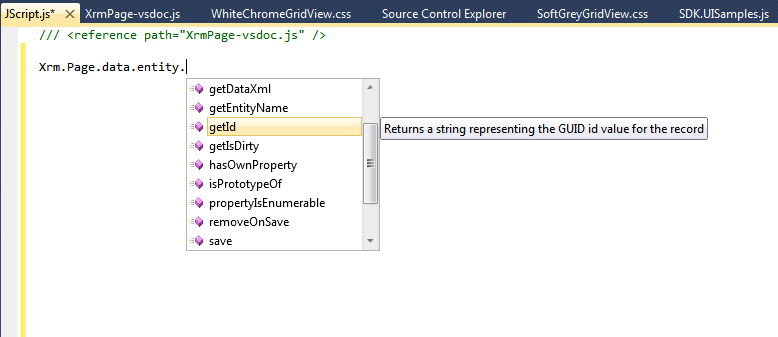
Follow the instructions in the following post to have the IntelliSense while writing JavaScript for CRM 2011.
http://www.patrickverbeeten.com/pages/ContentItemPage.aspx?id=9&item=118&p=true
Bye..

 Nishant Rana's Weblog